# Where are the clock and learning options after reset? ;-(
**URL:** https://community.openconversational.ai/t/where-are-the-clock-and-learning-options-after-reset/3824
**Category:** This category is being retired - Support
**Created:** [May 23, 2018, 10:01pm UTC](https://community.openconversational.ai/t/where-are-the-clock-and-learning-options-after-reset/3824 "2018-05-23T22:01:16Z")
**Posts on this page:** 16
**Page:** 1
### Author:  [@timelock](https://community.openconversational.ai/u/timelock)
#### Post date: [May 23, 2018, 10:01pm UTC](https://community.openconversational.ai/t/where-are-the-clock-and-learning-options-after-reset/3824/1 "2018-05-23T22:01:16Z")
Hi forum, starting and register Mycroft the first time I enable the options “clock” and “learning”. And Mycroft had showing the clock in rest breaks. Then I had to make a factory reset. And now after a new registration I can not find this options anymore. My Mycroft have
CORE VERSION INSTALLED 18.2.6
ENCLOSURE VERSION INSTALLED 1.4.0
Located in Cologne/Germany
Any solutions?
Best
Timo
---
### Author:  [@KathyReid](https://community.openconversational.ai/u/KathyReid)
#### Post date: [May 24, 2018, 2:51pm UTC](https://community.openconversational.ai/t/where-are-the-clock-and-learning-options-after-reset/3824/2 "2018-05-24T14:51:44Z")
Hi @timelock, thanks for providing great diagnostic information.
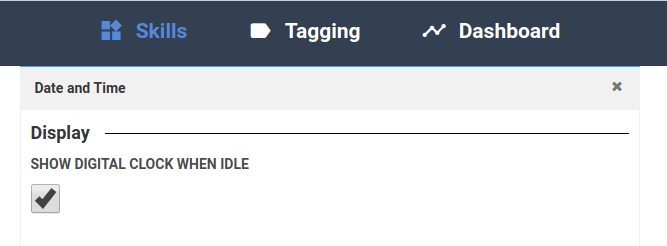
### Show clock on idle
This is a setting in ‘Skills’ in home.mycroft.ai:
### Learning
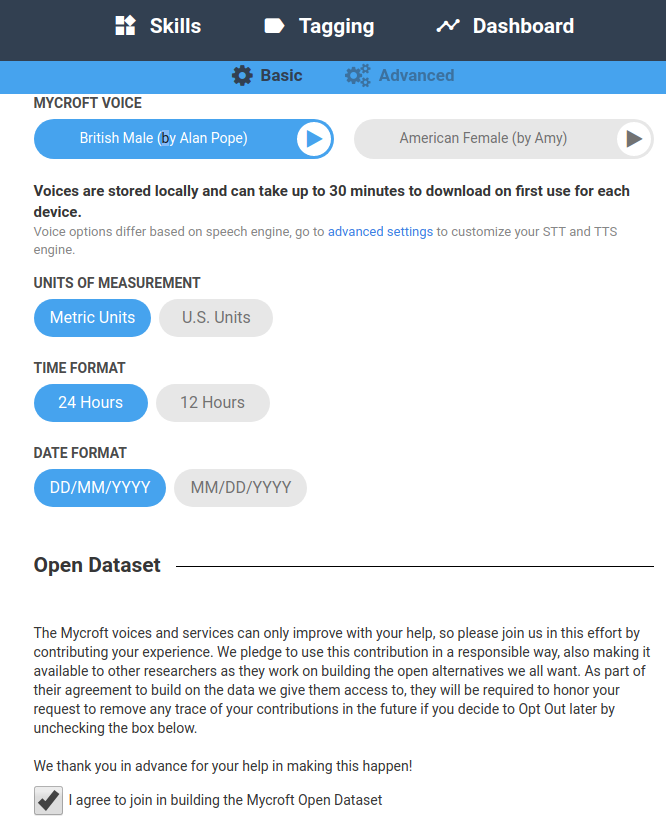
I’m not _exactly_ sure what you mean by this Timo, I **think** you mean Opting in to the learning dataset - which is under Your Name → Settings in home.mycroft.ai.
---
### Author:  [@timelock](https://community.openconversational.ai/u/timelock)
#### Post date: [May 24, 2018, 3:28pm UTC](https://community.openconversational.ai/t/where-are-the-clock-and-learning-options-after-reset/3824/3 "2018-05-24T15:28:25Z")
Hi Kathy, Thanks for your feedback. I have connected Mycroft with the internet via wlan , opened an account at home.mycroft.ai, connected Mycroft as the devices. But under “Skills” there is no longer a setting for the clock. I only get this informations: Configure your skills:
To get more skills, just tell Mycroft to install a skill
LIST OF SKILLS
Alternatively, install skills via the command line from our Skills Repo on GitHub"
I disconnect and reconnect, shut down and start Mycroft again but this does not help.
Mycroft shows his mouth if i call him “hey Mycroft”, but asking him the standart skills like “how is the weather” or “how is the weather in cologne” he answered: please wait a moment as I finished booting up". Only thing i recognize every time between wake up and his answer is a quiet sound like a read head scratching over a CD.
Any ideas what can help?
Best
Timo
---
### Author:  [@KathyReid](https://community.openconversational.ai/u/KathyReid)
#### Post date: [May 24, 2018, 4:22pm UTC](https://community.openconversational.ai/t/where-are-the-clock-and-learning-options-after-reset/3824/4 "2018-05-24T16:22:07Z")
Thanks @timo for a great description. What happens if you **remove** the Device then **add** the Device again? This means you will need to re-pair the Device.
---
### Author:  [@timelock](https://community.openconversational.ai/u/timelock)
#### Post date: [May 25, 2018, 9:02pm UTC](https://community.openconversational.ai/t/where-are-the-clock-and-learning-options-after-reset/3824/5 "2018-05-25T21:02:12Z")
Hi Kathy, removing, rebooting and add the Device again does not fix the problem.
Mycroft is paired but does not have any answer for me. And the clock option ist not under skills.
---
### Author:  [@KathyReid](https://community.openconversational.ai/u/KathyReid)
#### Post date: [May 26, 2018, 4:40pm UTC](https://community.openconversational.ai/t/where-are-the-clock-and-learning-options-after-reset/3824/6 "2018-05-26T16:40:27Z")
Sorry to provide advice that didn’t work @timelock.
This sounds like the `mark-1` Skill may need to be reinstalled.
Are you comfortable using `ssh` to connect to Mark 1?
---
### Author:  [@timelock](https://community.openconversational.ai/u/timelock)
#### Post date: [May 27, 2018, 10:48am UTC](https://community.openconversational.ai/t/where-are-the-clock-and-learning-options-after-reset/3824/7 "2018-05-27T10:48:55Z")
Mhmmm, I am a dumb Windows user. But I have no problems to try something. Think I have to connect Mycroft via lan cable, have to install a ssh client, have to download the firmeware and upload it to mycroft. If this is right can you recomend a win ssh client freeware and have you some links to download the firmeware and a step by step tutorial?
Best
Timo
---
### Author:  [@pcwii](https://community.openconversational.ai/u/pcwii)
#### Post date: [May 27, 2018, 3:28pm UTC](https://community.openconversational.ai/t/where-are-the-clock-and-learning-options-after-reset/3824/8 "2018-05-27T15:28:23Z")
ssh client = putty.
[https://www.chiark.greenend.org.uk/~sgtatham/putty/latest.html](https://www.chiark.greenend.org.uk/~sgtatham/putty/latest.html)
---
### Author:  [@KathyReid](https://community.openconversational.ai/u/KathyReid)
#### Post date: [May 28, 2018, 2:08pm UTC](https://community.openconversational.ai/t/where-are-the-clock-and-learning-options-after-reset/3824/9 "2018-05-28T14:08:17Z")
OK, before going down this path, which seems quite involved, let’s see if we can get the Skill to fix itself. When the Mark 1 reboots, it checks to see if Skills are up to date, and tries to update Skills. If you try 2-3 reboots, does anything change? If not I can provide more information.
---
### Author:  [@timelock](https://community.openconversational.ai/u/timelock)
#### Post date: [May 29, 2018, 2:17pm UTC](https://community.openconversational.ai/t/where-are-the-clock-and-learning-options-after-reset/3824/10 "2018-05-29T14:17:59Z")
Hey Kathy, in the meantime I found someone with linus coding knowledge. The next day he will have one or two hours for me. So if you post me the link to the firmeware and a short discription of the routine for rebuilding Mycroft the coder will do this for me. I don`t know if it is important for him but do I need the IP from Mycroft? If yes remember that Mycroft is not talking to me and so I can`t ask him for his IP.
Best
Timo
---
### Author:  [@KathyReid](https://community.openconversational.ai/u/KathyReid)
#### Post date: [May 29, 2018, 7:03pm UTC](https://community.openconversational.ai/t/where-are-the-clock-and-learning-options-after-reset/3824/11 "2018-05-29T19:03:23Z")
Unfortunately you will need the IP address to be able to connect to the device.
If you can find the IP address, try [ssh ing in to the Mark 1](https://mycroft.ai/documentation/mark-1/#connecting-to-the-mark-1-via-ssh) and then running;
`sudo apt-get update && sudo apt-get upgrade`
---
### Author:  [@DiscoPanda](https://community.openconversational.ai/u/DiscoPanda)
#### Post date: [May 29, 2018, 7:59pm UTC](https://community.openconversational.ai/t/where-are-the-clock-and-learning-options-after-reset/3824/12 "2018-05-29T19:59:07Z")
I can think of a couple ways you might be able to look for the IP address.
If your router is anything like the router/modem my ISP gave me, it shows a list of connected devices (both hardwired and wireless), and you _might_ be able to find it in that list. (If you don’t know your router’s IP address to connect to it, [this page](http://www.ipaddresslocation.org/router-ip-address.php) lists the defaults for some brands, and a method to look for it if that doesn’t work. Default username/password tends to be admin/admin, if that doesn’t work try leaving one or the other blank, or failing that search it online (`default password model_or_brand_here`). I once even had a router where the default _username_ was to leave it blank and the _password_ was admin. Yes, weird.)
Also, the antivirus/anti-malware I run (ESET Smart Security, good stuff) has a section called “Connected Home Monitor” that shows what devices it sees on the network, whatever AV product you use may have a similar feature.
---
### Author:  [@Jarbas\_Ai](https://community.openconversational.ai/u/Jarbas_Ai)
#### Post date: [May 29, 2018, 11:03pm UTC](https://community.openconversational.ai/t/where-are-the-clock-and-learning-options-after-reset/3824/13 "2018-05-29T23:03:59Z")
when i get similar trouble i run nmap to find the ip address
---
### Author:  [@j1nx](https://community.openconversational.ai/u/j1nx)
#### Post date: [May 30, 2018, 5:54am UTC](https://community.openconversational.ai/t/where-are-the-clock-and-learning-options-after-reset/3824/14 "2018-05-30T05:54:51Z")
For non-tech users the app “Fing” on your phone will do the trick just fine.
---
### Author:  [@Vino-git](https://community.openconversational.ai/u/Vino-git)
#### Post date: [August 18, 2018, 12:58pm UTC](https://community.openconversational.ai/t/where-are-the-clock-and-learning-options-after-reset/3824/15 "2018-08-18T12:58:12Z")
I am also having same problem in my raspberry-pi3 as i am using picroft unstable image. Below the debug mode output.
============================================================================================================================================== mycroft-core 18.2.13 ===
```auto
12:55:09.654 - mycroft.skills.core:load_skill:143 - WARNING - Module mycroft-fallback-duck-duck-go.mycroftai does not appear to be skill
12:55:09.713 - mycroft.skills.core:load_skill:106 - INFO - ATTEMPTING TO LOAD SKILL: mycroft-spelling.mycroftai with ID mycroft-spelling.mycroftai
12:55:09.760 - mycroft.skills.core:load_skill:143 - WARNING - Module mycroft-spelling.mycroftai does not appear to be skill
12:55:09.786 - mycroft.skills.core:load_skill:106 - INFO - ATTEMPTING TO LOAD SKILL: mycroft-speak.mycroftai with ID mycroft-speak.mycroftai
12:55:09.801 - mycroft.skills.core:load_skill:143 - WARNING - Module mycroft-speak.mycroftai does not appear to be skill
12:55:11.908 - mycroft.skills.padatious_service:train:72 - INFO - Training... (single_thread=False)
12:55:12.075 - mycroft.skills.padatious_service:train:74 - INFO - Training complete.
Process ForkPoolWorker-8:
Traceback (most recent call last):
File "/usr/lib/python3.5/multiprocessing/process.py", line 249, in _bootstrap
self.run()
File "/usr/lib/python3.5/multiprocessing/process.py", line 93, in run
self._target(*self._args, **self._kwargs)
File "/usr/lib/python3.5/multiprocessing/pool.py", line 108, in worker
task = get()
File "/usr/lib/python3.5/multiprocessing/queues.py", line 343, in get
res = self._reader.recv_bytes()
File "/usr/lib/python3.5/multiprocessing/synchronize.py", line 99, in __exit__
return self._semlock. __exit__ (*args)
File "/home/pi/mycroft-core/mycroft/lock/ __init__.py", line 69, in __call__
self.__previous_func(signame, sf)
KeyboardInterrupt
12:55:35.275 - mycroft.skills.core:handler:1213 - WARNING - No fallback could handle intent.
12:55:35.285 - __main__ :handle_complete_intent_failure:81 - INFO - Failed to find intent.
12:55:44.229 - mycroft.skills.core:handler:1213 - WARNING - No fallback could handle intent.
12:55:44.256 - __main__ :handle_complete_intent_failure:81 - INFO - Failed to find intent.
12:55:47.614 - mycroft.skills.core:handler:1213 - WARNING - No fallback could handle intent.
12:55:47.674 - __main__ :handle_complete_intent_failure:81 - INFO - Failed to find intent.
12:55:52.325 - __main__ :handle_complete_intent_failure:81 - INFO - Failed to find intent.
12:55:52.316 - mycroft.skills.core:handler:1213 - WARNING - No fallback could handle intent.
13:39:32.388 - __main__ :handle_wakeword:56 - INFO - Wakeword Detected: hey jarvis
13:39:34.698 - __main__ :handle_utterance:61 - INFO - Utterance: ["what's the time"]
13:39:34.799 - __main__ :handle_complete_intent_failure:81 - INFO - Failed to find intent.
13:39:34.768 - mycroft.skills.core:handler:1213 - WARNING - No fallback could handle intent.
Below from Cli.
13:42:55.286 - __main__ :handle_record_begin:35 - INFO - Begin Recording...
Playing WAVE '/home/pi/mycroft-core/mycroft/res/snd/start_listening.wav' : Signed 16 bit Little Endian, Rate 44100 Hz, Stereo
13:42:58.180 - __main__ :handle_record_end:40 - INFO - End Recording...
13:42:58.189 - __main__ :handle_wakeword:56 - INFO - Wakeword Detected: hey jarvis
13:43:01.096 - __main__ :handle_utterance:61 - INFO - Utterance: ["what's the time"]
13:43:01.161 - mycroft.skills.core:handler:1213 - WARNING - No fallback could handle intent.
13:43:01.161 - __main__ :handle_complete_intent_failure:81 - INFO - Failed to find intent.
^--- NEWEST ---^
History ========================================================================== Log Output Legend ================================================== Mic Level ===
what's the time DEBUG output
>> Please wait a moment as I finish booting up. skills.log, other
what's the time voice.log
>> Please wait a moment as I finish booting up.
Below the response from debug mode.
13:44:05.316 - mycroft.skills.core:load_skill:143 - WARNING - Module mycroft-support-helper.mycroftai does not appear to be skill
13:44:05.337 - mycroft.skills.core:load_skill:106 - INFO - ATTEMPTING TO LOAD SKILL: mycroft-joke.mycroftai with ID mycroft-joke.mycroftai
13:44:05.341 - mycroft.skills.core:load_skill:143 - WARNING - Module mycroft-joke.mycroftai does not appear to be skill
~~~~.358 - mycroft.skills.core:load_skill:106 - INFO - ATTEMPTING TO LOAD SKILL: mycroft-fallback-duck-duck-go.mycroftai with ID mycroft-fallback-duck-duck-go.mycroftai
13:44:05.364 - mycroft.skills.core:load_skill:143 - WARNING - Module mycroft-fallback-duck-duck-go.mycroftai does not appear to be skill
13:44:05.379 - mycroft.skills.core:load_skill:106 - INFO - ATTEMPTING TO LOAD SKILL: mycroft-spelling.mycroftai with ID mycroft-spelling.mycroftai
13:44:05.386 - mycroft.skills.core:load_skill:143 - WARNING - Module mycroft-spelling.mycroftai does not appear to be skill
13:44:05.402 - mycroft.skills.core:load_skill:106 - INFO - ATTEMPTING TO LOAD SKILL: mycroft-speak.mycroftai with ID mycroft-speak.mycroftai
13:44:05.412 - mycroft.skills.core:load_skill:143 - WARNING - Module mycroft-speak.mycroftai does not appear to be skill
13:44:07.502 - mycroft.skills.padatious_service:train:72 - INFO - Training... (single_thread=False)
13:44:07.636 - mycroft.skills.padatious_service:train:74 - INFO - Training complete.
13:44:31.096 - mycroft.session:get:76 - INFO - New Session Start: 092543b1-184f-468d-8e12-bd7b55838a8a
13:44:31.106 - __main__ :handle_record_begin:35 - INFO - Begin Recording...
Playing WAVE '/home/pi/mycroft-core/mycroft/res/snd/start_listening.wav' : Signed 16 bit Little Endian, Rate 44100 Hz, Stereo
Playing WAVE '/home/pi/mycroft-core/mycroft/res/snd/start_listening.wav' : Signed 16 bit Little Endian, Rate 44100 Hz, Stereo
13:44:34.044 - __main__ :handle_record_end:40 - INFO - End Recording...
13:44:34.053 - __main__ :handle_wakeword:56 - INFO - Wakeword Detected: hey jarvis
13:44:36.719 - __main__ :handle_utterance:61 - INFO - Utterance: ["what's the time"]
13:44:36.838 - __main__ :handle_complete_intent_failure:81 - INFO - Failed to find intent.
13:44:36.817 - mycroft.skills.core:handler:1213 - WARNING - No fallback could handle intent.
^--- NEWEST ---^
History ========================================================================== Log Output Legend ================================================== Mic Level ===
what's the time DEBUG output
>> Please wait a moment as I finish booting up. skills.log, other
voice.log
```
---
### Author:  [@MARKRONSON](https://community.openconversational.ai/u/MARKRONSON)
#### Post date: [April 19, 2019, 10:36am UTC](https://community.openconversational.ai/t/where-are-the-clock-and-learning-options-after-reset/3824/17 "2019-04-19T10:36:04Z")
hello,
i was having a similar sort of issue. i was finding solutions and i came across this thread. thank you so much guys for your solutions, it helped me alot.
best regards!!