### Author:  [@andlo](https://community.openconversational.ai/u/andlo)
#### Post date: [November 25, 2018, 9:54pm UTC](https://community.openconversational.ai/t/theia-ide-skill-new-and-better/5216/1 "2018-11-25T21:54:37Z")
#### How to install THEIA IDE skill
This skill is for Picroft and Mark\_1 !
Install THEIA IDE skill by …
```auto
mycroft-msm install https://github.com/andlo/theia-ide-skill.git
```
If you did try earlier version, uninstall that first.
Skill will download and extract a precompiled packahe of THEIA IDE setup for Mycroft. This takes some time.
When done, there should be a log info saying “Starting THEIA IDE” and Mycroft will say THEIA IDE is installed. You can then open a web-browser and gå to [http://picroft:3000](http://picroft:3000/) if your Mycroft device is picroft. If on a Mark One go to http://mark\_1:3000/ You then get access to the THEIA IDE in a workplace located /opt/mycroft/skills.
at Skills at home.mycroft.ai, there is one option under THEIA IDE to have the IDE to auto start or not.
#### THEIA IDE skill connects to absolutly no online service.
but If you want, THEIA has a great Github integration.
#### How to test THEIA IDE Skill
- Installing and setup
- Running and access to THEIA [http://picroft:3000](http://picroft:3000/)
- Therminal and use og mycroft specifik commands
- Git integration - Pull and push and monitor changes etc.
notise THEIA IDE cant ask for your GitHub username or password. To use integration you need to cache this.
- Search throu all workspaceses
- Python Language server support - formatiing and highlight etc.
Try hoovering a command, rigklich and “go to definition” or Peek definition.
- Memmory use - does Mycroft run out of free mem when using this skil.
- Start and stop IDE by woice - “start IDE” and “Stop IDE” - if you got better voice commads Ill be happy.
#### Where feedback on SKILL NAME should be directed a
Feedback will be apriciated here or through Issues on GitHub, or via [Mycroft Chat](https://chat.mycroft.ai/).
---
### Author:  [@Dominik](https://community.openconversational.ai/u/Dominik)
#### Post date: [November 28, 2018, 7:51pm UTC](https://community.openconversational.ai/t/theia-ide-skill-new-and-better/5216/2 "2018-11-28T19:51:46Z")
Run the installation as instructed, then I cloned the vocab and dialog files to “de-de” subfolders as my Picroft is configured with lang=“de-de”. With that the download an unpacking started - this took nearly one hour in total on my PiCroft.
After that I get error message:
```
Starting the master backend process without a timeout.
Starting server worker...
Server worker has been started. [ID: 1 | PID: 19987]
/home/mycroft/.mycroft/skills/TheiaIde/node_modules/@theia/core/lib/node/cluster/main.js:59
throw reason;
^
~~~~ _3.4.21' not found (required by /home/mycroft/.mycroft/skills/TheiaIde/node_modules/vscode-nsfw/build/Release/nsfw.node)
at Object.Module._extensions..node (module.js:682:18)
at Module.load (module.js:566:32)
at tryModuleLoad (module.js:506:12)
at Function.Module._load (module.js:498:3)
at Module.require (module.js:597:17)
at require (internal/module.js:11:18)
at Object. (/home/mycroft/.mycroft/skills/TheiaIde/node_modules/vscode-nsfw/lib/src/index.js:3:16)
```
Note: this is a Picroft based on the Jessie-image.
---
### Author:  [@andlo](https://community.openconversational.ai/u/andlo)
#### Post date: [November 28, 2018, 10:34pm UTC](https://community.openconversational.ai/t/theia-ide-skill-new-and-better/5216/3 "2018-11-28T22:34:39Z")
Great or not so great to hear. But you did say the reason……The precompiled package is made for picroft on debian strech.
Maybe the one I compiled for mark\_1 could be used on picroft jessie - I dont know.
Why it should take an hour to download could have some to do with you speed of internet - it is ~100 Mb package plased on GitHub.
If you are upi to it - you can try the mark\_1 package instead, as mark\_1 runs jesie. You can do more or les this:
```auto
cd /home/mycroft/.mycroft/skills/TheiaIde
sudo rm -r *
sudo su mycroft
wget https://github.com/andlo/theia-for-mycroft/releases/download/THEIA-for-Mycroft/theiaide-mark1.tgz
tar -zxvf theiaide-mark1.tgz
exit
/home/pi/mycroft-core/start-mycroft.sh skills
```
That would delete all the theia ide files (notise it is NOT the skil it self which is in skillsdir at /opt/mycroft/skills/)
change user to mycroft
download precompiled package and unpack it ,
exiting back to pi user adn restrting skills
After that
If it isnt starting and no erros in log - say “hey mycroft, restart IDE”
---
### Author:  [@KathyReid](https://community.openconversational.ai/u/KathyReid)
#### Post date: [November 29, 2018, 9:54am UTC](https://community.openconversational.ai/t/theia-ide-skill-new-and-better/5216/4 "2018-11-29T09:54:31Z")
Hi @andlo should I hold off on running the Skill Assurance check on this Skill for while until you can take a look at this?
---
### Author:  [@andlo](https://community.openconversational.ai/u/andlo)
#### Post date: [November 29, 2018, 10:30am UTC](https://community.openconversational.ai/t/theia-ide-skill-new-and-better/5216/5 "2018-11-29T10:30:19Z")
Yah hold until someone kan confirm that it is working 😉
But should I make the skill aware if it is on Picroft Jessie or Picroft Strech ? There isnt any way in market to mark which versions a skill supports.
If I got time i could make a precompiled package on Picroft Jessie to and ad that to the skill installation.
---
### Author:  [@KathyReid](https://community.openconversational.ai/u/KathyReid)
#### Post date: [November 29, 2018, 10:35am UTC](https://community.openconversational.ai/t/theia-ide-skill-new-and-better/5216/6 "2018-11-29T10:35:25Z")
I think the best approach here would be to _only_ make the Skill available on certain platforms. To do this you can add the specific platforms in the `README.md` file - the [Meta Editor](https://raw.githack.com/MycroftAI/mycroft-skills/18.08/meta_editor.html) makes this easier.
---
### Author:  [@andlo](https://community.openconversational.ai/u/andlo)
#### Post date: [November 29, 2018, 3:49pm UTC](https://community.openconversational.ai/t/theia-ide-skill-new-and-better/5216/7 "2018-11-29T15:49:19Z")
Yah, and i have - it is set to picroft and mark\_1, but there isnt any way to say Picroft Jessie or strech, and that is exactly the problem herre as the skill depends on precompiled software.
But I think I will flash a picroft jessie and do test, and make a package for that platform to. And then add logic to the skill to figure out right package for picroft.
---
### Author:  [@andlo](https://community.openconversational.ai/u/andlo)
#### Post date: [November 29, 2018, 3:54pm UTC](https://community.openconversational.ai/t/theia-ide-skill-new-and-better/5216/8 "2018-11-29T15:54:29Z")
Ohh I cant, as I cant find picroft jessie image on the download…
Then I just add a check to make sure user is installing the skill on the right picroft 😉
@Dominique that makes it dificult for me to change the skill so it fits your need - any change you can reflash whit the latest Picroft ?
---
### Author:  [@Dominik](https://community.openconversational.ai/u/Dominik)
#### Post date: [November 29, 2018, 4:26pm UTC](https://community.openconversational.ai/t/theia-ide-skill-new-and-better/5216/9 "2018-11-29T16:26:29Z")
Good news: installed the Mark-I package according to your instructions above and it works!
(Btw: download an unpacking was much faster this time - about 10 minutes in total…)
I would suggest that at minimum there is a note in the README/release notes that the Picroft-version requires the Stretch-image. In addition you can add the above instructions
Another solution is to check which Debian-version Mycroft is running with and decide which package-version to install - but I don’t know if that is easy to do?
---
### Author:  [@andlo](https://community.openconversational.ai/u/andlo)
#### Post date: [November 29, 2018, 4:50pm UTC](https://community.openconversational.ai/t/theia-ide-skill-new-and-better/5216/10 "2018-11-29T16:50:21Z")
Great news - then I will do some magic - so check enclosure, and if on picroft, check debian version. And from that deside which package to install.
---
### Author:  [@andlo](https://community.openconversational.ai/u/andlo)
#### Post date: [November 29, 2018, 4:53pm UTC](https://community.openconversational.ai/t/theia-ide-skill-new-and-better/5216/11 "2018-11-29T16:53:39Z")
the secret magic….
```auto
if platform == "picroft":
url = 'https://github.com/andlo/theia-for-mycroft/releases/download/THEIA-for-Mycroft/theiaide-picroft.tgz'
if int(open("/etc/debian_version").read(1)) is 8:
url = 'https://github.com/andlo/theia-for-mycroft/releases/download/THEIA-for-Mycroft/theiaide-mark1.tgz'
if platform == "mycroft_mark_1":
url = 'https://github.com/andlo/theia-for-mycroft/releases/download/THEIA-for-Mycroft/theiaide-mark1.tgz'
```
---
### Author:  [@andlo](https://community.openconversational.ai/u/andlo)
#### Post date: [November 29, 2018, 4:57pm UTC](https://community.openconversational.ai/t/theia-ide-skill-new-and-better/5216/12 "2018-11-29T16:57:28Z")
@Dominik and it is strange the different time in downloads, as both packages are ~100 Mb.
---
### Author:  [@andlo](https://community.openconversational.ai/u/andlo)
#### Post date: [November 29, 2018, 5:02pm UTC](https://community.openconversational.ai/t/theia-ide-skill-new-and-better/5216/13 "2018-11-29T17:02:54Z")
And should the voice replyes be more “human like” so instead of saying
“THEIA IDE is runnng. To acces…” he shod say something like
“Please dont mess in my brain.” or “Please make me a better person - not evil and bad” and stuff like that ?
---
### Author:  [@Dominik](https://community.openconversational.ai/u/Dominik)
#### Post date: [November 29, 2018, 5:50pm UTC](https://community.openconversational.ai/t/theia-ide-skill-new-and-better/5216/14 "2018-11-29T17:50:27Z")
The “magic” is looking good to me - I wasn’t aware that /etc/debian\_version exists. Regarding the download&unpacking times I have no Idea, maybe yesterday my connection was busy (e.g. kids watching Youtube…).
I think the replies are fine just like they are - this skill is for the more technical oriented user who can live with a more technical dialog…
---
### Author:  [@gras64](https://community.openconversational.ai/u/gras64)
#### Post date: [December 3, 2018, 1:19pm UTC](https://community.openconversational.ai/t/theia-ide-skill-new-and-better/5216/15 "2018-12-03T13:19:34Z")
thanks for your work. but since the latest version I have a big problem with the memory. early was my memory in rest at about 500mb now I binn permanently at 1.5gb what makes a raspberry unusable. I use stretch with mycroft dev version
with picroft in the setting
---
### Author:  [@andlo](https://community.openconversational.ai/u/andlo)
#### Post date: [December 3, 2018, 4:12pm UTC](https://community.openconversational.ai/t/theia-ide-skill-new-and-better/5216/16 "2018-12-03T16:12:42Z")
Wow - I dont know why that happens. I have been dooing what i could to only load what is needed, and by that got it to work whit the limited memory there is on the PI, and whitout encreasing swap.
This is how my memory looks
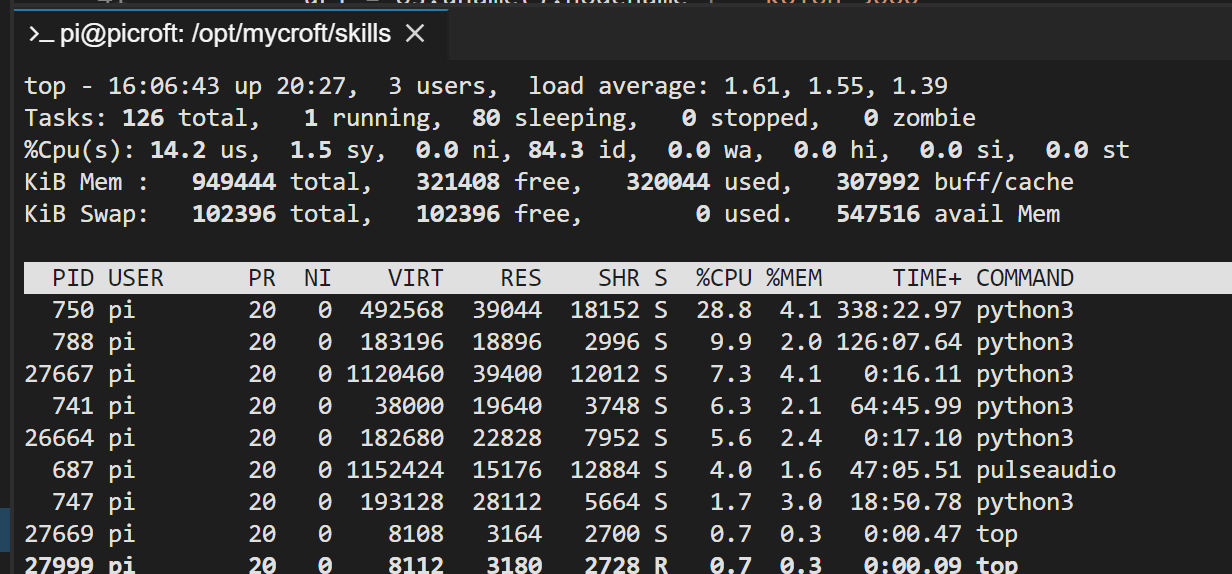
You can stop Theia by the command “Stop IDE” and look if the memmory usage is going down.
Alo what is interesting is if it after a reboot is at one level and if it growes and keeps growing. Look specifik at the node proces, as that is the one running the Theia IDE.
And by the way - thanks for the feedback.
---
### Author:  [@andlo](https://community.openconversational.ai/u/andlo)
#### Post date: [December 3, 2018, 4:34pm UTC](https://community.openconversational.ai/t/theia-ide-skill-new-and-better/5216/17 "2018-12-03T16:34:28Z")
Well - I did duing many tests notise that I ended up having a lot of python processes running - I think because test started Python language server, and it didnt stop when I killed the node process.I saw that if I hoover a function the the tekst that showed were repeted many times.
But I hassnt seen it on clean installs that I made after many tests whit many combinations fo settings etc.
---
### Author:  [@gras64](https://community.openconversational.ai/u/gras64)
#### Post date: [December 3, 2018, 11:11pm UTC](https://community.openconversational.ai/t/theia-ide-skill-new-and-better/5216/18 "2018-12-03T23:11:26Z")
I had to delete the skill and the data on /.mycroft/skills. Now everything works again
---
### Author:  [@andlo](https://community.openconversational.ai/u/andlo)
#### Post date: [December 3, 2018, 11:41pm UTC](https://community.openconversational.ai/t/theia-ide-skill-new-and-better/5216/19 "2018-12-03T23:41:56Z")
That makes me glad again. Plese look for if the problem comes back, and report it.
---
### Author:  [@andlo](https://community.openconversational.ai/u/andlo)
#### Post date: [December 30, 2018, 2:34pm UTC](https://community.openconversational.ai/t/theia-ide-skill-new-and-better/5216/20 "2018-12-30T14:34:55Z")
Just uploaded a new build og THEIA including new stuff:
- experimental supprt for VS Code plugins - put plugins into /home/pi/theia-plugins on picroft or /home/mycroft/theia-plugins and they will be loaded when IDE is started.Notise that it isnt all vscode plugins that will work on THEIA. If you got some plugin that you think should be installed by default by the skill let me know.
- getting started guide - is located under Help menu
- Debug - but dont know how to use it or confgure it…someone knows ?
- posibility to make and run tasks. Thinking of making some mycroft related tasks to run like mycroft-cli-client, tail of logfiles and stuf like that…for now there isnt any tasks default.
To upgrade THEIA IDE remove the skill and intall it againg. If that dosnt do it remove skill and delete everything in /home/pi/.mycroft/skills/TheiaIde om picroft and /home/mycroft/.mycroft/skills/TheiaIde on mark\_1
[Next page](https://community.openconversational.ai/t/theia-ide-skill-new-and-better/5216.md?page=2)