# Testing and Feedback for Kodi Skill
**URL:** https://community.openconversational.ai/t/testing-and-feedback-for-kodi-skill/4196
**Category:** Feedback / Support
**Created:** [July 20, 2018, 1:28am UTC](https://community.openconversational.ai/t/testing-and-feedback-for-kodi-skill/4196 "2018-07-20T01:28:44Z")
**Posts on this page:** 20
**Page:** 1
### Author:  [@pcwii](https://community.openconversational.ai/u/pcwii)
#### Post date: [July 20, 2018, 1:28am UTC](https://community.openconversational.ai/t/testing-and-feedback-for-kodi-skill/4196/1 "2018-07-20T01:28:44Z")
#### Kodi-Skill
https://www.youtube.com/embed/ZsqbDKqehR4?feature=oembed&wmode=opaque
#### How to install Kodi Skill
- Install Kodi Skill by …
- msm install [GitHub - pcwii/kodi-skill: A Kodi search and playback skill for Mycroft AI](https://github.com/pcwii/kodi-skill.git)
- `requirements.txt` should install kodipydent and requests, alternatively you can pip install.
pip install kodipydent
pip install requests
- Prepare Kodi by …
- Configure Kodi to “allow remote control via HTTP”, under the Kodi settings:services
- Configure Kodi to “allow remote control from applications on other systems”, under the Kodi settings:services
- Under Kodi settings:services note the port number (8080)
#### How to test Kodi Skill
- Kodi Skill connects to a single instance of Kodi on your network …
- After installation your mycroft.ai home page should have default settings for your kodi instance.
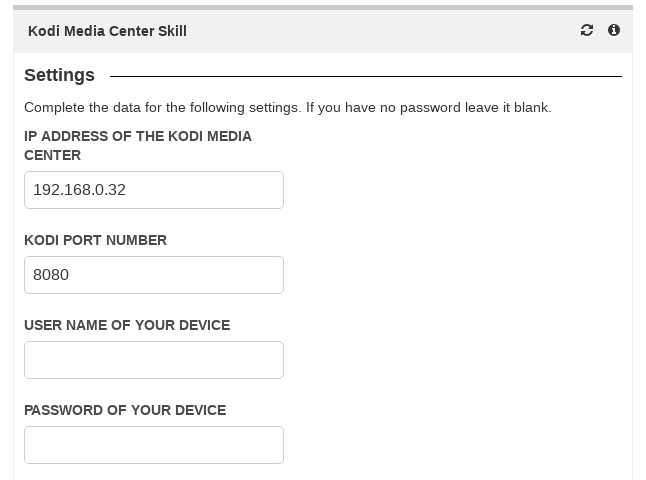
You will need to update these to reflect your kodi instance.
Username and Password are a WIP.
#### Example Intents
- “turn kodi notifications on”
- “turn kodi notifications off”
- “move the cursor up / down / left / right / back / select / cancel” (Conversational Context)
- “play film {film name}”
- “play the movie {movie name}”
- “show the movie information”
- “hide the movie information”
- “pause the movie”
- “re-start the movie”
- “stop the movie”
#### Conversational Context
- If mycroft.ai locates more than one movie that matches your request it will permit you to itterate through your requests using conversational context.
eg. “hey mycroft:”
Request: “play the move Iron Man”
Response: “I have located 3 movies with the name Iron Man, would you like me to list them?”
Request: “yes” / “no”
Response: “Iron Man, to Skip, say Next, say play, to play, or Cancel, to stop”
Request: “next” / “skip”
Response: “Iron Man 2”
Request: “play” / “select”
Response: “o-k, attempting to play, Iron Man 2”
#### Feedback can be via this topic or via issues on Github.
Enjoy - pcwii
---
### Author:  [@sanderant](https://community.openconversational.ai/u/sanderant)
#### Post date: [July 20, 2018, 8:09pm UTC](https://community.openconversational.ai/t/testing-and-feedback-for-kodi-skill/4196/2 "2018-07-20T20:09:17Z")
I installed it but I’m not sure if the skill is working.
Here’s a transcript:
play film bullit
> > I’m not sure I understood you.
> > resume kodi
> > kodi find bullet
> > You might have to say that a different way.
> > kodi connect to 192.168.1.199
> > Sorry, I didn’t catch that.
Based on your update I’m not sure if these commands are working. Can you list which words should work or work best so I can test?
---
### Author:  [@pcwii](https://community.openconversational.ai/u/pcwii)
#### Post date: [July 20, 2018, 9:03pm UTC](https://community.openconversational.ai/t/testing-and-feedback-for-kodi-skill/4196/3 "2018-07-20T21:03:09Z")
@sanderant,
A few questions for you.
1. Did the skill install correctly?
2. Were you able to configure the skill from the microft.ai home page?
3. Is your Kodi configured to “allow remote control via HTTP”, under the Kodi settings: services?
4. Is Your Kodi set to “allow remote control from applications on other systems”, again under settings: services?
5. Make sure that you correctly specify the port number in the Mycroft home page. Some systems are 80 and others are 8080.
6. Lastly, try some of the commands from the “Example Intents” above.
Good luck.
P.s. what platform are you running Mycroft from?
---
### Author:  [@sanderant](https://community.openconversational.ai/u/sanderant)
#### Post date: [July 20, 2018, 10:01pm UTC](https://community.openconversational.ai/t/testing-and-feedback-for-kodi-skill/4196/4 "2018-07-20T22:01:21Z")
- Did the skill install correctly?
I ran the msm install command it seemed to work.
- Were you able to configure the skill from the microft.ai home page?
I was able to see and set the ip and port from the home page.
- Is your Kodi configured to “allow remote control via HTTP”, under the Kodi settings: services?
Yes.
- Is Your Kodi set to “allow remote control from applications on other systems”, again under settings: services?
I now have it have enabled.
- Make sure that you correctly specify the port number in the Mycroft home page. Some systems are 80 and others are 8080.
Mine is 8080 running the chorus interface I can access the web interface this way.
- Lastly, try some of the commands from the “Example Intents” above.
It doesn’t seem to recognize the commands. Should it say can’t reach kodi or something?
---
### Author:  [@sanderant](https://community.openconversational.ai/u/sanderant)
#### Post date: [July 20, 2018, 10:06pm UTC](https://community.openconversational.ai/t/testing-and-feedback-for-kodi-skill/4196/5 "2018-07-20T22:06:00Z")
Here’s the output from a cli session:
play film bullet
> > Sorry, I don’t understand.
turn kodi notifications on
> > Sorry, entity “notifications” wasn’t found.
Connect to Kodi on 192.168.1.199
> > Sorry, I didn’t catch that.
---
### Author:  [@pcwii](https://community.openconversational.ai/u/pcwii)
#### Post date: [July 20, 2018, 10:13pm UTC](https://community.openconversational.ai/t/testing-and-feedback-for-kodi-skill/4196/6 "2018-07-20T22:13:09Z")
@sanderant,
I appreciate you testing this. “play film bullet” and “turn kodi notifications on” should work if the skill is running as expected. The last command “connect to Kodi on 192.168.1.199” would not be a valid command.
Are you comfortable looking at the log file?
What platform are you running on?
Thanks again.
---
### Author:  [@sanderant](https://community.openconversational.ai/u/sanderant)
#### Post date: [July 20, 2018, 10:16pm UTC](https://community.openconversational.ai/t/testing-and-feedback-for-kodi-skill/4196/7 "2018-07-20T22:16:11Z")
@pcwii
Sure which log file should I check?
I’m running 18.2.11B on a Mark I
---
### Author:  [@pcwii](https://community.openconversational.ai/u/pcwii)
#### Post date: [July 20, 2018, 10:28pm UTC](https://community.openconversational.ai/t/testing-and-feedback-for-kodi-skill/4196/8 "2018-07-20T22:28:19Z")
I am not 100% certain of the location on the Mark 1 but on the Rpi it is located in
/var/log/mycroft-skills.log
if you search the log for kodi-skill you should see if there is an error. Feel free to send me the relevant part of the log to investigate.
---
### Author:  [@sanderant](https://community.openconversational.ai/u/sanderant)
#### Post date: [July 20, 2018, 10:58pm UTC](https://community.openconversational.ai/t/testing-and-feedback-for-kodi-skill/4196/9 "2018-07-20T22:58:55Z")
I think the skill isn’t being recognized or something, I’m assuming the intent\_failure means it’s not finding “play film”, but just a guess. It looks like it tries the home assistant and wolframalpha skilll after failing to figure it out.
22:54:43.789 - urllib3.connectionpool - DEBUG - Starting new HTTPS connection (1): api.mycroft.ai:443
22:54:43.792 - SKILLS - DEBUG - {“data”: {“utterance”: “play film bullet”, “lang”: “en-US”}, “context”: {“ident”: “1532127282.41860961738497185”, “client\_name”: “mycroft\_listener”}, “type”: “intent\_failure”}
22:54:43.822 - SKILLS - DEBUG - {“data”: {“handler”: “fallback”}, “context”: {“ident”: “1532127282.41860961738497185”, “client\_name”: “mycroft\_listener”}, “type”: “mycroft.skill.handler.start”}
22:54:43.832 - urllib3.connectionpool - DEBUG - Starting new HTTP connection (1): ha
22:54:43.841 - urllib3.connectionpool - DEBUG - ha:8123 “POST /api/conversation/process HTTP/1.1” 200 85
22:54:43.849 - mycroft.skills.padatious\_service:handle\_fallback:111 - DEBUG - Padatious fallback attempt: play film bullet
22:54:43.857 - WolframAlphaSkill - DEBUG - WolframAlpha fallback attempt: play film bullet
22:54:43.858 - WolframAlphaSkill - DEBUG - Non-question, ignoring: play film bullet
22:54:43.864 - fallback-aiml:load\_brain:51 - INFO - Loading Brain
Loading brain from /home/mycroft/.mycroft/skills/AimlFallback/bot\_brain.brn…done (0 categories in 0.00 seconds)
Kernel bootstrap completed in 0.00 seconds
22:54:43.873 - urllib3.connectionpool - DEBUG - Starting new HTTPS connection (1): api.mycroft.ai:443
22:54:43.972 - urllib3.connectionpool - DEBUG - [https://api.mycroft.ai:443](https://api.mycroft.ai:443) “POST /v1/device/2b78a955-ef3f-4c21-804f-99437685c6d2/metric/timing HTTP/1.1” 200 280
22:54:44.030 - urllib3.connectionpool - DEBUG - [https://api.mycroft.ai:443](https://api.mycroft.ai:443) “GET /v1/device/2b78a955-ef3f-4c21-804f-99437685c6d2 HTTP/1.1” 304 0
22:54:44.044 - mycroft.api:send:111 - DEBUG - Etag matched. Nothing changed for: device/2b78a955-ef3f-4c21-804f-99437685c6d2
22:54:44.070 - urllib3.connectionpool - DEBUG - Starting new HTTPS connection (1): api.mycroft.ai:443
22:54:44.233 - urllib3.connectionpool - DEBUG - api.mycroft.ai:443 “POST /v1/device/2b78a955-ef3f-4c21-804f-99437685c6d2/metric/fallback-unknown:failed-intent HTTP/1.1” 200 149
22:54:44.261 - urllib3.connectionpool - DEBUG - Starting new HTTPS connection (1): api.mycroft.ai:443
22:54:44.269 - SKILLS - DEBUG - {“data”: {“utterance”: “I don’t know what that means.”, “expect\_response”: false}, “context”: {“ident”: “1532127282.41860961738497185”, “client\_name”: “mycroft\_listener”}, “type”: “speak”}
22:54:44.281 - SKILLS - DEBUG - {“data”: {“fallback\_handler”: “UnknownSkill.handle\_fallback”, “handler”: “fallback”}, “context”: {“ident”: “1532127282.41860961738497185”, “client\_name”: “mycroft\_listener”}, “type”: “mycroft.skill.handler.complete”}
22:54:44.303 - SKILLS - DEBUG - {“type”: “recognizer\_loop:audio\_output\_start”, “context”: null, “data”: {}}
22:54:44.367 - SKILLS - DEBUG - {“type”: “Command: mouth.talk”, “data”: {}, “context”: null}
22:54:44.431 - urllib3.connectionpool - DEBUG - api.mycroft.ai:443 “POST /v1/device/2b78a955-ef3f-4c21-804f-99437685c6d2/metric/timing HTTP/1.1” 200 289
22:54:46.220 - SKILLS - DEBUG - {“type”: “recognizer\_loop:audio\_output\_end”, “context”: null, “data”: {}}
22:54:46.309 - SKILLS - DEBUG - {“type”: “Command: mouth.reset”, “data”: {}, “context”: null}
22:54:50.502 - SKILLS - DEBUG - {“data”: {}, “context”: null, “type”: “skill-date-time:TimeSkillupdate\_display”}
22:54:50.521 - mycroft.client.enclosure.display\_manager:remove\_active:140 - DEBUG - Removing active skill…
---
### Author:  [@pcwii](https://community.openconversational.ai/u/pcwii)
#### Post date: [July 20, 2018, 11:17pm UTC](https://community.openconversational.ai/t/testing-and-feedback-for-kodi-skill/4196/10 "2018-07-20T23:17:48Z")
Are you able to find any reference to kodi-skill in the log?
---
### Author:  [@sanderant](https://community.openconversational.ai/u/sanderant)
#### Post date: [July 20, 2018, 11:26pm UTC](https://community.openconversational.ai/t/testing-and-feedback-for-kodi-skill/4196/11 "2018-07-20T23:26:02Z")
This is the only thing I see, which is happening fairly frequently.
22:08:30.411 - mycroft.skills.settings:\_request\_my\_settings:440 - DEBUG - getting skill settings from server for KodiSkill
22:09:30.598 - mycroft.skills.settings:\_request\_my\_settings:440 - DEBUG - getting skill settings from server for KodiSkill
22:10:30.786 - mycroft.skills.settings:\_request\_my\_settings:440 - DEBUG - getting skill settings from server for KodiSkill
22:11:30.988 - mycroft.skills.settings:\_request\_my\_settings:440 - DEBUG - getting skill settings from server for KodiSkill
22:12:31.168 - mycroft.skills.settings:\_request\_my\_settings:440 - DEBUG - getting skill settings from server for KodiSkill
22:13:31.353 - mycroft.skills.settings:\_request\_my\_settings:440 - DEBUG - getting skill settings from server for KodiSkill
---
### Author:  [@pcwii](https://community.openconversational.ai/u/pcwii)
#### Post date: [July 21, 2018, 12:37pm UTC](https://community.openconversational.ai/t/testing-and-feedback-for-kodi-skill/4196/12 "2018-07-21T12:37:09Z")
This is strange, it looks to me that the skill is having trouble accessing the home.mycroft.ai settings page. I could be wrong on this but I think that is the error you are getting. @KathyReid do you know what the 440 error is above?
---
### Author:  [@pcwii](https://community.openconversational.ai/u/pcwii)
#### Post date: [July 22, 2018, 11:54am UTC](https://community.openconversational.ai/t/testing-and-feedback-for-kodi-skill/4196/13 "2018-07-22T11:54:08Z")
@sanderant
Are you able to check the skills directory for the name of the kodi skill folder and it’s permission? There is an issue with MSM that appends the github hub username to the skill directory name and incorrectly sets the folder permission to root instead of mycroft.
---
### Author:  [@sanderant](https://community.openconversational.ai/u/sanderant)
#### Post date: [July 22, 2018, 4:07pm UTC](https://community.openconversational.ai/t/testing-and-feedback-for-kodi-skill/4196/14 "2018-07-22T16:07:36Z")
@pcwii Sorry that doesn’t seem to be the case:
```
pi@mark_1:~/skills/kodi-skill.pcwii $ ls -l
total 116
-rw-r--r-- 1 mycroft mycroft 20587 Jul 20 19:55 API.txt
drwxr-xr-x 3 mycroft mycroft 4096 Jul 20 19:55 dialog
-rw-r--r-- 1 mycroft mycroft 12993 Jul 20 19:55 __init__.py
-rw-r--r-- 1 mycroft mycroft 35147 Jul 20 19:55 LICENSE.md
-rw-r--r-- 1 mycroft mycroft 175 Jul 20 19:55 Links.txt
drwxr-xr-x 2 mycroft mycroft 4096 Jul 20 19:56 __pycache__
-rw-r--r-- 1 mycroft mycroft 1360 Jul 20 19:55 README.md
-rw-r--r-- 1 mycroft mycroft 20 Jul 20 19:55 requirements.txt
-rw-r--r-- 1 mycroft mycroft 106 Jul 20 22:39 settings.json
-rw-r--r-- 1 mycroft mycroft 1347 Jul 20 19:55 settingsmeta.json
drwxr-xr-x 3 mycroft mycroft 4096 Jul 20 19:55 test
-rw-r--r-- 1 mycroft mycroft 3835 Jul 20 19:55 tests.py
drwxr-xr-x 3 mycroft mycroft 4096 Jul 20 19:55 vocab
pi@mark_1:~/skills/kodi-skill.pcwii $ ls -ld
drwxr-xr-x 7 mycroft mycroft 4096 Jul 20 19:58 .
```
---
### Author:  [@pcwii](https://community.openconversational.ai/u/pcwii)
#### Post date: [July 22, 2018, 4:59pm UTC](https://community.openconversational.ai/t/testing-and-feedback-for-kodi-skill/4196/15 "2018-07-22T16:59:41Z")
Rename kodi-skill.pcwii to just kodi-skill then reboot
The .pcwii should not be there and is an issue with MSM.
---
### Author:  [@sanderant](https://community.openconversational.ai/u/sanderant)
#### Post date: [July 22, 2018, 8:14pm UTC](https://community.openconversational.ai/t/testing-and-feedback-for-kodi-skill/4196/16 "2018-07-22T20:14:33Z")
Yay! That did it. I was able to play a movie from command (Awesome!) and cycle through a list of movies and get one to play (Really awesome!).
I can test specific commands now if you’d like.
This is great!
---
### Author:  [@pcwii](https://community.openconversational.ai/u/pcwii)
#### Post date: [July 22, 2018, 8:31pm UTC](https://community.openconversational.ai/t/testing-and-feedback-for-kodi-skill/4196/17 "2018-07-22T20:31:47Z")
Excellent news! I will try to update the installation instructions for future testing. If you have any recommendations feel free to pass them along.
---
### Author:  [@KathyReid](https://community.openconversational.ai/u/KathyReid)
#### Post date: [July 23, 2018, 3:37pm UTC](https://community.openconversational.ai/t/testing-and-feedback-for-kodi-skill/4196/18 "2018-07-23T15:37:34Z")
Sorry for taking a while to come back to you on this one.
The `440` error is not common one; I had to go digging into the HTTP documentation to figure out what it was for. It looks like it’s some sort of authentication timeout error
[http://getstatuscode.com/440](http://getstatuscode.com/440)
Is it still happening?
---
### Author:  [@pcwii](https://community.openconversational.ai/u/pcwii)
#### Post date: [July 23, 2018, 4:01pm UTC](https://community.openconversational.ai/t/testing-and-feedback-for-kodi-skill/4196/19 "2018-07-23T16:01:27Z")
I don’t think so. I believe the issue had something to do with the fact that the msm install appended my github username .pcwii to the installation that the member performed. This was an issue with msm that we discussed under another topic a while ago. Once the skill directory was renamed without the .pcwii the skill began to function as expected.
---
### Author:  [@KathyReid](https://community.openconversational.ai/u/KathyReid)
#### Post date: [July 23, 2018, 4:05pm UTC](https://community.openconversational.ai/t/testing-and-feedback-for-kodi-skill/4196/20 "2018-07-23T16:05:35Z")
OK that’s interesting. The name of the Skill directory itself doesn’t have any direct dependency on the Skill functioning _unless_ there’s some sort of hard-coded file path that the Skill uses - for instance to save or access files?
[Next page](https://community.openconversational.ai/t/testing-and-feedback-for-kodi-skill/4196.md?page=2)