# ReSpeaker 4-Mic Array HAT Mycroft A.I. Skill
**URL:** https://community.openconversational.ai/t/respeaker-4-mic-array-hat-mycroft-a-i-skill/5773
**Category:** Feedback / Support
**Created:** [January 31, 2019, 11:41am UTC](https://community.openconversational.ai/t/respeaker-4-mic-array-hat-mycroft-a-i-skill/5773 "2019-01-31T11:41:17Z")
**Posts on this page:** 20
**Page:** 1
### Author:  [@j1nx](https://community.openconversational.ai/u/j1nx)
#### Post date: [January 31, 2019, 11:41am UTC](https://community.openconversational.ai/t/respeaker-4-mic-array-hat-mycroft-a-i-skill/5773/1 "2019-01-31T11:41:17Z")
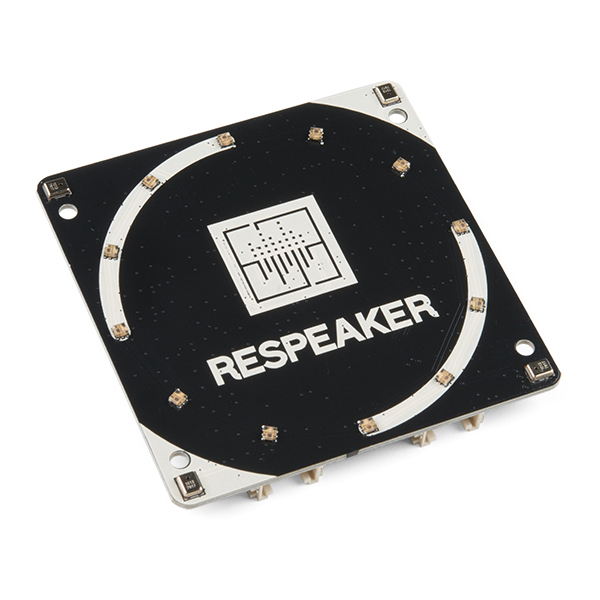 **ReSpeaker 4-Mic Array HAT Mycroft A.I. Skill.**
This skill is to enable and control the Seeed - ReSpeaker 4-Mic Array for Raspberry Pi. ReSpeaker 4-Mic Array for Raspberry Pi is a quad-microphone expansion board for Raspberry Pi designed for AI and voice applications and provides a super cool LED ring, which contains 12 APA102 programable LEDs.
DISCLAIMER: At the moment this is **NOT** tested by me (as of yet), but as multiple people asked for a ReSpeaker 4-Mic Array HAT skill in the past, already created this topic to open the dialogue and possible feedback / testing.
CREDITS: **ALL** credits go to @Dominik as he created the almost exact same skill for the ReSpeaker Core V2. I only changed some small code to flip the library used (pixel-ring) to use the 4-Mic Array instead.
#### How to install respeaker-4mic-hat-skill
Install respeaker-4mic-hat-skill by …
- SSH into your Mycroft, then
- mycroft-msm install [GitHub - j1nx/respeaker-4mic-hat-skill: Mycroft A.I. unofficial - ReSpeaker 4Mic HAT Skill.](https://github.com/j1nx/respeaker-4mic-hat-skill.git)
In case the requirements are not installed automatically you must perform the following;
- mycroft-pip install pixel-ring gpiozero
#### Turn on SPI on the Raspberry Pi
To make sure the RPi can control the LEDs, you need to enable SPI;
##### For Raspbian based systems (Picroft)
- sudo raspi-config
- Go to “Interfacing Options”
- Go to “SPI”
- Enable SPI
- Exit raspi-config
- ? reboot ?
##### Manually
- Edit the file config.txt on the boot partition of your Raspberry Pi
- Make sure the following content is there;
> dtparam=spi=on
#### Ideas & Additions for later
##### Finish / Start enabling and disabling the pixel ring
- “Hey Mycroft”, “Enable pixel ring”
- “Hey Mycroft”, “Disable pixel ring”
##### Change LED mode
- “Hey Mycroft”, “Set pixel ring to Alexa”
- “Hey Mycroft”, “Set pixel ring to Google”
##### Add Mycroft LED mode
- “Hey Mycroft”, “Set pixel ring to Mycroft”
##### DOA (Direction Of Arrival) of keyword
#### Where feedback should be directed a
Feedback on the skill should be provided through:
- replying to this thread
- [Issue on Github](https://github.com/j1nx/respeaker-4mic-hat-skill/issues)
- [Mycroft Chat](https://chat.mycroft.ai/) in channel ~skills
---
### Author:  [@j1nx](https://community.openconversational.ai/u/j1nx)
#### Post date: [January 31, 2019, 7:14pm UTC](https://community.openconversational.ai/t/respeaker-4-mic-array-hat-mycroft-a-i-skill/5773/2 "2019-01-31T19:14:27Z")
WARNING !!! Just installed on Raspbian and 18.8.12 but it hangs the RPI !!!
DO NOT INSTALL (yet)
---
### Author:  [@j1nx](https://community.openconversational.ai/u/j1nx)
#### Post date: [January 31, 2019, 7:16pm UTC](https://community.openconversational.ai/t/respeaker-4-mic-array-hat-mycroft-a-i-skill/5773/3 "2019-01-31T19:16:40Z")
Now only need to figure out how to debug this?
a) I don’t know Python yet
b) Loading the skill brings the RPi on it’s knees
Running out of time for now. Must be somewhere in spidev \<-\> gpiozero as only hardware thingies can bring computers on its knees I think.
---
### Author:  [@Dominik](https://community.openconversational.ai/u/Dominik)
#### Post date: [January 31, 2019, 8:49pm UTC](https://community.openconversational.ai/t/respeaker-4-mic-array-hat-mycroft-a-i-skill/5773/4 "2019-01-31T20:49:08Z")
I would try to debug it like following:
```
LOG.debug("initialising")
power = LED(5)
LOG.debug("power set to LED(5)")
power.on()
LOG.debug("power on")
```
Maybe user `mycroft` is missing permissions:
`sudo usermod -g gpio mycroft`
---
### Author:  [@j1nx](https://community.openconversational.ai/u/j1nx)
#### Post date: [February 1, 2019, 9:40am UTC](https://community.openconversational.ai/t/respeaker-4-mic-array-hat-mycroft-a-i-skill/5773/5 "2019-02-01T09:40:50Z")
Yeah, will start playing around with the ezample code first;
>
Highly doubt it is the Mycroft part, or your code in that regard.
When I first run the Skill on MycroftOS I was missing lsusb libs, which brought up errors in the section that checks which HAT/Hardware is present via pyusb. Now that error is gone and the PI was bought on it’s knees.
Because of that searched that old Raspbian based SDcard, updated everything and tested there as well. Same thing, so suspect it hangs on either that checking hardware thing with lsusb/pyusb or one step further in actually controllinig the SPI via spidev/gpiozero.
Oh well, a good first project to start learning some Python. Did my fair share of coding with other languages in the past, so can easily read the code. Will see how far I can get…
---
### Author:  [@suisat](https://community.openconversational.ai/u/suisat)
#### Post date: [April 7, 2019, 4:52pm UTC](https://community.openconversational.ai/t/respeaker-4-mic-array-hat-mycroft-a-i-skill/5773/6 "2019-04-07T16:52:25Z")
I am not able to bring it to run on my rpi-3b+ with picroft stable.
But I am unsure if it is because of my setup or your skill.
Can I send you any informations/logs?
EDIT:
With the [commands here](https://community.openconversational.ai/t/mycroft-and-gpio-raspberry-pi-3/2353/11) I think I bring it to run. I am running that skill on a RPi3B+ with Picroft stable.
But… The lights only show up once on the startup of mycroft.
Here is a video of that: [Watch me](https://mega.nz/#!fwJxVYiS!Pa59B72V-n-4IudHkaQ8WHhIPpKTRUdWmaifT4PN98I)

---
### Author:  [@gez-mycroft](https://community.openconversational.ai/u/gez-mycroft)
#### Post date: [April 9, 2019, 12:29am UTC](https://community.openconversational.ai/t/respeaker-4-mic-array-hat-mycroft-a-i-skill/5773/7 "2019-04-09T00:29:51Z")
Hi suisat,
Are there errors showing up in your voice or audio logs? This is located at `/var/log/mycroft/voice.log`.
If the CLI is accepting commands you can tell it to “create a support ticket” and it will upload all your logs to termbin and email you a link. This can be much easier than fetching them manually.
In your other post you said “Mycroft is hearing me but only when I do some inputs” do you mean, only after typing things into the CLI?
---
### Author:  [@suisat](https://community.openconversational.ai/u/suisat)
#### Post date: [April 12, 2019, 6:14am UTC](https://community.openconversational.ai/t/respeaker-4-mic-array-hat-mycroft-a-i-skill/5773/8 "2019-04-12T06:14:41Z")
Nothin in the skill-logs about that.
After isntall the j1nx skill for respeaker 4mic hat I had some issues about some pip-requirements but after install that, there gone.
But yesterday if foudn out how to run the LED’s.
1. Install the git skill from j1nx (msm install GIT-URL or within home.mycroft.ai)
2. Start mycroft
3. perhaps you need to say once “enable pixel ring” or “disable pixel ring”
4. Restart mycroft and while booting up, check the pixel-ring on your respeaker. It should pop up for a second.
5. Press CTRL+ALT+F2 and open another raspi-terminal
6. Type in **python** and then:
```auto
from pixel_ring import pixel_ring
from gpiozero import LED
power = LED(5)
power.on()
pixel_ring.set_brightness(10)
pixel_ring.wakeup()
```
1. As long as your python shell is running, it should work like a charm
Anything does not work in j1nx skill. Perhaps it has something todo with “self.en.write(1)” in the “def shutdown” function but I am npt sure. I try to replace the line with:
```auto
def shutdown(self):
LOG.debug("shutdown")
power = LED(5)
power.off()
```
But without success.
@j1nx or @Dominik Did you have any idea why it does not run on my mycroft-stable instance on my Raspberry-PI-3b+ . It seems that mycroft has any problems with running or keeping the gpio power.
I would be very happy about any hints.
@gez-mycroft
How can I enable full-detailed-logging of the skill? I read this [Log Files - Mycroft AI](https://mycroft.ai/documentation/logs/#errors-in-a-skill) and yesterday I did add thisline to the **init**.py ([respeaker-4mic-hat-skill/\_\_init\_\_.py at master · j1nx/respeaker-4mic-hat-skill · GitHub](https://github.com/j1nx/respeaker-4mic-hat-skill/blob/master/ __init__.py)):
```auto
LOGGER = getLogger( __name__ )
```
But that just enable the output like “_initialising_” or “_speak_”.
Here is a new video how beatiful it could be:
> [https://mega.nz/embed#!60xBzYRa!3hMBEOKGaC9JLziIXMPjOCZGCxyOtz1m78PzuZhMRc8](https://mega.nz/embed#!60xBzYRa!3hMBEOKGaC9JLziIXMPjOCZGCxyOtz1m78PzuZhMRc8)
---
### Author:  [@gez-mycroft](https://community.openconversational.ai/u/gez-mycroft)
#### Post date: [April 12, 2019, 7:07am UTC](https://community.openconversational.ai/t/respeaker-4-mic-array-hat-mycroft-a-i-skill/5773/9 "2019-04-12T07:07:17Z")
Hey, looking at the code j1nx has imported the logging utility as “LOG” so if you see on [line 28](https://github.com/j1nx/respeaker-4mic-hat-skill/blob/98fab904370bea9bcb3cf731a54ce0e73c466daf/ __init__.py#L28) there is:
`LOG.debug("initialising")`
This is what’s causing the output. If you want to log something else, you need to add in some extra `LOG.debug()`
_Slightly unrelated but fun side fact:_ the logger is now included in the base MycroftSkill class so we no longer need to import it at all. You can call this within the Skill using `self.log.debug()`
---
### Author:  [@suisat](https://community.openconversational.ai/u/suisat)
#### Post date: [April 12, 2019, 7:11am UTC](https://community.openconversational.ai/t/respeaker-4-mic-array-hat-mycroft-a-i-skill/5773/10 "2019-04-12T07:11:28Z")
I will add this to the **init**.py and write here something if I can see more in the skill.log.
THX
---
### Author:  [@j1nx](https://community.openconversational.ai/u/j1nx)
#### Post date: [April 17, 2019, 8:29am UTC](https://community.openconversational.ai/t/respeaker-4-mic-array-hat-mycroft-a-i-skill/5773/11 "2019-04-17T08:29:12Z")
@suisat and @gez-mycroft First of all, my apologies for my late response / abscence. Momentarily it is rather busy with my daytime job, so haven’t much played with mycroft, nor being active online.
First things first;
This plugin was quickly, let say “blind” coded without any Python knowledge what so ever. I just saw @Dominik his Skill for the ReSpeaker V2 box and looking at his code I discovered that the Python libraries it used, already had everything in place for the “other” MIC arrays. That code also was properly commented, so it looked like a quick revamp to get it working on the 4-MIC array. Apparently is isn’t 😉
I still don’t have much / any time to investigate or fix / adjust, but here are my thoughts on the above testing and information.
> With the [commands here](https://community.openconversational.ai/t/mycroft-and-gpio-raspberry-pi-3/2353/11) I think I bring it to run. I am running that skill on a RPi3B+ with Picroft stable.
Yes, this is what I already expected some what. These commands can be added to a “requirements.sh” next to the “requirements.txt” file. Similar as this one from @Dominik ;
>
However the first command; “mycroft-pip install RPi.GPIO” should be removed and added to the “requirements.txt” file instead;
> pixel-ring
> gpiozero
> RPi.GPIO
I don’t know if both; “gpiozero” and “RPi.GPIO” are needed, or that I made a mistake and “gpiozero” needs to be changed to “RPi.GPIO”
Then on to the strangest thing of all, you needed to type this into another terminal / python CLI;
> from pixel\_ring import pixel\_ring
> from gpiozero import LED
> power = LED(5)
> power.on()
> pixel\_ring.set\_brightness(10)
> pixel\_ring.wakeup()
All this code is within the Skill **init**.py file as shown here;
>
So it looks like the code within the Skill is not properly loaded or initialised. I have no clue why as I don’t know Python yet.
What I can think of is that, perhaps the Skill initialisation fails because I deleted the " settingsmeta.json" ?!?! The content of it looked like only placeholders, so deleted it. It does not do much yet, but considering that you apparantly also can enable/disable the pixelring by commands, hence toggling it is needed to get stuff working, perhaps this file need to be there as well ?
Perhaps @forslund can have a look, if that could be the cause of it. Or perhaps you could test it by creating the file with the following content, similar as @Dominik ;
>
So far, my ideas and thoughts. Hope to start cracking with Mycroft again any time soon now…
---
### Author:  [@j1nx](https://community.openconversational.ai/u/j1nx)
#### Post date: [April 17, 2019, 3:00pm UTC](https://community.openconversational.ai/t/respeaker-4-mic-array-hat-mycroft-a-i-skill/5773/12 "2019-04-17T15:00:12Z")
Perhaps, this;
>
Is/ was also related with this;
[https://github.com/j1nx/respeaker-4mic-hat-skill/blob/master/](https://github.com/j1nx/respeaker-4mic-hat-skill/blob/master/) **init**.py#L19
---
### Author:  [@forslund](https://community.openconversational.ai/u/forslund)
#### Post date: [April 17, 2019, 6:33pm UTC](https://community.openconversational.ai/t/respeaker-4-mic-array-hat-mycroft-a-i-skill/5773/13 "2019-04-17T18:33:56Z")
Hmm, that shouldn’t make a difference the skill doesn’t seem to wait for the “message” message that the PR re-enabled…
The missing settingsmeta.json shouldn’t™ be an issue either.
From a quick glance I’m afraid I don’t see anything obviously wrong 😕
---
### Author:  [@Dominik](https://community.openconversational.ai/u/Dominik)
#### Post date: [April 17, 2019, 7:18pm UTC](https://community.openconversational.ai/t/respeaker-4-mic-array-hat-mycroft-a-i-skill/5773/14 "2019-04-17T19:18:11Z")
> [@j1nx](#):
>
> I don’t know if both; “gpiozero” and “RPi.GPIO” are needed, or that I made a mistake and “gpiozero” needs to be changed to “RPi.GPIO”
No, RPi.GPIO and gpiozero are two different libraries for the same thing (accessing GPIO), where the gpiozero is the more conveniant one to program with. You are using gpiozero, so you can safely remove the RPi.GPIO requirement.
As already stated before: maybe user ‘mycroft’ is lacking permissions to access GPIO?
try ` sudo usermod -g gpio mycroft`
---
### Author:  [@suisat](https://community.openconversational.ai/u/suisat)
#### Post date: [April 23, 2019, 12:47pm UTC](https://community.openconversational.ai/t/respeaker-4-mic-array-hat-mycroft-a-i-skill/5773/15 "2019-04-23T12:47:10Z")
There is no user mycroft in the pycroft stable release.
---
### Author:  [@forslund](https://community.openconversational.ai/u/forslund)
#### Post date: [April 25, 2019, 4:49pm UTC](https://community.openconversational.ai/t/respeaker-4-mic-array-hat-mycroft-a-i-skill/5773/16 "2019-04-25T16:49:06Z")
The newer picroft images doesn’t use the separate mycroft user. Try doing the suggested change for the pi user: `sudo usermod -g gpio pi`
---
### Author:  [@suisat](https://community.openconversational.ai/u/suisat)
#### Post date: [April 25, 2019, 8:04pm UTC](https://community.openconversational.ai/t/respeaker-4-mic-array-hat-mycroft-a-i-skill/5773/17 "2019-04-25T20:04:37Z")
Yeah, I did that already. Without success. 😕
Perhaps it has smething todo with the the order of the skills that get loaded when Mycroft starts.
Is there a chance to force mycroft to load the skill at the end?
---
### Author:  [@suisat](https://community.openconversational.ai/u/suisat)
#### Post date: [July 18, 2019, 2:57pm UTC](https://community.openconversational.ai/t/respeaker-4-mic-array-hat-mycroft-a-i-skill/5773/18 "2019-07-18T14:57:51Z")
@j1nx sorry for my afk’nes 🙂
Did you think we can together bring this skill to a stable rls?
---
### Author:  [@j1nx](https://community.openconversational.ai/u/j1nx)
#### Post date: [July 19, 2019, 9:55am UTC](https://community.openconversational.ai/t/respeaker-4-mic-array-hat-mycroft-a-i-skill/5773/19 "2019-07-19T09:55:44Z")
@suisat No worries, I was (still am a bit) busy aswell.
I am about to reflash my sd with the latest picroft image to start tackling this plugin again. So yes, let’s work together to figure out how to fix this. Assume it is just a small thing we are overlooking and we should be able to get it fixed.
Hope to get start cracking after the weekend.
---
### Author:  [@mtwannabe](https://community.openconversational.ai/u/mtwannabe)
#### Post date: [August 30, 2019, 10:32pm UTC](https://community.openconversational.ai/t/respeaker-4-mic-array-hat-mycroft-a-i-skill/5773/20 "2019-08-30T22:32:58Z")
Any more updates on this? I’d love to see this working so i can replace the microphone in mine. I really love the microphones in the newer Alexa Echo (yes we play with them all) and would love my Mycroft to not feel left out.
[Next page](https://community.openconversational.ai/t/respeaker-4-mic-array-hat-mycroft-a-i-skill/5773.md?page=2)