# Remote Debug skill
**URL:** https://community.openconversational.ai/t/remote-debug-skill/8012
**Category:** Feedback / Support
**Created:** [January 29, 2020, 9:53pm UTC](https://community.openconversational.ai/t/remote-debug-skill/8012 "2020-01-29T21:53:56Z")
**Posts on this page:** 4
**Page:** 1
### Author:  [@andlo](https://community.openconversational.ai/u/andlo)
#### Post date: [January 29, 2020, 9:53pm UTC](https://community.openconversational.ai/t/remote-debug-skill/8012/1 "2020-01-29T21:53:56Z")
#  Remote Debug
Enable PTVSD - Python Tools for Visual Studio debug server
This skill adds PTVSD - Python Tools for Visual Studio debug server to make it posible to
debug running skills.
It is made as a companion to the THEIA IDE skill to enable debugging from there. But if you use another IDE like VS Code you can use this skill to inject the debug adaptor in the
mycroft.skills service and attach to it on port 5678.
When you activate debugging by saying “Run debug adaptor” the skill will change Settings for padatious single\_thread = true so skills service runs in single thread.
THEIA IDE (latest version) should already be setup so you just have to start debug from debug menu after starting remote debug adaptor.
When finish debugging say “End debug adaptor” and skill restore single\_thread settings and the skill will restart mycroft.skills service
[https://github.com/Microsoft/ptvsd](https://github.com/Microsoft/ptvsd)
### This skills requeue using the dev branch !
### launch.json
To use the debug adaptor from THEIA IDE or VS Code make sure you use Python
remote attach setting in launch.json
```auto
{
"name": "Python: Remote Attach",
"type": "python",
"request": "attach",
"port": 5678,
"host": "localhost",
}
```
## Examples
- Start (remote|ptvsd|) debug adaptor
- Enable (remote|ptvsd|) debug adaptor
- Run (remote|ptvsd|) debug adaptor
- Stop (remote|ptvsd|) debug adaptor
- Exit (remote|ptvsd|) debug adaptor
- End (remote|ptvsd|) debug adaptor
#### How to install Remote debug skill
use mycroft-msm to install the skill
```auto
mycroft-msm install https://github.com/andlo/remote-debug-skill.git
```
#### How to test Remote debug skill
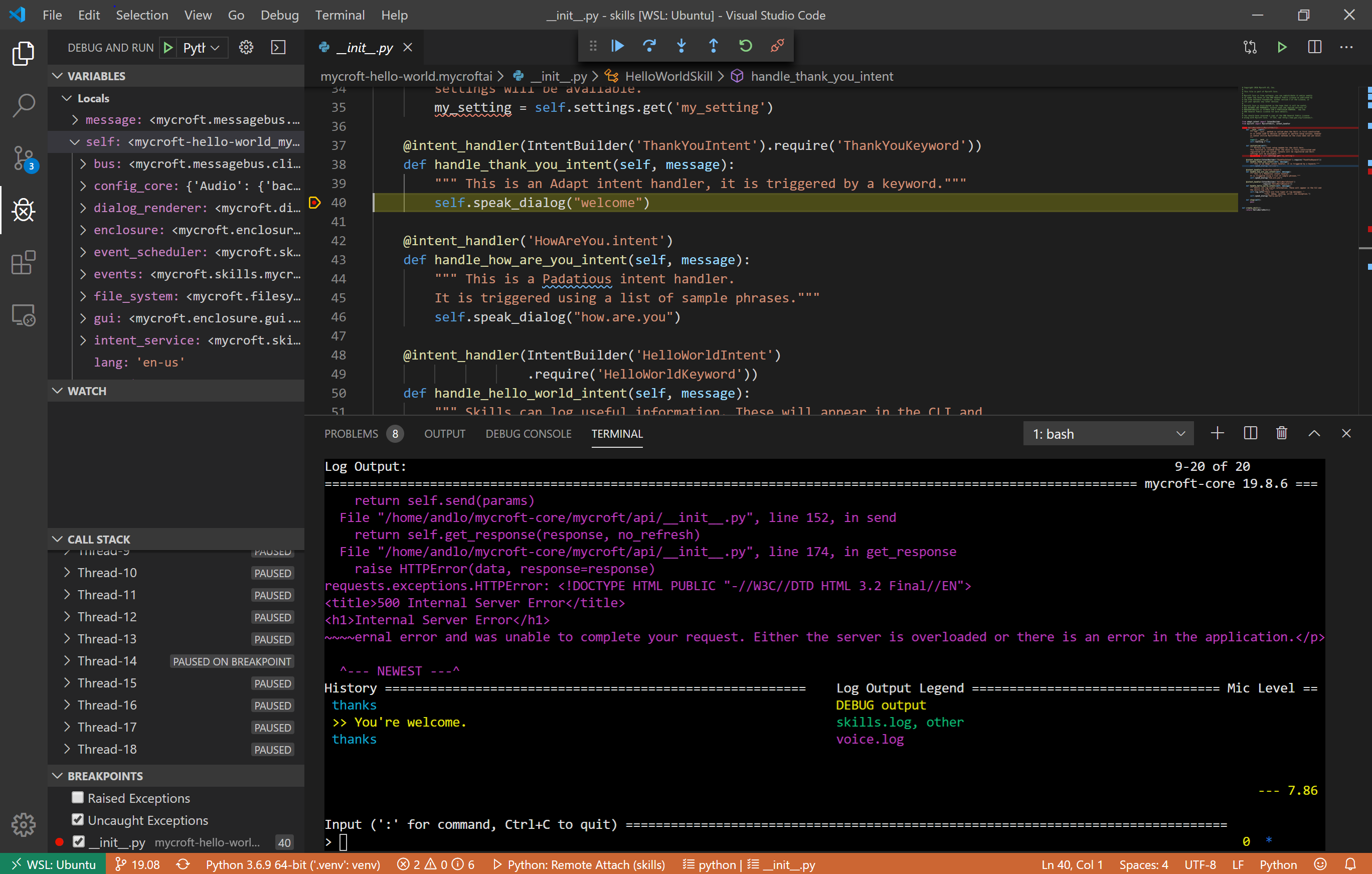
- Start remote debug adaptor by saying “hey mycroft - run remote debug adaptor”
- in VS THEIA IDE or VS code (or maybe other IDE` start debug and atatch to remote
- edit the **init.py** in the mycroft-hello-world.mycrofta skill
- set breakpoint in line 46 `` self.speak\_dialog(“how.are.you”)````
- say “hey mycroft - thanks” and see that code is paused and debuger is active
- step throu the code or stop debuging
- say “hey mycroft - end remote debug adaptor”
If it works as expected th debugger stops and and you can go throu code step by step and see values in variables etc. you can step in and out of functions
When debug adaptor is running you can se that ptvsd is running
```auto
andlo@DESKTOP-D9EUQU6:/opt/mycroft/skills/mycroft-hello-world.mycroftai$ ps ax |grep " -m mycroft.skills"
17025 ? Sl 5:36 python3 -m ptvsd --host 0.0.0.0 --port 5678 -m mycroft.skills
20565 pts/0 S 0:00 grep --color=auto -m mycroft.skills
```
when debugger isnt running you see
```auto
andlo@DESKTOP-D9EUQU6:/opt/mycroft/skills/mycroft-hello-world.mycroftai$ ps ax |grep " -m mycroft.skills"
20696 ? Rl 0:01 python3 -m mycroft.skills
20782 pts/0 S 0:00 grep --color=auto -m mycroft.skills
```
Feedback on this Skill and debugging with PTVSD can be done through Issues on the skills GitHub page or here in the forum or via [Mycroft Chat](https://chat.mycroft.ai).
> **[GitHub - andlo/ZZZ-remote-debug-skill: Enables the ptvsd debug adaptor for remote...](https://github.com/andlo/ZZZ-remote-debug-skill)**
>
> Enables the ptvsd debug adaptor for remote debuging
---
### Author:  [@andlo](https://community.openconversational.ai/u/andlo)
#### Post date: [January 30, 2020, 6:36pm UTC](https://community.openconversational.ai/t/remote-debug-skill/8012/2 "2020-01-30T18:36:53Z")
To use Remote debug from VS code I use plugin " Remote - SSH" ms-vscode-remote.remote-ssh and “Remote - SSH: Editing Configuration Files” ms-vscode-remote.remote-ssh-edit and ssh to picroft and go to folder /opt/mycroft/skills
To use Vscode and working on mycroft running in a WSL I use plugin “Remote - WSL” ms-vscode-remote.remote-wsl and go to folder /opt/mycroft/skills
both when conecting to picroft and WSL I also added the plugin “Python”
ms-python.python.
On WSL I had to add the venv location information in the python settings
To use it from THEIA IDE just install the latest THEIA IDE skill and it should be all setup to debug in skills folder and having right plugins installed.
To use from PyCharm I cant figure out how - PyCharm is for me a bit confusing. But as far as I can read PyCharm should be able to do the same as VS code and THEIA and connect to a remote system and debug adaptor running there.
---
### Author:  [@Tony763](https://community.openconversational.ai/u/Tony763)
#### Post date: [February 26, 2021, 9:30pm UTC](https://community.openconversational.ai/t/remote-debug-skill/8012/3 "2021-02-26T21:30:14Z")
Helo @andlo , acording to mycrosoft git, ᴘᴛᴠsᴅ is now deprecated in flavor of [debugpy](https://github.com/microsoft/debugpy). Will You update Your skill?
I tried it by myself, but I end up with:
```
23:28:15.346 | INFO | 350880 | RemoteDebug | Starting DEBUGPY - Python Tools for Visual Studio debug server.....
23:28:15.346 | INFO | 350880 | RemoteDebug | Debugserver port 5678 reddy for attatch.
23:28:15.346 | INFO | 350880 | RemoteDebug | THEIA IDE is already setup so you just have to start debug from debug menu
23:28:15.347 | INFO | 350880 | RemoteDebug | Setting padatious single_thread = True
23:28:15.347 | INFO | 350880 | RemoteDebug | Restarting skill-service
Stopping skills (350880)...Traceback (most recent call last):
File "/usr/lib/python3.8/runpy.py", line 194, in _run_module_as_main
return _run_code(code, main_globals, None,
File "/usr/lib/python3.8/runpy.py", line 87, in _run_code
exec(code, run_globals)
File "/srv/mycroft-core/mycroft/skills/ __main__.py", line 297, in
main()
File "/srv/mycroft-core/mycroft/skills/ __main__.py", line 233, in main
time.sleep(0.1)
File "/srv/mycroft-core/mycroft/lock/ __init__.py", line 69, in __call__
self.__previous_func(signame, sf)
KeyboardInterrupt
failed to stop.
```
---
### Author:  [@Tony763](https://community.openconversational.ai/u/Tony763)
#### Post date: [March 4, 2021, 10:31pm UTC](https://community.openconversational.ai/t/remote-debug-skill/8012/4 "2021-03-04T22:31:21Z")
Helo, I went a little ahead and made a necessary changes, they can be found in PR [#1](https://github.com/andlo/remote-debug-skill/pull/1)