# Picroft emby and tunein skills
**URL:** https://community.openconversational.ai/t/picroft-emby-and-tunein-skills/11909
**Category:** Feedback / Support
**Tags:** support
**Created:** [February 16, 2022, 12:38pm UTC](https://community.openconversational.ai/t/picroft-emby-and-tunein-skills/11909 "2022-02-16T12:38:03Z")
**Posts on this page:** 2
**Page:** 1
### Author:  [@F1apjack](https://community.openconversational.ai/u/F1apjack)
#### Post date: [February 16, 2022, 12:38pm UTC](https://community.openconversational.ai/t/picroft-emby-and-tunein-skills/11909/1 "2022-02-16T12:38:03Z")
* * *
## FIXED: 16.2.22 METHOD: Remove and then reinstall using mycroft-msm --latest instal emby
Hi everyone,
I’ve installed these two skills via msm. I input my emby details on the ‘skills’ page of my account and I can see that emby recognises my picroft. However he won’t play anything when asked. He always tells me he doesn’t understand.
Same with tunein. I ask him to play a station (with this skill there are no settings) and he just doesn’t understand. What am I doing wrong?
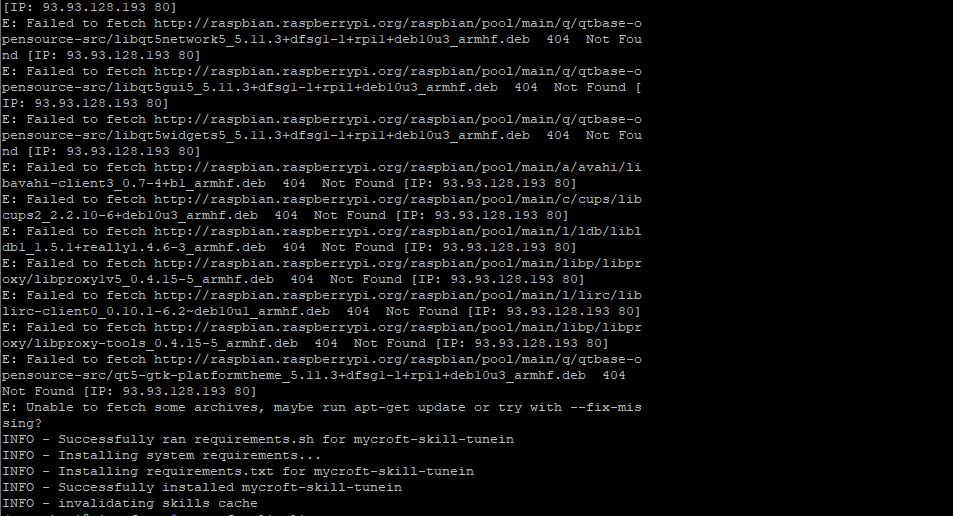
I do get these errors when installing but then it says installed successfully. Am I missing something?
Here is the link to the log: [https://termbin.com/9yav](https://termbin.com/9yav)
---
### Author:  [@F1apjack](https://community.openconversational.ai/u/F1apjack)
#### Post date: [February 16, 2022, 1:09pm UTC](https://community.openconversational.ai/t/picroft-emby-and-tunein-skills/11909/2 "2022-02-16T13:09:03Z")
This is what is sent back in the cli-client when I try ‘check emby’
