# No valid sudoers source
**URL:** https://community.openconversational.ai/t/no-valid-sudoers-source/8758
**Category:** This category is being retired - Support
**Created:** [May 20, 2020, 1:58am UTC](https://community.openconversational.ai/t/no-valid-sudoers-source/8758 "2020-05-20T01:58:42Z")
**Posts on this page:** 7
**Page:** 1
### Author:  [@Looping](https://community.openconversational.ai/u/Looping)
#### Post date: [May 20, 2020, 1:58am UTC](https://community.openconversational.ai/t/no-valid-sudoers-source/8758/1 "2020-05-20T01:58:42Z")
I tried the running sudo without password thing.
well… now I can’t access any sudo action anymore.
> sudo nano /etc/sudoers.d/010\_pi-nopasswd```
> pi ALL=(ALL) NOPASSWD: ALL
it says:
´´\>\>\> /etc/sudoers.d/010\_pi-nopasswd: syntax error near line 1 \<\<\<
sudo: parse error in /etc/sudoers.d/010\_pi-nopasswd near line 1
sudo: no valid sudoers sources found, quitting
sudo: unable to initialize policy plugin``
---
### Author:  [@Looping](https://community.openconversational.ai/u/Looping)
#### Post date: [May 20, 2020, 2:11am UTC](https://community.openconversational.ai/t/no-valid-sudoers-source/8758/2 "2020-05-20T02:11:09Z")
FUCK!
What shall I do now???
@c0rnelius
@gez-mycroft
---
### Author:  [@gez-mycroft](https://community.openconversational.ai/u/gez-mycroft)
#### Post date: [May 20, 2020, 7:20am UTC](https://community.openconversational.ai/t/no-valid-sudoers-source/8758/3 "2020-05-20T07:20:22Z")
Hey looping, I bumped this to a new thread so we can explore what’s happened.
Have you restarted the device after making the change?
Am I understanding correctly that no `sudo` commands are working after this change?
If there’s nothing of value on your install, as in nothing you can’t reinstall easily like Skills, then I’d reflash the image and start with a fresh install.
Otherwise you could plug the Micro SD card into your primary machine and modify the file. You’d need to double check where it’s mounted, this can differ between distributions. On a standard Ubuntu install it would be `/media/user/rootfs`. In this case…
To turn on password protection you can run:
```auto
echo "pi ALL=(ALL) ALL" | sudo tee /media/user/rootfs/etc/sudoers.d/010_pi-nopasswd
```
To turn off the password requirement run:
```auto
echo "pi ALL=(ALL) NOPASSWD: ALL" | sudo tee /media/user/rootfs/etc/sudoers.d/010_pi-nopasswd
```
Just make sure to change the “user” to your username.
---
### Author:  [@Looping](https://community.openconversational.ai/u/Looping)
#### Post date: [May 21, 2020, 12:56pm UTC](https://community.openconversational.ai/t/no-valid-sudoers-source/8758/4 "2020-05-21T12:56:53Z")
Hey @gez-mycroft,
thanks for answering. Yeah sure I did a restart, didn’t help.
Yes, no `sudo` commands work.
I really don’t want to reflash the image…
I plugged the SD card into my primary machine now. It’s Windows10 though, so Linux commands do not help me. And even after a few hours, I can’t make out the location of the file…
---
### Author:  [@Looping](https://community.openconversational.ai/u/Looping)
#### Post date: [May 21, 2020, 12:59pm UTC](https://community.openconversational.ai/t/no-valid-sudoers-source/8758/5 "2020-05-21T12:59:50Z")
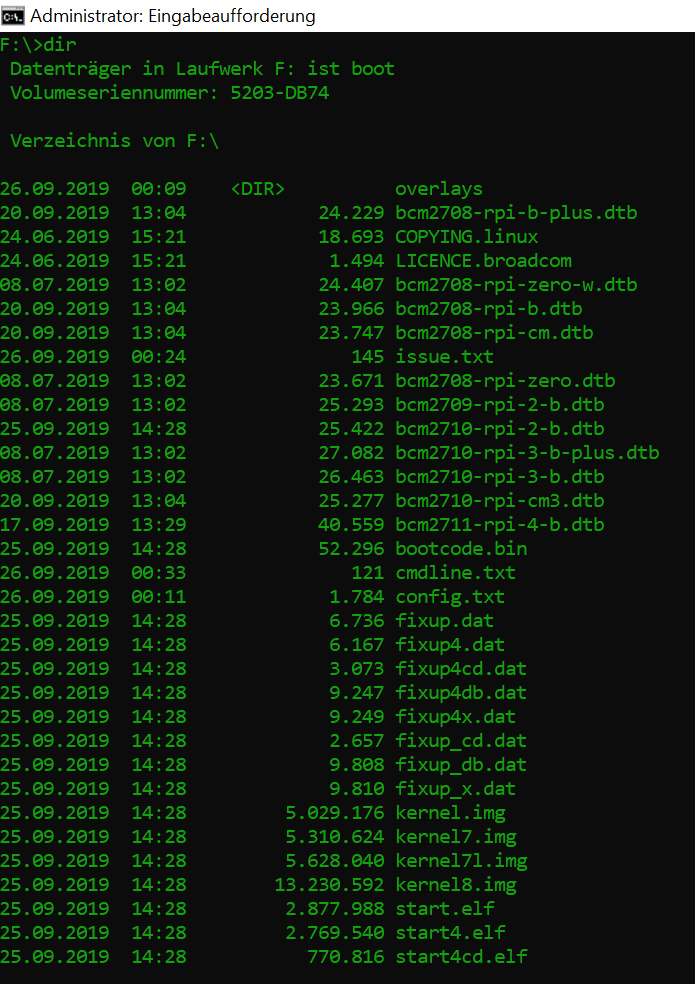
This seems to be on the card…
---
### Author:  [@Looping](https://community.openconversational.ai/u/Looping)
#### Post date: [May 21, 2020, 1:16pm UTC](https://community.openconversational.ai/t/no-valid-sudoers-source/8758/6 "2020-05-21T13:16:11Z")
and it seems to have only 252 MB?!

---
### Author:  [@Looping](https://community.openconversational.ai/u/Looping)
#### Post date: [May 21, 2020, 1:54pm UTC](https://community.openconversational.ai/t/no-valid-sudoers-source/8758/7 "2020-05-21T13:54:41Z")
Alright, I got it!
I downloaded [this](https://www.paragon-software.com/de/home/linuxfs-windows/#resources) from Paragon Software to be able to see everything on the card. And then I put in `pi ALL=(ALL) NOPASSWD: ALL` because before, I had made an `ALL` where to much haha