# No audio output audible through sub speaker
**URL:** https://community.openconversational.ai/t/no-audio-output-audible-through-sub-speaker/1309
**Category:** General Discussion
**Created:** [January 31, 2017, 8:22am UTC](https://community.openconversational.ai/t/no-audio-output-audible-through-sub-speaker/1309 "2017-01-31T08:22:52Z")
**Posts on this page:** 3
**Page:** 1
### Author:  [@siliconchris](https://community.openconversational.ai/u/siliconchris)
#### Post date: [January 31, 2017, 8:22am UTC](https://community.openconversational.ai/t/no-audio-output-audible-through-sub-speaker/1309/1 "2017-01-31T08:22:52Z")
Hello All,
first of all congrats to
a) the idea of an open source Ai system
b) the sleak architecture
c) the great community
Now, I do have a rather small issue on my side and that is, Mycroft can understand and process my commands, but I can’t get an audio feedback. I always only see the reply in the logs, but the speaker is not operational ☹
I will explain my setup:
I have a Raspberry PI 2 with the Picroft development image, v0.8b
I have one of those cheap c-media USB audio devices that come with the CM108 chip
C-Media CM108 Virtual 7.1-Surround USB 2.0 External Sound Card with Hardware Volume Control and Mute
The microphone, as said, is working perfectly. However, I don’t get any audio feedback.
Alsamixer is showing the device and the volume settings are all in the middle range (see picture
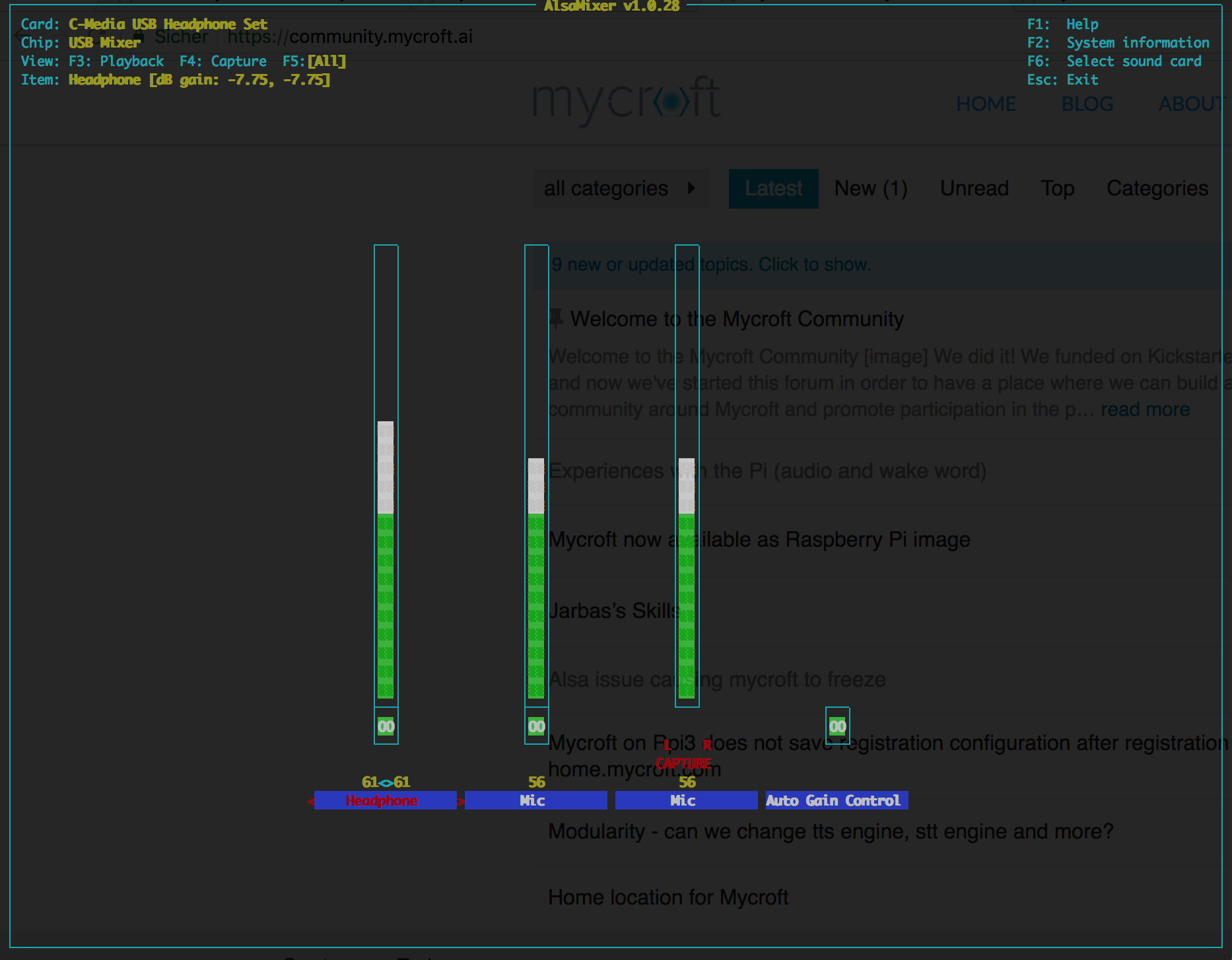).
The device is found - as can be seen with aplay -l:
```
aplay -l
****List of PLAYBACK Hardware Devices****
card 0: ALSA [bcm2835 ALSA], device 0: bcm2835 ALSA [bcm2835 ALSA]
Subdevices: 8/8
Subdevice #0: subdevice #0
Subdevice #1: subdevice #1
Subdevice #2: subdevice #2
Subdevice #3: subdevice #3
Subdevice #4: subdevice #4
Subdevice #5: subdevice #5
Subdevice #6: subdevice #6
Subdevice #7: subdevice #7
card 0: ALSA [bcm2835 ALSA], device 1: bcm2835 ALSA [bcm2835 IEC958/HDMI]
Subdevices: 1/1
Subdevice #0: subdevice #0
card 1: Set [C-Media USB Headphone Set], device 0: USB Audio [USB Audio]
Subdevices: 1/1
Subdevice #0: subdevice #0
card 2: Loopback [Loopback], device 0: Loopback PCM [Loopback PCM]
Subdevices: 8/8
Subdevice #0: subdevice #0
Subdevice #1: subdevice #1
Subdevice #2: subdevice #2
Subdevice #3: subdevice #3
Subdevice #4: subdevice #4
Subdevice #5: subdevice #5
Subdevice #6: subdevice #6
Subdevice #7: subdevice #7
card 2: Loopback [Loopback], device 1: Loopback PCM [Loopback PCM]
Subdevices: 8/8
Subdevice #0: subdevice #0
Subdevice #1: subdevice #1
Subdevice #2: subdevice #2
Subdevice #3: subdevice #3
Subdevice #4: subdevice #4
Subdevice #5: subdevice #5
Subdevice #6: subdevice #6
Subdevice #7: subdevice #7
```
So I configured alsa accordingly in /usr/share/alsa/alsa.conf as follows:
```
#defaults.ctl.card 0
#defaults.pcm.card 0
defaults.ctl.card 1
defaults.pcm.card 1
#defaults.pcm.device 1
defaults.pcm.device 0
```
Also I configured .asoundrc (both in pi AND mycroft home directory) as follows:
```
pcm.!default {
type hw
card 1
}
ctl.!default {
type hw
card 1
}
```
Now, I’m lost. I have no idea, what is wrong. I checked cable and speaker on my laptop and it works. I also tried to plug the speaker in the audio jack on the pI directly, but also to no avail.
Can anyone help me?
Kind regards,
Chris
---
### Author:  [@Maniac](https://community.openconversational.ai/u/Maniac)
#### Post date: [February 20, 2017, 9:36pm UTC](https://community.openconversational.ai/t/no-audio-output-audible-through-sub-speaker/1309/2 "2017-02-20T21:36:57Z")
@siliconchris, I’m in the exact same boat. Have you found a solution yet?
---
### Author:  [@Maniac](https://community.openconversational.ai/u/Maniac)
#### Post date: [February 20, 2017, 10:38pm UTC](https://community.openconversational.ai/t/no-audio-output-audible-through-sub-speaker/1309/3 "2017-02-20T22:38:39Z")
@siliconchris, found the issue. Assuming you have ALSA setup correctly you just need to modify the /etc/mycroft/mycrotf.conf file and ensure that the paly\_wav\_cmdline is not being overriden to use the analog output.
I’ve reduced mine to: “play\_wav\_cmdline”: “aplay %1”,