# Mycroft speaks twice with HomeAssistant confirmations
**URL:** https://community.openconversational.ai/t/mycroft-speaks-twice-with-homeassistant-confirmations/11428
**Category:** Feedback / Support
**Tags:** support
**Created:** [October 27, 2021, 5:46pm UTC](https://community.openconversational.ai/t/mycroft-speaks-twice-with-homeassistant-confirmations/11428 "2021-10-27T17:46:33Z")
**Posts on this page:** 20
**Page:** 1
### Author:  [@sparkyvision](https://community.openconversational.ai/u/sparkyvision)
#### Post date: [October 27, 2021, 5:46pm UTC](https://community.openconversational.ai/t/mycroft-speaks-twice-with-homeassistant-confirmations/11428/1 "2021-10-27T17:46:33Z")
With HomeAssistant skill:
> **[GitHub - MycroftAI/skill-homeassistant: Mycroft Skill/Integration for...](https://github.com/MycroftAI/skill-homeassistant)**
>
> Mycroft Skill/Integration for Homeassistant. Contribute to MycroftAI/skill-homeassistant development by creating an account on GitHub.
Recently got HomeAssistant up and running. It’s great! I really like it, and it makes the Mycroft much more useful with the range of integrations. However, when asking Mycroft to set the thermostat on my ecobee thermostat to %temperature, it does so…then tells me twice.
“Successfully set thermostat to 70 none, successfully set thermostat to 70 none”. (Side note: 70 none? Why the “none”? Is that for tenths of a degree? That needs to go away…I do not need my thermostat to care about tenths of a degree.)
> [0:02] Decoding of 8759b211db1e9dcfe6f4fbe9febb7ef4.mp3 finished.
> 2021-10-27 12:34:51.320 | INFO | 20027 | mycroft.audio.speech:mute\_and\_speak:127 | Speak: Successfully set Thermostat to 70 None.
> 2021-10-27 12:34:51.325 | INFO | 20027 | mycroft.tts.tts:\_get\_sentence\_from\_cache:407 | Found 8759b211db1e9dcfe6f4fbe9febb7ef4.mp3 in TTS cache
> High Performance MPEG 1.0/2.0/2.5 Audio Player for Layers 1, 2 and 3
> version 1.25.10; written and copyright by Michael Hipp and others
> free software (LGPL) without any warranty but with best wishes
>
> Directory: /tmp/mycroft/cache/tts/PollyTTS/
> Playing MPEG stream 1 of 1: 8759b211db1e9dcfe6f4fbe9febb7ef4.mp3 …
>
> MPEG 2.0 L III cbr48 22050 mono
>
> 2021-10-27 12:34:51.611 | INFO | 20027 | mycroft.audio.speech:mute\_and\_speak:127 | Speak: Successfully set Thermostat to 70 None.
> 2021-10-27 12:34:51.617 | INFO | 20027 | mycroft.tts.tts:\_get\_sentence\_from\_cache:407 | Found 8759b211db1e9dcfe6f4fbe9febb7ef4.mp3 in TTS cache
>
> [0:02] Decoding of 8759b211db1e9dcfe6f4fbe9febb7ef4.mp3 finished.
> High Performance MPEG 1.0/2.0/2.5 Audio Player for Layers 1, 2 and 3
> version 1.25.10; written and copyright by Michael Hipp and others
> free software (LGPL) without any warranty but with best wishes
>
> Directory: /tmp/mycroft/cache/tts/PollyTTS/
> Playing MPEG stream 1 of 1: 8759b211db1e9dcfe6f4fbe9febb7ef4.mp3 …
>
> MPEG 2.0 L III cbr48 22050 mono
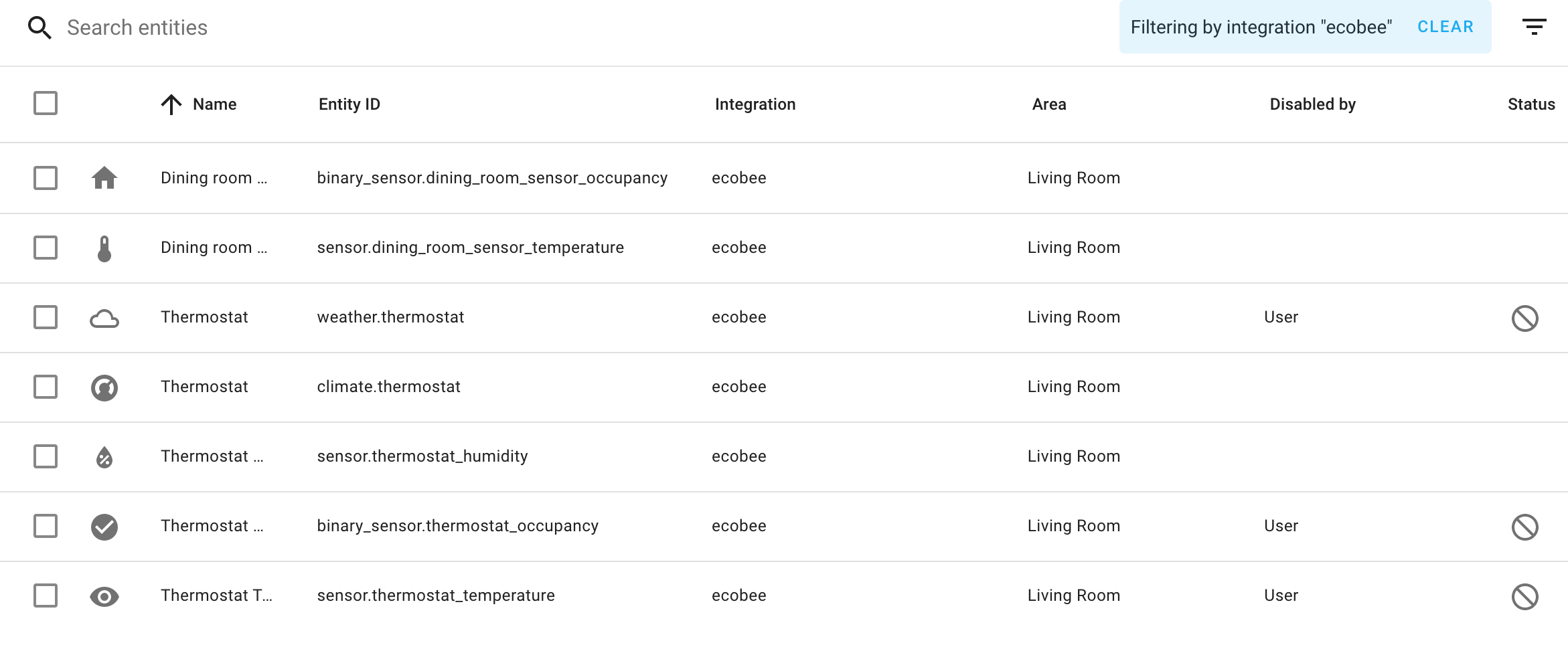
Would be pretty nice if I wanted to hear it twice…but I don’t. I do not see an obvious thing in the logs. I did try disabling entities with “thermostat” in their name in HomeAssistant, because maybe it was matching the name up and trying to set the temp on two thermostats, but that didn’t fix it. Screenshot attached, any advice would be very much appreciated.
Side note: I’m really in awe of how great the combination of HomeAssistant and Mycroft is. It’s fabulous. If anyone remembers the bad old days of X10…this is loads better.
---
### Author:  [@gez-mycroft](https://community.openconversational.ai/u/gez-mycroft)
#### Post date: [October 28, 2021, 4:35am UTC](https://community.openconversational.ai/t/mycroft-speaks-twice-with-homeassistant-confirmations/11428/2 "2021-10-28T04:35:48Z")
Hey Sparky,
There’s some pretty active work going on in the HomeAssistant Skill at the moment.
I believe the “None” is referring to a unit of measure that wasn’t getting returned correctly, and I believe a fix is in the works.
Not sure why the dialog is duplicated though. I’ll flag it in the Skill repo and hopefully someone has time to take a look shortly.
Thanks for the detailed outline of the issue and really great to hear you’re liking the combination of HA and Mycroft!
---
### Author:  [@Tony763](https://community.openconversational.ai/u/Tony763)
#### Post date: [October 28, 2021, 9:07am UTC](https://community.openconversational.ai/t/mycroft-speaks-twice-with-homeassistant-confirmations/11428/3 "2021-10-28T09:07:28Z")
Hi @sparkyvision, Just to clarify, You want to interact with `climate.thermostat`?
Also which version if HA skill do you run? Is it actual branch 20.08 from GitHub or one installed from marketplace?
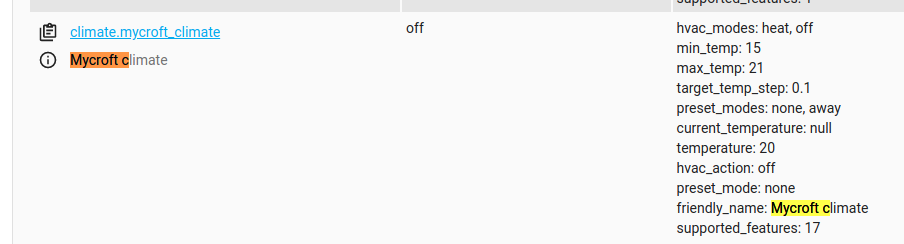
Could You share more information about your your thermostat? Ideally screen shot from developer tools in HA.
---
### Author:  [@sparkyvision](https://community.openconversational.ai/u/sparkyvision)
#### Post date: [October 28, 2021, 1:53pm UTC](https://community.openconversational.ai/t/mycroft-speaks-twice-with-homeassistant-confirmations/11428/4 "2021-10-28T13:53:59Z")
Hello @Tony763! Thanks for replying.
To clarify, yes, I’d like to interact with climate.thermostat. I installed it from the Marketplace, is that the incorrect way to do it? (Is there a better way to know what version is installed? I’m poking around in the files in the skills directory and not seeing a ver=20.08 or anything like that anywhere.)
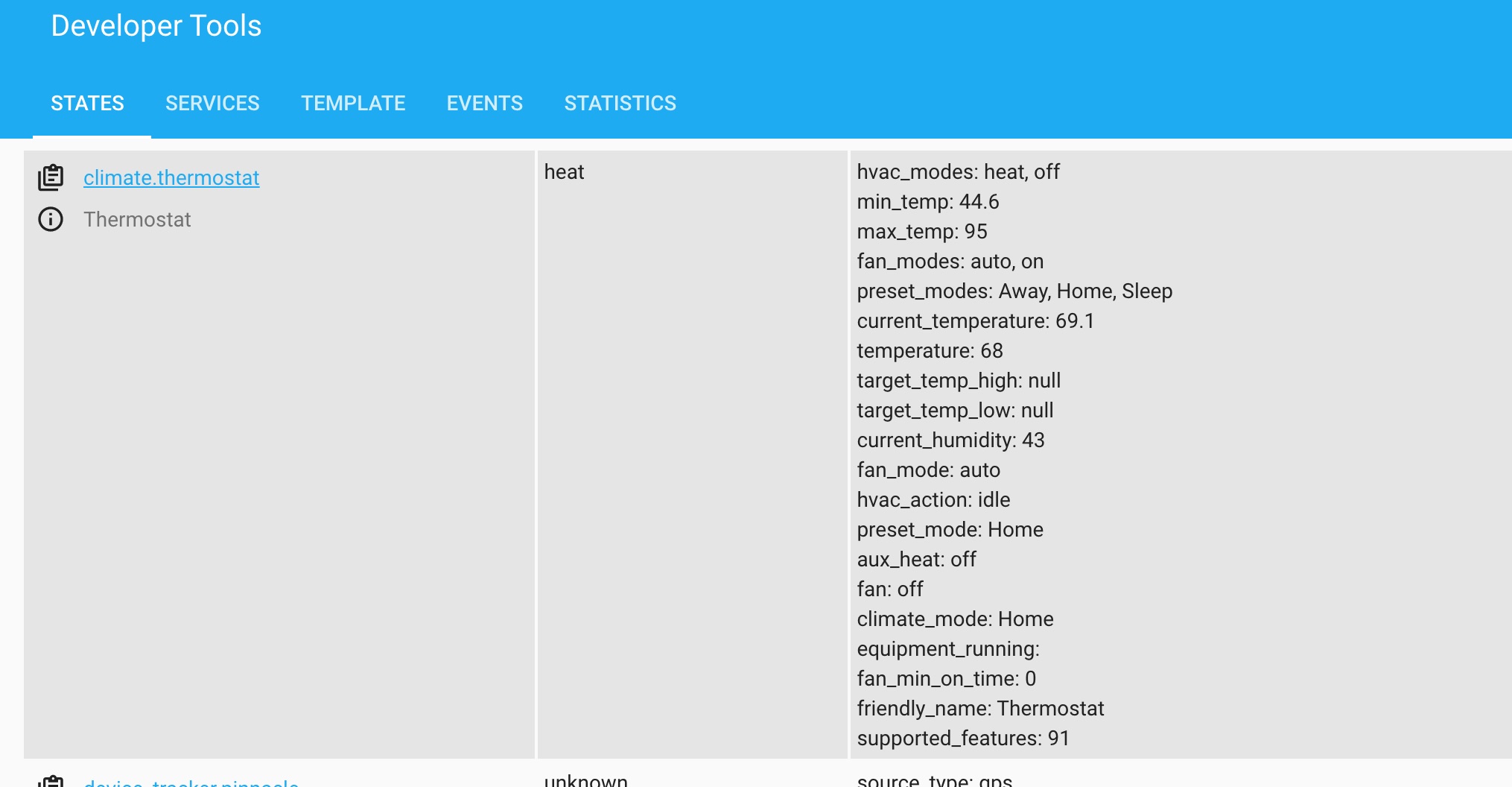
Attached is a screenshot showing climate.thermostat, let me know if that’s not what you’re after.
---
### Author:  [@Tony763](https://community.openconversational.ai/u/Tony763)
#### Post date: [October 28, 2021, 4:56pm UTC](https://community.openconversational.ai/t/mycroft-speaks-twice-with-homeassistant-confirmations/11428/5 "2021-10-28T16:56:46Z")
It’s absolute correct to install from Marketplace, however for Home Assistant skill Marketplace contain outdated version as there is conflict with `where is` skill, so latest changes are blocked. I proposed PR [#89](https://github.com/MycroftAI/skill-homeassistant/pull/89) for fixing it. Your second error with `None` should be already fixed. Latest build also contain another bug made by me (what a shame) but fix is also proposed as PR #[86](https://github.com/MycroftAI/skill-homeassistant/pull/86). It wait’s for test run as I prepared new test suite based on Github Actions. It had some birth pains but should be working now. I hope @gez-mycroft will have time soon to check them. This month must had been busy for him as there was really lot of development in HA skill. For two time response, I did not see this occur in latest code so when those bug fix got approve and merge, I will let You know and ask You to test it again. Hope it will be soon.
---
### Author:  [@Tony763](https://community.openconversational.ai/u/Tony763)
#### Post date: [October 29, 2021, 7:04am UTC](https://community.openconversational.ai/t/mycroft-speaks-twice-with-homeassistant-confirmations/11428/6 "2021-10-29T07:04:40Z")
Hi @sparkyvision, PR #86 was merged so if You want, You can test latest version of HA skill from GitHub.
---
### Author:  [@sparkyvision](https://community.openconversational.ai/u/sparkyvision)
#### Post date: [October 29, 2021, 1:32pm UTC](https://community.openconversational.ai/t/mycroft-speaks-twice-with-homeassistant-confirmations/11428/7 "2021-10-29T13:32:13Z")
I would do that via a git pull in the HomeAssistant directory, yeah?
---
### Author:  [@Tony763](https://community.openconversational.ai/u/Tony763)
#### Post date: [October 29, 2021, 1:35pm UTC](https://community.openconversational.ai/t/mycroft-speaks-twice-with-homeassistant-confirmations/11428/8 "2021-10-29T13:35:59Z")
Yes, that’s also way, You have to remove old skill and run mycroft-pip install -r requirements.txt from new clonned dir.
---
### Author:  [@goldyfruit](https://community.openconversational.ai/u/goldyfruit)
#### Post date: [October 29, 2021, 1:36pm UTC](https://community.openconversational.ai/t/mycroft-speaks-twice-with-homeassistant-confirmations/11428/9 "2021-10-29T13:36:08Z")
`msm update https://github.com/MycroftAI/skill-homeassistant.git` should do the trick.
---
### Author:  [@sparkyvision](https://community.openconversational.ai/u/sparkyvision)
#### Post date: [October 29, 2021, 1:41pm UTC](https://community.openconversational.ai/t/mycroft-speaks-twice-with-homeassistant-confirmations/11428/10 "2021-10-29T13:41:15Z")
You’d think so, wouldn’t you? But it claims to not be installed.
```auto
INFO - building SkillEntry objects for all skills
INFO - Problem performing action. Restoring skill to previous state...
NotInstalled: skill-homeassistant is not installed
```
[Edit] I searched for and removed the “homeassistant” skill via ` msm list` , then did a ` msm install https://github.com/MycroftAI/skill-homeassistant.git` , which completed successfully. However, I’m still waiting for the thingy to appear in my skills listing at [Account](https://account.mycroft.ai/skills).
[Edit 2] _franticly mashes CTRL+R_
---
### Author:  [@goldyfruit](https://community.openconversational.ai/u/goldyfruit)
#### Post date: [October 29, 2021, 1:51pm UTC](https://community.openconversational.ai/t/mycroft-speaks-twice-with-homeassistant-confirmations/11428/11 "2021-10-29T13:51:45Z")
Do you get any errors in the `skills.log` ? Like something like this:
```auto
File "/home/mycroft/core/mycroft/skills/skill_loader.py", line 307, in _create_skill_instance
self.instance.initialize()
File "/opt/mycroft/skills/skill-homeassistant.mycroftai/ __init__.py", line 93, in initialize
self._setup()
File "/opt/mycroft/skills/skill-homeassistant.mycroftai/ __init__.py", line 34, in _setup
ip_address = check_url(self.settings.get('host'))
File "/opt/mycroft/skills/skill-homeassistant.mycroftai/ha_client.py", line 53, in check_url
matches = re.findall(IPV6_REGEX, ip_address)
File "/usr/lib/python3.7/re.py", line 223, in findall
return _compile(pattern, flags).findall(string)
TypeError: expected string or bytes-like object
```
---
### Author:  [@sparkyvision](https://community.openconversational.ai/u/sparkyvision)
#### Post date: [October 29, 2021, 1:55pm UTC](https://community.openconversational.ai/t/mycroft-speaks-twice-with-homeassistant-confirmations/11428/12 "2021-10-29T13:55:11Z")
Why yes, as a matter of fact.
```auto
2021-10-29 08:46:42.181 | INFO | 28731 | mycroft.skills.skill_loader:load:185 | ATTEMPTING TO LOAD SKILL: skill-homeassistant.mycroftai
2021-10-29 08:46:42.553 | INFO | 28731 | mycroft.skills.settings:get_local_settings:83 | /opt/mycroft/skills/skill-homeassistant.mycroftai/settings.json
2021-10-29 08:46:42.555 | INFO | 28731 | mycroft.skills.settings:get_local_settings:83 | /opt/mycroft/skills/skill-homeassistant.mycroftai/settings.json
2021-10-29 08:46:42.642 | INFO | 28731 | HomeAssistantSkill | Removing all handlers...
2021-10-29 08:46:42.646 | WARNING | 28731 | mycroft.skills.fallback_skill:remove_fallback:185 | Could not find matching fallback handler
2021-10-29 08:46:42.659 | ERROR | 28731 | mycroft.skills.skill_loader:_create_skill_instance:313 | Skill initialization failed with TypeError('expected string or bytes-like object')
Traceback (most recent call last):
File "/home/pi/mycroft-core/mycroft/skills/skill_loader.py", line 307, in _create_skill_instance
self.instance.initialize()
File "/opt/mycroft/skills/skill-homeassistant.mycroftai/ __init__.py", line 93, in initialize
self._setup()
File "/opt/mycroft/skills/skill-homeassistant.mycroftai/ __init__.py", line 34, in _setup
ip_address = check_url(self.settings.get('host'))
File "/opt/mycroft/skills/skill-homeassistant.mycroftai/ha_client.py", line 53, in check_url
matches = re.findall(IPV6_REGEX, ip_address)
File "/usr/lib/python3.7/re.py", line 223, in findall
return _compile(pattern, flags).findall(string)
TypeError: expected string or bytes-like object
2021-10-29 08:46:42.685 | ERROR | 28731 | mycroft.skills.skill_loader:_communicate_load_status:351 | Skill skill-homeassistant.mycroftai failed to load
2021-10-29 08:46:46.797 | INFO | 28731 | mycroft.skills.intent_services.padatious_service:train:81 | Training... (single_thread=False)
Regenerated skill-homeassistant.mycroftai:cover.open.intent.
Regenerated skill-homeassistant.mycroftai:set.climate.intent.
Regenerated skill-homeassistant.mycroftai:toggle.intent.
Regenerated skill-homeassistant.mycroftai:set.light.brightness.intent.
Regenerated skill-homeassistant.mycroftai:increase.light.brightness.intent.
Regenerated skill-homeassistant.mycroftai:automation.intent.
```
There is that.
[Edit] Formatting.
---
### Author:  [@goldyfruit](https://community.openconversational.ai/u/goldyfruit)
#### Post date: [October 29, 2021, 1:56pm UTC](https://community.openconversational.ai/t/mycroft-speaks-twice-with-homeassistant-confirmations/11428/13 "2021-10-29T13:56:17Z")
I’m having the same error. @Tony763 is aware about this and will try to look into it.
---
### Author:  [@Tony763](https://community.openconversational.ai/u/Tony763)
#### Post date: [October 29, 2021, 2:06pm UTC](https://community.openconversational.ai/t/mycroft-speaks-twice-with-homeassistant-confirmations/11428/14 "2021-10-29T14:06:48Z")
could you clone my repo Tony763/skill-homeassistant and switch to branch patch-8. I put some debbuging there (did on phone but CI claims it works) an post output here?
---
### Author:  [@sparkyvision](https://community.openconversational.ai/u/sparkyvision)
#### Post date: [October 29, 2021, 2:09pm UTC](https://community.openconversational.ai/t/mycroft-speaks-twice-with-homeassistant-confirmations/11428/15 "2021-10-29T14:09:19Z")
You know, one of these days I’ll get around to Googling “how does git work” but until then, uh…do what now?
Apologies for being an ignoramus.
---
### Author:  [@Tony763](https://community.openconversational.ai/u/Tony763)
#### Post date: [October 29, 2021, 2:17pm UTC](https://community.openconversational.ai/t/mycroft-speaks-twice-with-homeassistant-confirmations/11428/16 "2021-10-29T14:17:04Z")
remove old skill,
`msm install https://github.com/Tony763/skill-homeassistant.git`
, cd skill-homeassistant git checkout patch-8, restart mycroft
---
### Author:  [@goldyfruit](https://community.openconversational.ai/u/goldyfruit)
#### Post date: [October 29, 2021, 2:19pm UTC](https://community.openconversational.ai/t/mycroft-speaks-twice-with-homeassistant-confirmations/11428/17 "2021-10-29T14:19:03Z")
Same error with branch `patch-8`
```auto
mycroft@mycroft_skills:/opt/mycroft/skills/skill-homeassistant.tony763$ git branch
github-actions
* patch-8
```
---
### Author:  [@Tony763](https://community.openconversational.ai/u/Tony763)
#### Post date: [October 29, 2021, 2:24pm UTC](https://community.openconversational.ai/t/mycroft-speaks-twice-with-homeassistant-confirmations/11428/18 "2021-10-29T14:24:01Z")
yes it will be, i just put debug inside so I need a log output, there should be two lines: type and content. As I cannot reproduce this error, I need this output from your instances
---
### Author:  [@goldyfruit](https://community.openconversational.ai/u/goldyfruit)
#### Post date: [October 29, 2021, 2:27pm UTC](https://community.openconversational.ai/t/mycroft-speaks-twice-with-homeassistant-confirmations/11428/19 "2021-10-29T14:27:45Z")
I had to add `str()` to `ip_address` to make it loads. Here is the `diff`:
```auto
diff --git a/ha_client.py b/ha_client.py
index 3f3c881..e8862f0 100644
--- a/ha_client.py
+++ b/ha_client.py
@@ -50,7 +50,7 @@ def check_url(ip_address):
If nothing found, second regex try to find IPv4 and domains names.
"""
valid = False
- matches = re.findall(IPV6_REGEX, ip_address)
+ matches = re.findall(IPV6_REGEX, str(ip_address))
if matches:
largest = max(matches, key=len)[0]
@@ -65,7 +65,7 @@ def check_url(ip_address):
if largest and valid:
return largest
- matches = re.search(IP_REGEX, ip_address)
+ matches = re.search(IP_REGEX, str(ip_address))
if matches:
return matches.group(1)
return None
```
_EDIT 1:_
But now I got this:
```auto
2021-10-29 14:26:03.479 | ERROR | 1 | HomeAssistantSkill | type:
2021-10-29 14:26:03.479 | ERROR | 1 | HomeAssistantSkill | content:
```
_EDIT 2:_
Seems to just be a debug message, because in `settings.json` I got the configuration from the UI.
```auto
{"__mycroft_skill_firstrun": false, "ssl": false, "host": "http://192.168.1.9", "token": "XXXXX", "verify": false, "portnum": 8123, "enable_fallback": true}`
```
_EDIT 3:_
It’s working. 😍
---
### Author:  [@sparkyvision](https://community.openconversational.ai/u/sparkyvision)
#### Post date: [October 29, 2021, 2:34pm UTC](https://community.openconversational.ai/t/mycroft-speaks-twice-with-homeassistant-confirmations/11428/20 "2021-10-29T14:34:24Z")
I’m attempting to remove the old skill, however I’m running into the MultipleSkillMatches error. I don’t see a command line switch in the documentation to force one or the other, and the two skills are identically named “homeassistant”. Thoughts?
I could just blow away the dirs, but I assume msm does stuff to configuration files and I don’t want those to have dirty uninstall information in them.
[Next page](https://community.openconversational.ai/t/mycroft-speaks-twice-with-homeassistant-confirmations/11428.md?page=2)