# Mycroft Mark II with Home Assistant
**URL:** https://community.openconversational.ai/t/mycroft-mark-ii-with-home-assistant/12543
**Category:** Archive - Former Random Mycroft Category
**Created:** [October 4, 2022, 12:25am UTC](https://community.openconversational.ai/t/mycroft-mark-ii-with-home-assistant/12543 "2022-10-04T00:25:27Z")
**Posts on this page:** 20
**Page:** 1
### Author:  [@Bloom](https://community.openconversational.ai/u/Bloom)
#### Post date: [October 4, 2022, 12:25am UTC](https://community.openconversational.ai/t/mycroft-mark-ii-with-home-assistant/12543/1 "2022-10-04T00:25:27Z")
Hi,
I am wondering whether the integration of the Mycroft Mark II is straightforward with Home Assistant?
The Home Assistant documentation [about this](https://www.home-assistant.io/integrations/mycroft/) confuses me, because it says that the skills “allows to deliver notifications from Home Assistant to Mycroft AI”. Shouldn’t it be the other way around? I want Mycroft to figure out my voice command and then send the command to Home Assistant. Is this working as intended?
---
### Author:  [@goldyfruit](https://community.openconversational.ai/u/goldyfruit)
#### Post date: [October 4, 2022, 11:06pm UTC](https://community.openconversational.ai/t/mycroft-mark-ii-with-home-assistant/12543/2 "2022-10-04T23:06:57Z")
> **[GitHub - MycroftAI/skill-homeassistant: Mycroft Skill/Integration for...](https://github.com/MycroftAI/skill-homeassistant)**
>
> Mycroft Skill/Integration for Homeassistant. Contribute to MycroftAI/skill-homeassistant development by creating an account on GitHub.
---
### Author:  [@gez-mycroft](https://community.openconversational.ai/u/gez-mycroft)
#### Post date: [October 5, 2022, 3:29am UTC](https://community.openconversational.ai/t/mycroft-mark-ii-with-home-assistant/12543/3 "2022-10-05T03:29:57Z")
Hey there,
The Home Assistant integration you linked to was a community developed plugin to HomeAssistant. As far as I know it has not been updated in a long time and is not supported at all.
We do what you’ve suggested using the Skill linked above. Mycroft determines the intent behind your utterance and sends a command to do something to Home Assistant.
In the Mark II it comes pre-installed, you just need to add your Home Assistant IP and an access token to your Skill settings.
---
### Author:  [@MyPCroft](https://community.openconversational.ai/u/MyPCroft)
#### Post date: [November 10, 2022, 4:40pm UTC](https://community.openconversational.ai/t/mycroft-mark-ii-with-home-assistant/12543/4 "2022-11-10T16:40:12Z")
In all honesty there is no clear way to determine that MyCroft has or is using the settings. I have done several settings updates 1) with ip address, 2) with fully qualified domain name, and 3) the token. Additionally, I made a background change to watch how long it would take for the home screen to change.
Each time I tried the suggested command but it is not clear if the unit was successful (or not). I know my home assistant is working as I have many other devices and integrations.
---
### Author:  [@phone](https://community.openconversational.ai/u/phone)
#### Post date: [November 15, 2022, 3:23am UTC](https://community.openconversational.ai/t/mycroft-mark-ii-with-home-assistant/12543/5 "2022-11-15T03:23:38Z")
In my case home assistant is working correctly.
I only picked IP address and long living token (not using SSL).
However I had to give proper entity names (for e.g. Living Room Lights) otherwise Mycroft would just say entity not found.
---
### Author:  [@MyPCroft](https://community.openconversational.ai/u/MyPCroft)
#### Post date: [November 15, 2022, 4:12pm UTC](https://community.openconversational.ai/t/mycroft-mark-ii-with-home-assistant/12543/6 "2022-11-15T16:12:45Z")
Are you using the Mark II - that was recently shipped – I have opened a support ticket as I have other solutions working with Home Assistant. There is really no solid way to check if this MyCroft has the settings or downloaded what I added within the skill.
---
### Author:  [@phone](https://community.openconversational.ai/u/phone)
#### Post date: [November 15, 2022, 7:34pm UTC](https://community.openconversational.ai/t/mycroft-mark-ii-with-home-assistant/12543/7 "2022-11-15T19:34:26Z")
My Mark II arrived about 2 weeks ago and I set it up just last week
---
### Author:  [@MyPCroft](https://community.openconversational.ai/u/MyPCroft)
#### Post date: [November 15, 2022, 7:59pm UTC](https://community.openconversational.ai/t/mycroft-mark-ii-with-home-assistant/12543/8 "2022-11-15T19:59:21Z")
Mine arrived similar timeframe. I got it setup about 1 week ago.
I was hoping to have my “Home Assistant Yellow” (from Nabu Casa) to interact with My Mark II. Ideally getting it to accept commands to use the Home Assistant skill.
I am using the default setup – I did not configure TLS yet.
On the mycroft home assistant skill page, I noticed that the checkboxes are not working – I cannot tell if these are checked or uncheck. I have tried the ip address as well as the fully qualified name.
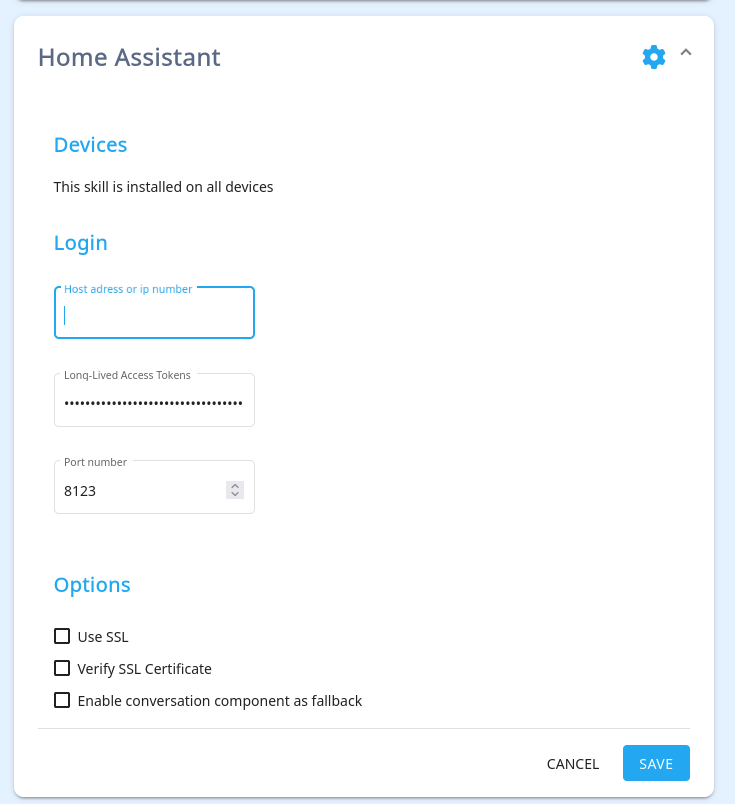
Initially I thought the problem was due to the token not being copy/paste correctly, but I don’t think that is really the case anymore.
For example I cannot even get SSH to work from this central website. I pasted my public key and the unit still does not have ssh working.
I copied/backed up the original usb that shipped with the unit (it is a similar sized sandisk).
---
### Author:  [@MyPCroft](https://community.openconversational.ai/u/MyPCroft)
#### Post date: [November 15, 2022, 8:38pm UTC](https://community.openconversational.ai/t/mycroft-mark-ii-with-home-assistant/12543/9 "2022-11-15T20:38:52Z")
What I suspected happened did… the settings are not getting updated or the website for the skill page is broken/bugged.
To help share more detail – I backed up the USB drive as I could not get ssh to work on this unit.
Then I found are two main mount points pvroot and pvboot.
searching thru all the files, I found the following directory/file here (pvroot is the base):
./disks/perm/mycroft/lxc-overlay/upper/home/mycroft/.config/mycroft/skills/homeassistant.mark2/settings.json
In that file was the following:
{“ssl”: true, “host”: “x.x.x.x”, “token”: “eyJhbGciOiJIUzI1NiIsInR5cCI6IkpXVCJ9.eyJpc3MiOiI0ZTA1ODNmZGMyMTQ0NTc4OWVjNzk5OWEyZWNiMjdiOCIsImlhdCI6MTY2ODA0MDE4NSwiZXhwIjoxOTgzNDAwMTg1fQ.h4bYs025ihPhzzMjHh83hOddDmQG509j6oQ6vakQeBo”, “verify”: false, “portnum”: 8123, “enable\_fallback”: false}
I changed the ip address and the token that was used has been removed from Home Assistant.
As the earlier picture demonstrated, the checkmarks were not selected, but the sync settings see SSL is set to true.
update: 2:48 PM (chicago)
I checked with other browsers - Safari (from an iPad Pro/Macbook pro), Firefox on Linux, Firefox on Windows, etc) - the checkboxs are not reflecting the “true” value on the web app. MyCroft json file from the website is showing SSL is set to true.
---
### Author:  [@phone](https://community.openconversational.ai/u/phone)
#### Post date: [November 15, 2022, 8:59pm UTC](https://community.openconversational.ai/t/mycroft-mark-ii-with-home-assistant/12543/10 "2022-11-15T20:59:04Z")
Your web settings look exactly same as mine (I use in-network IP address)
I’ll try enabling ssh later and see contents and report back.
---
### Author:  [@MyPCroft](https://community.openconversational.ai/u/MyPCroft)
#### Post date: [November 15, 2022, 9:07pm UTC](https://community.openconversational.ai/t/mycroft-mark-ii-with-home-assistant/12543/11 "2022-11-15T21:07:04Z")
> [@phone](#):
>
> I’ll try enabling ssh later and see contents and report back.
thank you.
I had to do a few trial and error attempts to get home assistant working. I believe my unit is connecting to Home Assistant.
The documentation portal ssh is running on port 8222 which I confirmed via nmap.
I got ssh working as well. [The documentation portal page does have some good detail](https://mycroft-ai.gitbook.io/docs/using-mycroft-ai/get-mycroft/mark-ii/mark-ii-dev-kit#ssh-access)
ssh -i ~/.ssh/id\_rsa-mycroft -p 8222 mycroft@x.x.x.x where x.x.x.x is your ip address
hope this works for you
---
### Author:  [@phone](https://community.openconversational.ai/u/phone)
#### Post date: [November 15, 2022, 10:45pm UTC](https://community.openconversational.ai/t/mycroft-mark-ii-with-home-assistant/12543/12 "2022-11-15T22:45:42Z")
My HomeAssistant skill worked right out of the box
---
### Author:  [@MyPCroft](https://community.openconversational.ai/u/MyPCroft)
#### Post date: [November 15, 2022, 11:09pm UTC](https://community.openconversational.ai/t/mycroft-mark-ii-with-home-assistant/12543/13 "2022-11-15T23:09:51Z")
if I had to guess, you probably never click on the checkboxes within the web UI.
I generally check out the Web UI interfaces (text fields, checkbox, etc) to see if there is any validation. For example the SSH public key has to be in a specific format otherwise the text box will not accept it.
In this sense I think the webpage has some issue that registers an user input value but does not displays it.
---
### Author:  [@phone](https://community.openconversational.ai/u/phone)
#### Post date: [November 16, 2022, 1:21am UTC](https://community.openconversational.ai/t/mycroft-mark-ii-with-home-assistant/12543/14 "2022-11-16T01:21:15Z")
I unticked all checkboxes (they were ticked) and entered the info
---
### Author:  [@n0pe](https://community.openconversational.ai/u/n0pe)
#### Post date: [January 31, 2023, 5:30pm UTC](https://community.openconversational.ai/t/mycroft-mark-ii-with-home-assistant/12543/15 "2023-01-31T17:30:59Z")
The Home Assistant skill has been working for me pretty good once I learned how to turn things on and off.
Dumb question: Is there a list somewhere that has all of the available utterances that it can understand and act on regarding Home Assistant?
---
### Author:  [@clintonthegeek](https://community.openconversational.ai/u/clintonthegeek)
#### Post date: [January 31, 2023, 7:00pm UTC](https://community.openconversational.ai/t/mycroft-mark-ii-with-home-assistant/12543/16 "2023-01-31T19:00:21Z")
I’ve a different, also maybe-dumb question: how easy would it be to have the Home Assistant instance also running on the Mark II alongside the Mycroft software? Would it negatively impact performance to a noticeable degree if I’m only using it for, like, two power sockets or light switches?
I rent one room—my “home automation” needs don’t really exceed the scope of what might be provided by the “clap on! clap off!” clapper for the one light I have on a shelf that’s a bit of a pain to reach. I figured dropping $30 on a Zigbee USB antennae and plugging it into the Mark II should be all I need.
---
### Author:  [@n0pe](https://community.openconversational.ai/u/n0pe)
#### Post date: [February 2, 2023, 6:35am UTC](https://community.openconversational.ai/t/mycroft-mark-ii-with-home-assistant/12543/17 "2023-02-02T06:35:49Z")
If you don’t have a lot going on in the Home Assistant instance then I’m sure it would be fine. The boot might take a little longer for it to get up and running.
---
### Author:  [@n0pe](https://community.openconversational.ai/u/n0pe)
#### Post date: [March 14, 2023, 1:39am UTC](https://community.openconversational.ai/t/mycroft-mark-ii-with-home-assistant/12543/18 "2023-03-14T01:39:27Z")
Does anyone happen to know what should be said to control thermostats from the home assistant skill on the Mark II?
I’ve tried many variations of what once worked through Amazon Alexa devices, but not having much luck.
---
### Author:  [@Tony763](https://community.openconversational.ai/u/Tony763)
#### Post date: [March 19, 2023, 9:52pm UTC](https://community.openconversational.ai/t/mycroft-mark-ii-with-home-assistant/12543/19 "2023-03-19T21:52:56Z")
Hi @n0pe, I do not have access to Mark 2 so cannot tell if there are differences for mark2 and original skill. But You can try to update skill to latest available version from [Github](https://github.com/MycroftAI/skill-homeassistant). Thermostat then can by set by `set.climate.intent`:
```auto
set (the|) {entity} to {temp} degrees
set (the|) {entity} temperature to {temp} degrees
change (the|) {entity} temperature to {temp} degrees
```
---
### Author:  [@n0pe](https://community.openconversational.ai/u/n0pe)
#### Post date: [March 20, 2023, 1:27am UTC](https://community.openconversational.ai/t/mycroft-mark-ii-with-home-assistant/12543/20 "2023-03-20T01:27:44Z")
Exactly what I was looking for, thank you!
[Next page](https://community.openconversational.ai/t/mycroft-mark-ii-with-home-assistant/12543.md?page=2)