# Missing device settings like ssh public key?
**URL:** https://community.openconversational.ai/t/missing-device-settings-like-ssh-public-key/13431
**Category:** Mark II
**Tags:** markii
**Created:** [March 14, 2023, 4:33pm UTC](https://community.openconversational.ai/t/missing-device-settings-like-ssh-public-key/13431 "2023-03-14T16:33:24Z")
**Posts on this page:** 20
**Page:** 1
### Author:  [@cosgrave](https://community.openconversational.ai/u/cosgrave)
#### Post date: [March 14, 2023, 4:33pm UTC](https://community.openconversational.ai/t/missing-device-settings-like-ssh-public-key/13431/1 "2023-03-14T16:33:24Z")
Hi,
I got my Mark II today, got through the set up and tested a few skills. That all went OK.
What I don’t appear to have is device settings beyond entering the name of my Mycroft, it’s “placement” in, then Geographical Location information and a link to click in the “Advanced Settings” that takes me to a page about mycroft.conf . I don’t see anywhere to put the ssh public key for example as mentioned in the ssh setup docs.
I’ve tried rebooting the device a few times in case it was a pairing issue and in case it was some sort of weird browser / account bug I’ve tried repeatedly logging out, clearing browser cache etc.
Does anyone know what might be wrong?
Thanks!
---
### Author:  [@Collab](https://community.openconversational.ai/u/Collab)
#### Post date: [March 15, 2023, 1:22am UTC](https://community.openconversational.ai/t/missing-device-settings-like-ssh-public-key/13431/2 "2023-03-15T01:22:22Z")
Once you’ve added your device to [Account](https://account.mycroft.ai/devices/) you can click the “edit” button and look all the way at the bottom of your browser screen (below the link you mentioned that leads to mycroft.conf). There is a paragraph that says:
“To access this device via the command line, provide the public SSH key for the computer that will be used to access the device below.”
There is a box below that that you paste your public SSH key into. Here’s my crude ASCII graphics-style approximation:
```
-Public SSH Key--------------------------------------------------------------
| {Box here} |
-----------------------------------------------------------------------------
Paste the public SSH key of the computer used to to login to this device
```
Some people have reported that this feature is apparently not always available. Hopefully you won’t run into anything like that. Anyway, the above is what worked for me.
Here’s the Mycroft official support person guessing at what might have gone wrong: [Gez explains missing SSH input field](https://community.openconversational.ai/t/setting-up-ssh-access-mycroft-mark-ii/12647/12)
> . . . it shouldn’t be required to switch to the Beta release.
>
> My assumption is that the initial pairing with our Pantacor update servers failed. Without this information we assume that the device is not a retail Mark II, and is more likely a Sandbox or other image that don’t use this public key field.
>
> Any reboot it should re-attempt the connection with the update servers, so when you switched to Beta that would also have triggered a new attempt.
>
> So you can switch back to Stable if you want and that will retain the public SSH key field.
---
### Author:  [@cosgrave](https://community.openconversational.ai/u/cosgrave)
#### Post date: [March 15, 2023, 7:32am UTC](https://community.openconversational.ai/t/missing-device-settings-like-ssh-public-key/13431/3 "2023-03-15T07:32:44Z")
Thanks for the reply 🙂 Unfortunately I would appear to be one of the people that it isn’t always available for as it’s not visible on the page for me. I might try removing and re-adding my device to see if that changes anything 🤞
---
### Author:  [@burns](https://community.openconversational.ai/u/burns)
#### Post date: [March 16, 2023, 8:18pm UTC](https://community.openconversational.ai/t/missing-device-settings-like-ssh-public-key/13431/4 "2023-03-16T20:18:51Z")
It’s not there for me either. I just took the USB stick and put it in another Pi that I can log into and looked around. It’s kind of weird that people say to use the username mycroft. That name does not exist in /etc/passwd, only “pi” as usual with RPi. Similarly, the only directory under “home” is “pi”. I know that at least Picroft uses some virtual system that I am not too familiar with, but I’m still a bit mystified about all this. Any thoughts?
---
### Author:  [@burns](https://community.openconversational.ai/u/burns)
#### Post date: [March 16, 2023, 9:27pm UTC](https://community.openconversational.ai/t/missing-device-settings-like-ssh-public-key/13431/5 "2023-03-16T21:27:15Z")
I’ve tried a couple things–first, I actually did find the home directory for Mycroft…it’s buried down a few levels. But when I put the public key there (in authorized\_keys) that did not help. Then I unpaired it from my account and re-paired it. Nope. I may try again with a new account (my current one already has a PiCroft associated with it). But in the meantime, I have a $400 toy that can’t do anything that I bought it for. (I was planning to port my Hubitat skill to it so that I can change the lights etc in my office, but I can’t do that without being able to access it.) @gez-mycroft any ideas? This seems to be a common problem despite the fact that it _should_ work.
---
### Author:  [@cosgrave](https://community.openconversational.ai/u/cosgrave)
#### Post date: [March 20, 2023, 5:09pm UTC](https://community.openconversational.ai/t/missing-device-settings-like-ssh-public-key/13431/6 "2023-03-20T17:09:58Z")
So I finally got around to attempting removing the device and re-adding it via my Account’s devices page. But now I don’t get a new pairing code and I’m lost as to how to get a new one.
I’ve tried rebooting the device several times but the device continues through the boot process without going into the pairing code process. 😩
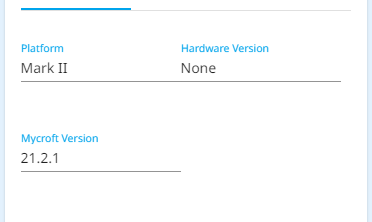
EDIT: OK I flashed the USB with the latest stable image which started a _new_ pairing process. But there is still no ssh box available. And the Hardware Version is “None” it may have already been like that but I’ve only just noticed it now.
---
### Author:  [@burns](https://community.openconversational.ai/u/burns)
#### Post date: [March 16, 2023, 7:09pm UTC](https://community.openconversational.ai/t/missing-device-settings-like-ssh-public-key/13431/7 "2023-03-16T19:09:25Z")
I just got my Mark II today, and wanted to do a few things inside. A little research shows me that there is no password login possible, but that I should be able to give it a public key via my account on mycroft.ai. I also saw someone else long ago say that they did not have “Public Key” as something they could add on their account (using “Edit” on the device).
I’m in the same boat, but given that that topic stopped many months ago, someone must have found out how to do it! Any luck?
I’ve also found that most of the system skills (like reboot, shut down etc) are not there (“Try saying that another way”).
Has anyone had any luck with either of these?
---
### Author:  [@burns](https://community.openconversational.ai/u/burns)
#### Post date: [March 16, 2023, 8:03pm UTC](https://community.openconversational.ai/t/missing-device-settings-like-ssh-public-key/13431/8 "2023-03-16T20:03:24Z")
That’s weird. I did not see Cosgrave’s post from just yesterday when I put in this one. I’m not sure if it did not appear or I just missed it. Ugg. Sorry.
---
### Author:  [@Collab](https://community.openconversational.ai/u/Collab)
#### Post date: [March 19, 2023, 5:51am UTC](https://community.openconversational.ai/t/missing-device-settings-like-ssh-public-key/13431/9 "2023-03-19T05:51:53Z")
So by now hopefully you saw messages that clarified that the Systems Skill you are referring to is not available in Dinkum (as of yet). First a Dinkum version of the Systems Skill needs to be created, converting the Classic Core Systems Skill, and that has not been done yet, and second some of the facilities may not be supported by Dinkum (as of yet).
---
### Author:  [@burns](https://community.openconversational.ai/u/burns)
#### Post date: [March 20, 2023, 3:11pm UTC](https://community.openconversational.ai/t/missing-device-settings-like-ssh-public-key/13431/10 "2023-03-20T15:11:28Z")
Thanks. I did not see that. Thanks.
---
### Author:  [@NeonClary](https://community.openconversational.ai/u/NeonClary)
#### Post date: [March 23, 2023, 2:11am UTC](https://community.openconversational.ai/t/missing-device-settings-like-ssh-public-key/13431/11 "2023-03-23T02:11:15Z")
All good. I’ve moved your post into that one. 🙂
---
### Author:  [@theradioguy](https://community.openconversational.ai/u/theradioguy)
#### Post date: [June 25, 2023, 6:55pm UTC](https://community.openconversational.ai/t/missing-device-settings-like-ssh-public-key/13431/12 "2023-06-25T18:55:29Z")
Was there any solution here? I’m in the same boat with my band new Mark-II and pretty frustrated at this point.
---
### Author:  [@jps](https://community.openconversational.ai/u/jps)
#### Post date: [June 26, 2023, 4:20am UTC](https://community.openconversational.ai/t/missing-device-settings-like-ssh-public-key/13431/13 "2023-06-26T04:20:03Z")
> [@theradioguy](#):
>
> I’m in the same boat with my band new Mark-II and pretty frustrated at this point.
Are running Dinkum or Neon?
I am running neon. I nounted the second partition of the SSD on my laptop and created a .ssh directory with permission 700 in home/neon then copied my public key to home/neon/authorized\_keys
Then I ejected the SSD, plugeed it into the Mycroft and powered up the Mycroft. After it booted, I was able to ssh to the Mycroft. (Had to immediately change the password.) So, success.
Next I booted the Mycroft from the Neon USB stick. I was able to ssh using the username neon (password the same) and was logged in and forced to change the password. I re logged in with the new password, chreated the .ssh directory, then put my public key in .ssh/authorized\_keys so no drive mounting registering or pairing required.
---
### Author:  [@NeonClary](https://community.openconversational.ai/u/NeonClary)
#### Post date: [June 26, 2023, 9:10pm UTC](https://community.openconversational.ai/t/missing-device-settings-like-ssh-public-key/13431/14 "2023-06-26T21:10:52Z")
@theradioguy This might be helpful [NeonAI® Documentation](https://neongeckocom.github.io/neon-docs/search.html?q=ssh) and let us know if you need any other support. I can be available for a video call as well if needed, and thanks @jps for jumping in with the ssh info!
---
### Author:  [@theradioguy](https://community.openconversational.ai/u/theradioguy)
#### Post date: [June 27, 2023, 3:00am UTC](https://community.openconversational.ai/t/missing-device-settings-like-ssh-public-key/13431/15 "2023-06-27T03:00:57Z")
Thanks for taking the time to reply guys.
> Are running Dinkum or Neon?
I’m assuming Dinkum? The Mark-II came with two flash drives, the installed flash drive is running Mycroft (I can say ‘Hey Mycroft’ to wake it up) and the second flash drive is running Neon. I was able to get SSH working on the Neon version, however, the performance is terrible so I was hoping to get SSH working with the factory firmware.
---
### Author:  [@jps](https://community.openconversational.ai/u/jps)
#### Post date: [June 27, 2023, 4:08pm UTC](https://community.openconversational.ai/t/missing-device-settings-like-ssh-public-key/13431/16 "2023-06-27T16:08:19Z")
> [@theradioguy](#):
>
> I’m assuming Dinkum
Ah. I haven’t tried booting the Dinkum drive yet/
---
### Author:  [@ChanceNCounter](https://community.openconversational.ai/u/ChanceNCounter)
#### Post date: [June 27, 2023, 4:39pm UTC](https://community.openconversational.ai/t/missing-device-settings-like-ssh-public-key/13431/17 "2023-06-27T16:39:47Z")
The factory firmware is abandonware. You’re better off sorting out your performance issues with the Neon crew.
---
### Author:  [@NeonClary](https://community.openconversational.ai/u/NeonClary)
#### Post date: [June 27, 2023, 8:38pm UTC](https://community.openconversational.ai/t/missing-device-settings-like-ssh-public-key/13431/18 "2023-06-27T20:38:54Z")
If the performance is terrible with the Neon OS, then either the boot drive isn’t functioning correctly, you’ve got a bad image, or you’ve got a very old image that hasn’t been updated. We know it’s still got plenty of room for improvements, but I’m proud to be able to say we’ve moved well beyond "terrible’ 😉
Also, if you’re running on a USB, an SSD is much faster.
Try “Hey Neon, check for updates” if you haven’t already, and if you’ve updated and / or re-imaged the drive and it’s still not working right then please drop me a private message or email with your address so I can send you send you a replacement.
---
### Author:  [@theradioguy](https://community.openconversational.ai/u/theradioguy)
#### Post date: [June 28, 2023, 3:30am UTC](https://community.openconversational.ai/t/missing-device-settings-like-ssh-public-key/13431/19 "2023-06-28T03:30:42Z")
Thanks for the reply, I’ve already updated the OS (was one of the first things I tried) but performance hasn’t really improved.
The main issue seems to be that the system runs at 100% CPU constantly, not sure if that’s expected or not. As a result it takes forever to execute commands and misses words half the time; overall it’s been pretty disappointing for what amounts to an expensive piece of hardware.
When I login through SSH and run `top` it doesn’t look like CPU is being tied up in iowait, but I suppose it could be a bum flash drive. I can try DDing this drive to another one if you guys think it will help.
```auto
Tasks: 147 total, 1 running, 146 sleeping, 0 stopped, 0 zombie
%Cpu(s): 20.7 us, 18.1 sy, 0.0 ni, 61.1 id, 0.2 wa, 0.0 hi, 0.0 si, 0.0 st
MiB Mem : 1798.3 total, 38.2 free, 1514.1 used, 329.5 buff/cache
MiB Swap: 1024.0 total, 922.2 free, 101.7 used. 284.2 avail Mem
PID USER PR NI VIRT RES SHR S %CPU %MEM TIME+ COMMAND
548 neon 20 0 1682520 408868 74228 S 94.0 22.2 6:22.52 neon-speech.py
360 neon 20 0 2939748 158088 94236 S 23.2 8.6 3:34.86 ovos-shell
546 neon 20 0 3106724 404208 64728 S 9.3 22.0 2:06.15 neon-audio.py
547 neon 20 0 2669956 165708 63768 S 7.6 9.0 1:32.40 neon-gui.py
597 neon 20 0 2790448 183404 67408 S 5.6 10.0 2:00.57 neon-enclosure.
598 neon 20 0 3647128 253652 65164 S 5.3 13.8 1:43.32 neon-skills.py
545 root 20 0 1833640 165224 64532 S 4.3 9.0 2:12.93 neon-admin-encl
502 pulse 9 -11 590356 18728 7236 S 3.0 1.0 0:20.14 pulseaudio
```
---
### Author:  [@NeonClary](https://community.openconversational.ai/u/NeonClary)
#### Post date: [June 28, 2023, 10:43pm UTC](https://community.openconversational.ai/t/missing-device-settings-like-ssh-public-key/13431/20 "2023-06-28T22:43:02Z")
I’d go straight to imaging a new drive with a fresh image, if that’s not difficult for you.
Here’s a link to the page with a downloadable most recent image & basic imaging instructions:
> **[Neon AI OS for the Mark II | Neon AI](https://neon.ai/NeonAIforMycroftMarkII)**
>
> Neon AI is the most advanced Conversational Assistant for the Mark II Neon AI provides download images for Mycroft Mark II hardware, ready for flashing to a USB drive. We recommend that you use Raspberry Pi Imager and a USB 3.0 or newer. What the...
There’s more troubleshooting and detailed instructions here:
[https://neongeckocom.github.io/neon-docs/neon\_os/On\_the\_MarkII/](https://neongeckocom.github.io/neon-docs/neon_os/On_the_MarkII/)
[Next page](https://community.openconversational.ai/t/missing-device-settings-like-ssh-public-key/13431.md?page=2)