# Mark II Unpair - Pair Bug?
**URL:** https://community.openconversational.ai/t/mark-ii-unpair-pair-bug/13025
**Category:** This category is being retired - Support
**Created:** [December 24, 2022, 5:35pm UTC](https://community.openconversational.ai/t/mark-ii-unpair-pair-bug/13025 "2022-12-24T17:35:16Z")
**Posts on this page:** 5
**Page:** 1
### Author:  [@KeeningEdge](https://community.openconversational.ai/u/KeeningEdge)
#### Post date: [December 24, 2022, 5:35pm UTC](https://community.openconversational.ai/t/mark-ii-unpair-pair-bug/13025/1 "2022-12-24T17:35:16Z")
I believe I found a bug related to pairing and unpairing today with my new Mark IIs. I’m currently using version 21.2.1 of Dinkum Stable branch.
When I first paired my Mark IIs everything seemed to work without issue. I could talk to them, and they would respond. While debugging what ended up being a connection issue on my side, I tried unpairing the devices. This lead to some unexpected things to occur.
**1) The Device Lost Its Skills**
When the devices were repaired, they started having an odd behavior. They would response to “Hey MyCroft” but would not do anything with the following vocal command. For example, saying “Hey MyCroft” would cause the blue circle to light up and wait for a command. After the command was issued, the circle would briefly start to swirl, but then stop and provide not feedback other than a short beep.
While debugging this I went to the Skills page only to find that it was empty. This problem seems to have fixed itself after continuously rebooting the device. However, I wanted to mention it since it seems like an unexpected behavior.
**2) Information on the Devices Page is Different for Repaired Device**
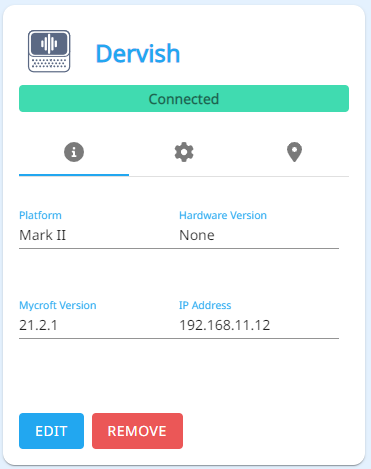
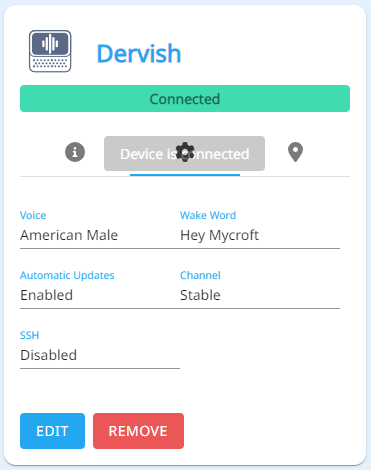
An unpaired and repaired device shows up differently on the Devices page.
First Pairing
Repairing
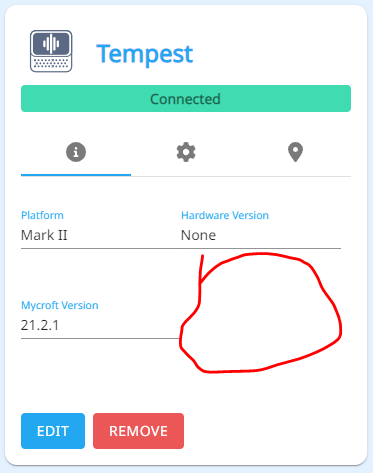
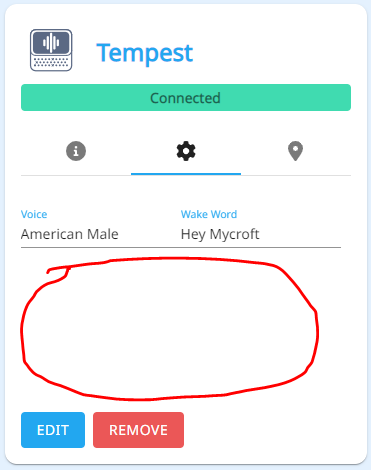
This difference in information also propagates into the “Edit Button”. The First Pairing version shows what I believe to be all of the settings: Name, Placement, Geographical Location, Software Release, Automatic Updates, and SSH Key. However, the Repaired version is missing most of these. Most notably the software related options and the SSH Key. The later has proved especially frustrating for debug =).
As part of the debug process, I reflashed one of my units to the latest Dinkum stable code posted here ( [Mycroft Software - Mycroft Mark II (gitbook.io)](https://mycroft-ai.gitbook.io/mark-ii/mycroft-software)). Doing this brought the device back to the expected “First Pairing” state. However, unpairing and repairing the unit recreates the bad state.
I seems that I can workaround this issue by just reflashing my units and doing the “Start Up” process, but I wanted to report it since this seems like a very undesirable behavior for a retail product.
---
### Author:  [@Collab](https://community.openconversational.ai/u/Collab)
#### Post date: [December 24, 2022, 11:40pm UTC](https://community.openconversational.ai/t/mark-ii-unpair-pair-bug/13025/2 "2022-12-24T23:40:28Z")
Earlier this week I ran into a similar problem, as you describe (the Mark II Dinkum picks up the Wake Word but does nothing with it – exactly as you describe above). This lasted for about a day, during which time I rebooted it many times. Then suddenly it started working properly again.
On one of the posts about the Mark I it seemed to imply that the Mycroft re-downloads its skills once an hour. If this is true – it should be clarified – I would think there may have been some kind of outage on the Mycroft / server side which was interfering with normal Mycroft behavior. More information please, friends.
---
### Author:  [@rmblr](https://community.openconversational.ai/u/rmblr)
#### Post date: [December 25, 2022, 10:41am UTC](https://community.openconversational.ai/t/mark-ii-unpair-pair-bug/13025/3 "2022-12-25T10:41:28Z")
Last week there was a problem with the mycroft servers that caused the default mark2 speech-to-text service from working… see here [Out of the box mycroft mark ii not working (no text transcription) - #7 by rmblr](https://community.openconversational.ai/t/out-of-the-box-mycroft-mark-ii-not-working-no-text-transcription/12990/7)
This could have been what you were experiencing @Collab ?
---
### Author:  [@KeeningEdge](https://community.openconversational.ai/u/KeeningEdge)
#### Post date: [December 25, 2022, 7:23pm UTC](https://community.openconversational.ai/t/mark-ii-unpair-pair-bug/13025/4 "2022-12-25T19:23:36Z")
@rmblr, @Collab, thank you for the insight.
Has anyone else recreated number 2?
---
### Author:  [@Collab](https://community.openconversational.ai/u/Collab)
#### Post date: [January 1, 2023, 4:57pm UTC](https://community.openconversational.ai/t/mark-ii-unpair-pair-bug/13025/5 "2023-01-01T16:57:06Z")
Yes, quite possibly. The problem went away after a couple days and hasn’t returned.