# Gpio skills not recognize
**URL:** https://community.openconversational.ai/t/gpio-skills-not-recognize/5537
**Category:** Modding
**Created:** [January 2, 2019, 11:31am UTC](https://community.openconversational.ai/t/gpio-skills-not-recognize/5537 "2019-01-02T11:31:59Z")
**Posts on this page:** 20
**Page:** 1
### Author:  [@vijay678](https://community.openconversational.ai/u/vijay678)
#### Post date: [January 2, 2019, 11:31am UTC](https://community.openconversational.ai/t/gpio-skills-not-recognize/5537/1 "2019-01-02T11:31:59Z")
-I am new to mycroft and working on rasp-berry pi 3 B+. I am doing btech final year project to control gpio using voice. I installed picroft unstable version 2018-09-12.
I installed picroft 8 switch relay skil gpio using command
msm install [GitHub - smolino/picroft\_skill\_gpio8s: Picroft ang GPIO 8 Relay](https://github.com/smolino/picroft_skill_gpio8s.git)
It says sucessfully installed but when i use voice to access that it says sorry i cant understand.
I typed “skills” command in mycroft-cli-client then that shows the skill in red colour.
i tried example skill also same error.
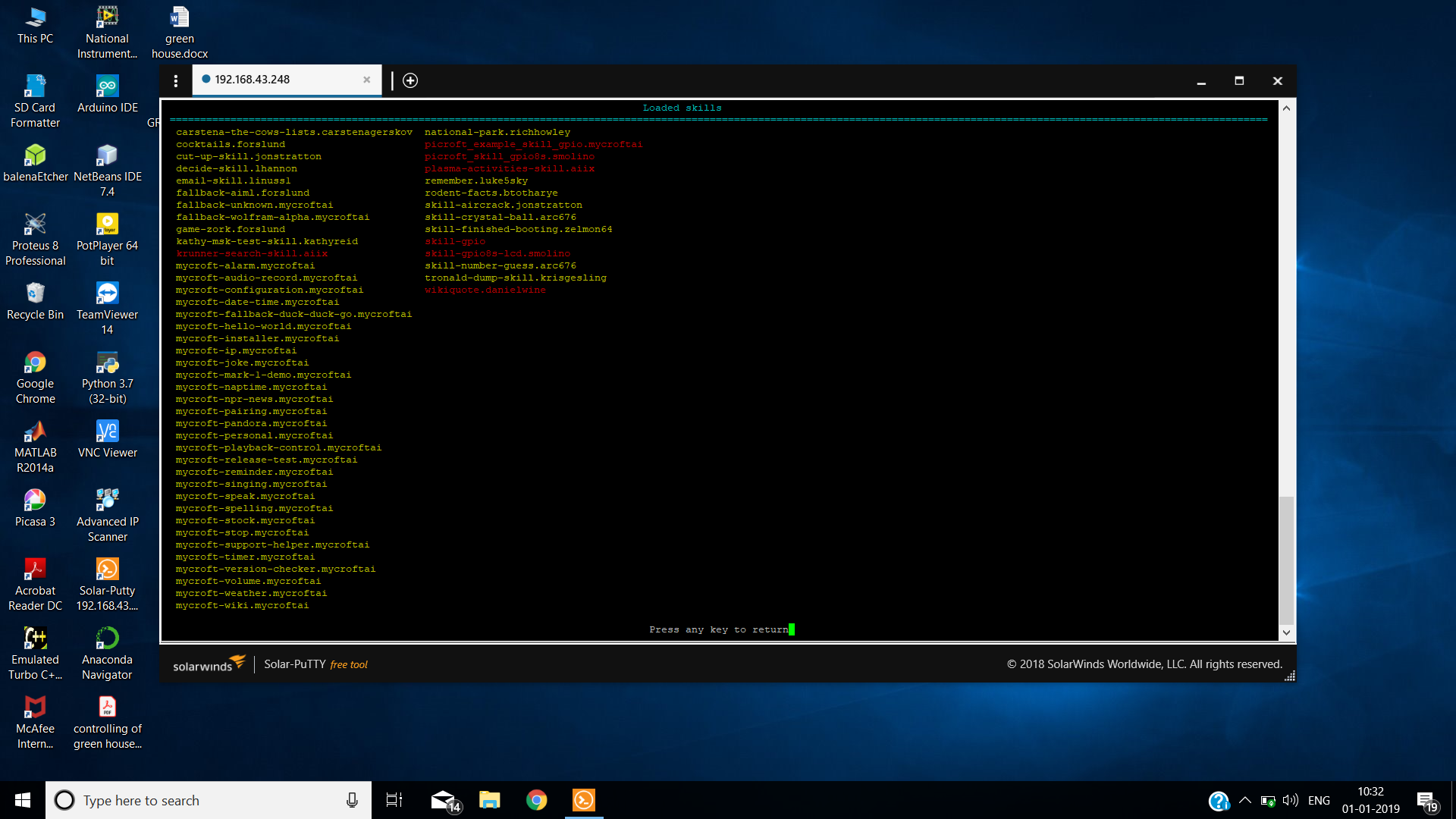
i typed commands
sudo useradd -G gpio mycroft
sudo apt-get install rpi.gpio
sudo pip install GPIO
sudo apt-get install python-rpi.gpio && sudo apt-get install python3-rpi.gpio
please help me
---
### Author:  [@pcwii](https://community.openconversational.ai/u/pcwii)
#### Post date: [January 2, 2019, 12:55pm UTC](https://community.openconversational.ai/t/gpio-skills-not-recognize/5537/2 "2019-01-02T12:55:34Z")
@vijay678,
Not sure if this helps but I have a working skill that I developed for a friend. It can be found here.
> **[pcwii/rpi-gpio-skill](https://github.com/pcwii/rpi-gpio-skill)**
>
> A skill to turn on / off a Rpi GPIO pin. Contribute to pcwii/rpi-gpio-skill development by creating an account on GitHub.
---
### Author:  [@andlo](https://community.openconversational.ai/u/andlo)
#### Post date: [January 2, 2019, 1:30pm UTC](https://community.openconversational.ai/t/gpio-skills-not-recognize/5537/3 "2019-01-02T13:30:14Z")
It could be that you need to add the user to the gpio group. That is done with the command
On Mark\_1 the user is mycroft, on Picroft the user is pi
```auto
sudo usermod -g gpio mycroft
```
---
### Author:  [@baconator](https://community.openconversational.ai/u/baconator)
#### Post date: [January 2, 2019, 6:34pm UTC](https://community.openconversational.ai/t/gpio-skills-not-recognize/5537/4 "2019-01-02T18:34:36Z")
Check the logs, should have a message about why it failed to load.
---
### Author:  [@vijay678](https://community.openconversational.ai/u/vijay678)
#### Post date: [January 3, 2019, 6:39am UTC](https://community.openconversational.ai/t/gpio-skills-not-recognize/5537/5 "2019-01-03T06:39:50Z")
i tried
sudo usermod -g gpio pi
but it didnt solved
---
### Author:  [@pcwii](https://community.openconversational.ai/u/pcwii)
#### Post date: [January 3, 2019, 11:12am UTC](https://community.openconversational.ai/t/gpio-skills-not-recognize/5537/6 "2019-01-03T11:12:11Z")
In the virtual environment type sudo adduser mycroft gpio
---
### Author:  [@Dominik](https://community.openconversational.ai/u/Dominik)
#### Post date: [January 3, 2019, 1:34pm UTC](https://community.openconversational.ai/t/gpio-skills-not-recognize/5537/7 "2019-01-03T13:34:18Z")
After the ˋadduserˋ you should log out and log in again (or perform a reboot) to see the effect.
---
### Author:  [@KathyReid](https://community.openconversational.ai/u/KathyReid)
#### Post date: [January 3, 2019, 3:33pm UTC](https://community.openconversational.ai/t/gpio-skills-not-recognize/5537/8 "2019-01-03T15:33:34Z")
Welcome @vijay678, great to have you here.
There are a few things to try here.
- The Skill is shown in the red colour because it could not load. This is usually because of a Python error. Around the middle of this year we switched from Python 2.7 to Python 3.4 [read more about our change here](https://mycroft.ai/blog/python-2-7-python-3-4/). Some older Skills, written in Python 2.7, won’t work with newer versions of `mycroft-core` (18.8 and higher).
- To find the errors that the Skill is showing, please provide your `skills.log`. This is at `/var/log/mycroft/skills.log`. [You can find more information on Mycroft logs here](https://mycroft.ai/documentation/logs/). If I’m developing a Skill, I always do a `tail -f` on the `skills.log` to see if the Skill is throwing any errors.
Until we know more about what errors are occurring, it’s difficult to provide further assistance.
---
### Author:  [@vijay678](https://community.openconversational.ai/u/vijay678)
#### Post date: [January 3, 2019, 3:41pm UTC](https://community.openconversational.ai/t/gpio-skills-not-recognize/5537/9 "2019-01-03T15:41:29Z")
these are the errors
15:14:11.771 - VolumeSkill - ERROR - Couldn’t allocate mixer, ALSAAudioError(‘Unable to find mixer control Master,0 [default]’,)
15:16:19.415 - msm.mycroft\_skills\_manager - ERROR - Error running install\_or\_update on mycroft-support-helper: GitException(Git command failed: GitCommandError([‘git’, ‘fetch’], 128, b"fatal: unable to access '[https://github.com/mycr~~~~](https://github.com/mycr~~~~)
15:32:10.237 - mycroft.skills.core:load\_skill:159 - ERROR - Failed to load skill: picroft\_skill\_gpio8s.smolino
Traceback (most recent call last):
File “/home/pi/mycroft-core/mycroft/skills/core.py”, line 126, in load\_skill
imp.PY\_SOURCE))
File “/usr/lib/python3.5/imp.py”, line 234, in load\_module
return load\_source(name, filename, file)
File “/usr/lib/python3.5/imp.py”, line 172, in load\_source
module = \_load(spec)
File “”, line 693, in \_load
File “”, line 673, in \_load\_unlocked
File “”, line 673, in exec\_module
File “”, line 222, in \_call\_with\_frames\_removed
File “/opt/mycroft/skills/picroft\_skill\_gpio8s.smolino/ **init**.py”, line 46, in
import GPIO
File “/opt/mycroft/skills/picroft\_skill\_gpio8s.smolino/GPIO.py”, line 32
“GPIO4”:05,
^
SyntaxError: invalid token
15:32:31.930 - mycroft.skills.core:load\_skill:159 - ERROR - Failed to load skill: rpi-gpio-skill.pcwii
Traceback (most recent call last):
File “/home/pi/mycroft-core/mycroft/skills/core.py”, line 126, in load\_skill
imp.PY\_SOURCE))
File “/usr/lib/python3.5/imp.py”, line 234, in load\_module
return load\_source(name, filename, file)
File “/usr/lib/python3.5/imp.py”, line 172, in load\_source
module = \_load(spec)
File “”, line 693, in \_load
File “”, line 673, in \_load\_unlocked
File “”, line 673, in exec\_module
File “”, line 222, in \_call\_with\_frames\_removed
File “/opt/mycroft/skills/rpi-gpio-skill.pcwii/ **init**.py”, line 21, in
class GPIOSkill(MycroftSkill):
File “/opt/mycroft/skills/rpi-gpio-skill.pcwii/ **init**.py”, line 67, in GPIOSkill
@intent\_handler(IntentBuilder(‘TestCustomIntent’).require(self.myKeywords)
NameError: name ‘intent\_handler’ is not defined
15:33:10.751 - mycroft.skills.core:load\_skill:159 - ERROR - Failed to load skill: picroft\_example\_skill\_gpio.mycroftai
Traceback (most recent call last):
File “/home/pi/mycroft-core/mycroft/skills/core.py”, line 126, in load\_skill
imp.PY\_SOURCE))
File “/usr/lib/python3.5/imp.py”, line 234, in load\_module
return load\_source(name, filename, file)
File “/usr/lib/python3.5/imp.py”, line 172, in load\_source
module = \_load(spec)
File “”, line 693, in \_load
File “”, line 673, in \_load\_unlocked
File “”, line 673, in exec\_module
File “”, line 222, in \_call\_with\_frames\_removed
File “/opt/mycroft/skills/picroft\_example\_skill\_gpio.mycroftai/ **init**.py”, line 56, in
import GPIO
File “/opt/mycroft/skills/picroft\_skill\_gpio8s.smolino/GPIO.py”, line 32
“GPIO4”:05,
^
SyntaxError: invalid token
---
### Author:  [@vijay678](https://community.openconversational.ai/u/vijay678)
#### Post date: [January 3, 2019, 4:12pm UTC](https://community.openconversational.ai/t/gpio-skills-not-recognize/5537/10 "2019-01-03T16:12:22Z")
i did “sudo reboot” several times
---
### Author:  [@KathyReid](https://community.openconversational.ai/u/KathyReid)
#### Post date: [January 3, 2019, 4:30pm UTC](https://community.openconversational.ai/t/gpio-skills-not-recognize/5537/11 "2019-01-03T16:30:06Z")
OK, there are several issues here;
```python
15:32:10.237 - mycroft.skills.core:load_skill:159 - ERROR - Failed to load skill: picroft_skill_gpio8s.smolino
Traceback (most recent call last):
File “/home/pi/mycroft-core/mycroft/skills/core.py”, line 126, in load_skill
imp.PY_SOURCE))
File “/usr/lib/python3.5/imp.py”, line 234, in load_module
return load_source(name, filename, file)
File “/usr/lib/python3.5/imp.py”, line 172, in load_source
module = _load(spec)
File “”, line 693, in _load
File “”, line 673, in _load_unlocked
File “”, line 673, in exec_module
File “”, line 222, in _call_with_frames_removed
File “/opt/mycroft/skills/picroft_skill_gpio8s.smolino/init.py”, line 46, in
import GPIO
File “/opt/mycroft/skills/picroft_skill_gpio8s.smolino/GPIO.py”, line 32
“GPIO4”:05,
^
SyntaxError: invalid token
```
This error is caused because both GPIO 04 and 05 have leading zeroes assigned. This is not allowed in Python 3. I _suspect_ this Skill has been written for Python 2, not for Python 3.
See [this Stack Overflow error](https://stackoverflow.com/questions/36386346/syntaxerror-invalid-token) for more information. You may need to remove the leading zeroes to get the Skill to work under Python 3.
```python
15:32:31.930 - mycroft.skills.core:load_skill:159 - ERROR - Failed to load skill: rpi-gpio-skill.pcwii
Traceback (most recent call last):
File “/home/pi/mycroft-core/mycroft/skills/core.py”, line 126, in load_skill
imp.PY_SOURCE))
File “/usr/lib/python3.5/imp.py”, line 234, in load_module
return load_source(name, filename, file)
File “/usr/lib/python3.5/imp.py”, line 172, in load_source
module = _load(spec)
File “”, line 693, in _load
File “”, line 673, in _load_unlocked
File “”, line 673, in exec_module
File “”, line 222, in _call_with_frames_removed
File “/opt/mycroft/skills/rpi-gpio-skill.pcwii/init.py”, line 21, in
class GPIOSkill(MycroftSkill):
File “/opt/mycroft/skills/rpi-gpio-skill.pcwii/init.py”, line 67, in GPIOSkill
@intent_handler(IntentBuilder(‘TestCustomIntent’).require(self.myKeywords)
NameError: name ‘intent_handler’ is not defined
```
This usually indicates a function or variable _scope_ issue. I actually think this code block is in the wrong spot, but I’m not sure.
```python
15:33:10.751 - mycroft.skills.core:load_skill:159 - ERROR - Failed to load skill: picroft_example_skill_gpio.mycroftai
Traceback (most recent call last):
File “/home/pi/mycroft-core/mycroft/skills/core.py”, line 126, in load_skill
imp.PY_SOURCE))
File “/usr/lib/python3.5/imp.py”, line 234, in load_module
return load_source(name, filename, file)
File “/usr/lib/python3.5/imp.py”, line 172, in load_source
module = _load(spec)
File “”, line 693, in _load
File “”, line 673, in _load_unlocked
File “”, line 673, in exec_module
File “”, line 222, in _call_with_frames_removed
File “/opt/mycroft/skills/picroft_example_skill_gpio.mycroftai/init.py”, line 56, in
import GPIO
File “/opt/mycroft/skills/picroft_skill_gpio8s.smolino/GPIO.py”, line 32
“GPIO4”:05,
^
SyntaxError: invalid token
```
This is again the “leading zeroes” problem.
---
### Author:  [@vijay678](https://community.openconversational.ai/u/vijay678)
#### Post date: [January 3, 2019, 4:31pm UTC](https://community.openconversational.ai/t/gpio-skills-not-recognize/5537/12 "2019-01-03T16:31:50Z")
skills.log errors
16:27:17.685 - urllib3.connectionpool - DEBUG - Starting new HTTPS connection (1): api.mycroft.ai:443
16:27:20.190 - SKILLS - DEBUG - {“type”: “mycroft-date-time.mycroftai:TimeSkillupdate\_display”, “data”: {}, “context”: null}
16:27:21.193 - SKILLS - DEBUG - {“type”: “mycroft-reminder.mycroftai:reminder”, “data”: {}, “context”: null}
16:27:29.041 - mycroft.skills.settings:\_poll\_skill\_settings:389 - ERROR - Failed to fetch skill settings: ReadTimeout(ReadTimeoutError(“HTTPSConnectionPool(host=‘api.mycroft.ai’, port=443): Read timed out. (read timeout=3.05)”,),)
Traceback (most recent call last):
File “/home/pi/mycroft-core/.venv/lib/python3.5/site-packages/urllib3/connectionpool.py”, line 343, in \_make\_request
self.\_validate\_conn(conn)
File “/home/pi/mycroft-core/.venv/lib/python3.5/site-packages/urllib3/connectionpool.py”, line 849, in _validate\_conn
conn.connect()
File “/home/pi/mycroft-core/.venv/lib/python3.5/site-packages/urllib3/connection.py”, line 356, in connect
ssl\_context=context)
File "/home/pi/mycroft-core/.venv/lib/python3.5/site-packages/urllib3/util/ssl_.py", line 359, in ssl\_wrap\_socket
return context.wrap\_socket(sock, server\_hostname=server\_hostname)
File “/usr/lib/python3.5/ssl.py”, line 385, in wrap\_socket
\_context=self)
File “/usr/lib/python3.5/ssl.py”, line 760, in **init**
self.do\_handshake()
File “/usr/lib/python3.5/ssl.py”, line 996, in do\_handshake
self.\_sslobj.do\_handshake()
File “/usr/lib/python3.5/ssl.py”, line 641, in do\_handshake
self.\_sslobj.do\_handshake()
socket.timeout: \_ssl.c:704: The handshake operation timed out
During handling of the above exception, another exception occurred:
Traceback (most recent call last):
File “/home/pi/mycroft-core/.venv/lib/python3.5/site-packages/requests/adapters.py”, line 449, in send
timeout=timeout
File “/home/pi/mycroft-core/.venv/lib/python3.5/site-packages/urllib3/connectionpool.py”, line 638, in urlopen
\_stacktrace=sys.exc\_info()[2])
File “/home/pi/mycroft-core/.venv/lib/python3.5/site-packages/urllib3/util/retry.py”, line 367, in increment
raise six.reraise(type(error), error, \_stacktrace)
File “/home/pi/mycroft-core/.venv/lib/python3.5/site-packages/urllib3/packages/six.py”, line 686, in reraise
raise value
File “/home/pi/mycroft-core/.venv/lib/python3.5/site-packages/urllib3/connectionpool.py”, line 600, in urlopen
chunked=chunked)
File “/home/pi/mycroft-core/.venv/lib/python3.5/site-packages/urllib3/connectionpool.py”, line 346, in \_make\_request
self.\_raise\_timeout(err=e, url=url, timeout\_value=conn.timeout)
File “/home/pi/mycroft-core/.venv/lib/python3.5/site-packages/urllib3/connectionpool.py”, line 306, in \_raise\_timeout
raise ReadTimeoutError(self, url, “Read timed out. (read timeout=%s)” % timeout\_value)
urllib3.exceptions.ReadTimeoutError: HTTPSConnectionPool(host=‘api.mycroft.ai’, port=443): Read timed out. (read timeout=3.05)
During handling of the above exception, another exception occurred:
Traceback (most recent call last):
File “/home/pi/mycroft-core/mycroft/skills/settings.py”, line 386, in \_poll\_skill\_settings
self.update\_remote()
File “/home/pi/mycroft-core/mycroft/skills/settings.py”, line 364, in update\_remote
skills\_settings = self.\_request\_my\_settings(hashed\_meta)
File “/home/pi/mycroft-core/mycroft/skills/settings.py”, line 481, in \_request\_my\_settings
settings = self.\_request\_settings()
File “/home/pi/mycroft-core/mycroft/skills/settings.py”, line 499, in \_request\_settings
“path”: self.\_api\_path
File “/home/pi/mycroft-core/mycroft/api/ **init**.py”, line 65, in request
return self.send(params)
File “/home/pi/mycroft-core/mycroft/api/ **init**.py”, line 136, in send
data=data, json=json\_body, timeout=(3.05, 15)
File “/home/pi/mycroft-core/.venv/lib/python3.5/site-packages/requests/api.py”, line 60, in request
return session.request(method=method, url=url, \*\*kwargs)
File “/home/pi/mycroft-core/.venv/lib/python3.5/site-packages/requests/sessions.py”, line 524, in request
resp = self.send(prep, \*\*send\_kwargs)
File “/home/pi/mycroft-core/.venv/lib/python3.5/site-packages/requests/sessions.py”, line 637, in send
r = adapter.send(request, \*\*kwargs)
File “/home/pi/mycroft-core/.venv/lib/python3.5/site-packages/requests/adapters.py”, line 529, in send
raise ReadTimeout(e, request=request)
requests.exceptions.ReadTimeout: HTTPSConnectionPool(host=‘api.mycroft.ai’, port=443): Read timed out. (read timeout=3.05)
16:27:30.210 - SKILLS - DEBUG - {“type”: “mycroft-date-time.mycroftai:TimeSkillupdate\_display”, “data”: {}, “context”: null}
16:27:38.225 - SKILLS - DEBUG - {“type”: “mycroft-configuration.mycroftai:ConfigurationSkillupdate\_remote”, “data”: “UpdateRemote”, “context”: null}
16:27:38.244 - urllib3.connectionpool - DEBUG - Starting new HTTPS connection (1): api.mycroft.ai:443
16:27:39.764 - urllib3.connectionpool - DEBUG - Starting new HTTPS connection (1): api.mycroft.ai:443
16:27:40.230 - SKILLS - DEBUG - {“type”: “mycroft-date-time.mycroftai:TimeSkillupdate\_display”, “data”: {}, “context”: null}
16:27:43.672 - ConfigurationSkill - WARNING - Failed to update settings, will retry later
16:27:48.800 - mycroft.skills.settings:\_poll\_skill\_settings:389 - ERROR - Failed to fetch skill settings: ReadTimeout(ReadTimeoutError(“HTTPSConnectionPool(host=‘api.mycroft.ai’, port=443): Read timed out. (read timeout=3.05)”,),)
Traceback (most recent call last):
File “/home/pi/mycroft-core/.venv/lib/python3.5/site-packages/urllib3/connectionpool.py”, line 343, in \_make\_request
self.\_validate\_conn(conn)
File “/home/pi/mycroft-core/.venv/lib/python3.5/site-packages/urllib3/connectionpool.py”, line 849, in _validate\_conn
conn.connect()
File “/home/pi/mycroft-core/.venv/lib/python3.5/site-packages/urllib3/connection.py”, line 356, in connect
ssl\_context=context)
File "/home/pi/mycroft-core/.venv/lib/python3.5/site-packages/urllib3/util/ssl_.py", line 359, in ssl\_wrap\_socket
return context.wrap\_socket(sock, server\_hostname=server\_hostname)
File “/usr/lib/python3.5/ssl.py”, line 385, in wrap\_socket
\_context=self)
File “/usr/lib/python3.5/ssl.py”, line 760, in **init**
self.do\_handshake()
File “/usr/lib/python3.5/ssl.py”, line 996, in do\_handshake
self.\_sslobj.do\_handshake()
File “/usr/lib/python3.5/ssl.py”, line 641, in do\_handshake
self.\_sslobj.do\_handshake()
socket.timeout: \_ssl.c:704: The handshake operation timed out
During handling of the above exception, another exception occurred:
Traceback (most recent call last):
File “/home/pi/mycroft-core/.venv/lib/python3.5/site-packages/requests/adapters.py”, line 449, in send
timeout=timeout
File “/home/pi/mycroft-core/.venv/lib/python3.5/site-packages/urllib3/connectionpool.py”, line 638, in urlopen
\_stacktrace=sys.exc\_info()[2])
File “/home/pi/mycroft-core/.venv/lib/python3.5/site-packages/urllib3/util/retry.py”, line 367, in increment
raise six.reraise(type(error), error, \_stacktrace)
File “/home/pi/mycroft-core/.venv/lib/python3.5/site-packages/urllib3/packages/six.py”, line 686, in reraise
raise value
File “/home/pi/mycroft-core/.venv/lib/python3.5/site-packages/urllib3/connectionpool.py”, line 600, in urlopen
chunked=chunked)
File “/home/pi/mycroft-core/.venv/lib/python3.5/site-packages/urllib3/connectionpool.py”, line 346, in \_make\_request
self.\_raise\_timeout(err=e, url=url, timeout\_value=conn.timeout)
File “/home/pi/mycroft-core/.venv/lib/python3.5/site-packages/urllib3/connectionpool.py”, line 306, in \_raise\_timeout
raise ReadTimeoutError(self, url, “Read timed out. (read timeout=%s)” % timeout\_value)
urllib3.exceptions.ReadTimeoutError: HTTPSConnectionPool(host=‘api.mycroft.ai’, port=443): Read timed out. (read timeout=3.05)
During handling of the above exception, another exception occurred:
Traceback (most recent call last):
File “/home/pi/mycroft-core/mycroft/skills/settings.py”, line 386, in \_poll\_skill\_settings
self.update\_remote()
File “/home/pi/mycroft-core/mycroft/skills/settings.py”, line 364, in update\_remote
skills\_settings = self.\_request\_my\_settings(hashed\_meta)
File “/home/pi/mycroft-core/mycroft/skills/settings.py”, line 481, in \_request\_my\_settings
settings = self.\_request\_settings()
File “/home/pi/mycroft-core/mycroft/skills/settings.py”, line 499, in \_request\_settings
“path”: self.\_api\_path
File “/home/pi/mycroft-core/mycroft/api/ **init**.py”, line 65, in request
return self.send(params)
File “/home/pi/mycroft-core/mycroft/api/ **init**.py”, line 136, in send
data=data, json=json\_body, timeout=(3.05, 15)
File “/home/pi/mycroft-core/.venv/lib/python3.5/site-packages/requests/api.py”, line 60, in request
return session.request(method=method, url=url, \*\*kwargs)
File “/home/pi/mycroft-core/.venv/lib/python3.5/site-packages/requests/sessions.py”, line 524, in request
resp = self.send(prep, \*\*send\_kwargs)
File “/home/pi/mycroft-core/.venv/lib/python3.5/site-packages/requests/sessions.py”, line 637, in send
r = adapter.send(request, \*\*kwargs)
File “/home/pi/mycroft-core/.venv/lib/python3.5/site-packages/requests/adapters.py”, line 529, in send
raise ReadTimeout(e, request=request)
requests.exceptions.ReadTimeout: HTTPSConnectionPool(host=‘api.mycroft.ai’, port=443): Read timed out. (read timeout=3.05)
---
### Author:  [@KathyReid](https://community.openconversational.ai/u/KathyReid)
#### Post date: [January 3, 2019, 4:33pm UTC](https://community.openconversational.ai/t/gpio-skills-not-recognize/5537/13 "2019-01-03T16:33:37Z")
That whole block of errors is basically saying that your device couldn’t contact home.mycroft.ai; it shouldn’t have a bearing on the functionality of your Skill.
---
### Author:  [@vijay678](https://community.openconversational.ai/u/vijay678)
#### Post date: [January 3, 2019, 4:36pm UTC](https://community.openconversational.ai/t/gpio-skills-not-recognize/5537/14 "2019-01-03T16:36:08Z")
ok thank you @KathyReid
but I am new to mycroft i dont know how to modify those skills
---
### Author:  [@KathyReid](https://community.openconversational.ai/u/KathyReid)
#### Post date: [January 3, 2019, 4:42pm UTC](https://community.openconversational.ai/t/gpio-skills-not-recognize/5537/15 "2019-01-03T16:42:51Z")
As a starting point, try removing the leading zeroes from the GPIO pins that have `05` and `06` assigned, and see if that loads the Skill.
---
### Author:  [@vijay678](https://community.openconversational.ai/u/vijay678)
#### Post date: [January 3, 2019, 5:08pm UTC](https://community.openconversational.ai/t/gpio-skills-not-recognize/5537/16 "2019-01-03T17:08:10Z")
sorry for using your time more
please give me commands to access and modify that GPIO pins
---
### Author:  [@andlo](https://community.openconversational.ai/u/andlo)
#### Post date: [January 4, 2019, 11:04am UTC](https://community.openconversational.ai/t/gpio-skills-not-recognize/5537/17 "2019-01-04T11:04:05Z")
hi @vijay678
If you are not familar with commands to edit files on your raspberrypi, I wouldnt recoment you to try to install and use skills that Arent in the mycroft market.
But when that said, there is lots of guides and instructions n how to edit files, navigate around in the shell and all that Linux stuff.
After this, there is mycroft documentation.
> **[Mycroft Documentation - Mycroft](https://mycroft.ai/documentation/)**
>
> Documentation for all Mycroft products and modules, including Mycroft Core for Linux, Picroft for Raspberry Pi, and how to build Mycroft Skills.
And then do ask questions and reach out for help but be specifik on your questions. Then you eventualy will get the knoledege to make your GPIO skill work 🙂
In short - Navigate to the skills directory bu using the cd command. Edtit the file using the nano editor. Like this
```auto
cd /opt/mycroft/skills/picroft_skill_gpio8s
nano __init__.py
```
When you exit the nano editor remember to save the file. When that is done mycroft automactly reloads the skill, and then you can look for if there is other problems in the log and try fix that the same way.
When everything is done and it works for you, you could go further and fork the original GitHub repo, add your changes and make a pull request back to the original repo.
Then the next one wants to do what you did, dosnt have to go throu same problems.
---
### Author:  [@vijay678](https://community.openconversational.ai/u/vijay678)
#### Post date: [January 4, 2019, 12:43pm UTC](https://community.openconversational.ai/t/gpio-skills-not-recognize/5537/18 "2019-01-04T12:43:53Z")
Thank you @andlo
Definitely I will try it.
---
### Author:  [@pcwii](https://community.openconversational.ai/u/pcwii)
#### Post date: [January 8, 2019, 1:21am UTC](https://community.openconversational.ai/t/gpio-skills-not-recognize/5537/19 "2019-01-08T01:21:19Z")
@KathyReid, @vijay678, The gpio skill i wrote was very crude and not really ready for community consumption, just demonstrated skill development wuth a new mycroft convert, with that said it was written for Python 3 so don’t think that is the issue. Might be something else going on with some legacy code i was playing with. Will try to have a look in next 24 hours.
---
### Author:  [@pcwii](https://community.openconversational.ai/u/pcwii)
#### Post date: [January 8, 2019, 2:12pm UTC](https://community.openconversational.ai/t/gpio-skills-not-recognize/5537/20 "2019-01-08T14:12:27Z")
I removed some incomplete code that I was playing with and accidentally pushed to the repo, I am pretty sure it was the source of your issues. msm update should get the gpio skill working again. There is no implied warranty 😋