# Google AIY v1 with Mycroft 20.08-no mic
**URL:** https://community.openconversational.ai/t/google-aiy-v1-with-mycroft-20-08-no-mic/9998
**Category:** Picroft
**Created:** [January 2, 2021, 3:08am UTC](https://community.openconversational.ai/t/google-aiy-v1-with-mycroft-20-08-no-mic/9998 "2021-01-02T03:08:51Z")
**Posts on this page:** 17
**Page:** 2
### Author:  [@nerlins](https://community.openconversational.ai/u/nerlins)
#### Post date: [January 3, 2021, 10:53pm UTC](https://community.openconversational.ai/t/google-aiy-v1-with-mycroft-20-08-no-mic/9998/22 "2021-01-03T22:53:52Z")
Honestly, I think I finally have this little jerk working, after all this troubleshooting.
Here’s a recap of my woes for anyone stumbling upon this page, looking for help:
1. My girlfried bought me a Pi v3B last Christmas, and I had been trying to figure out what to do with it, since I like the Pi v4-8GB.
2. I found Mycroft, and the Google AIY v1 was listed as supported.
3. I bought an AIY v1 voice kit for $30 off eBay and printed an enclosure on my Sovol SV01 3D printer.
4. The new Buster Raspbi images break the AIY v1 mic, unless the 91-pulseaudio-rpi.rules file is edited, using what I have written in one of the above posts.
5. The file is found in /lib/dev/rules.d. Once edited, reboot and test out mic.
6. Switch listener from Sphinx to Precise; since it loads Sphinx from default.
7. I am using the default Hey Jarvis wake-word, which was selected when doing the online pairing.
8. Edit mycroft-config with what I have in one of the above posts.
9. Change mic volume from 100% to 30-35% in alsamixer.
10. Install google-aiy-voicekit skill.
11. Test out Mycroft.
---
### Author:  [@goldyfruit](https://community.openconversational.ai/u/goldyfruit)
#### Post date: [January 3, 2021, 11:16pm UTC](https://community.openconversational.ai/t/google-aiy-v1-with-mycroft-20-08-no-mic/9998/23 "2021-01-03T23:16:17Z")
> [@nerlins](#):
>
> @goldyfruit Obviously there is a model, because it is in the account.mycroft.ai choices; along with hey Ezra, Christopher, and Hey Mycroft.
From what I see here[1], there is only `Hey Mycroft` . From the source code[2], I can see an URL which I’m not able to browse so maybe there are the three others there.
[1][GitHub - MycroftAI/precise-data at production\_models](https://github.com/MycroftAI/precise-data/tree/production_models)
[2][mycroft-core/mycroft/client/speech/hotword\_factory.py at dev · MycroftAI/mycroft-core · GitHub](https://github.com/MycroftAI/mycroft-core/blob/dev/mycroft/client/speech/hotword_factory.py#L196)
---
### Author:  [@JarbasAl](https://community.openconversational.ai/u/JarbasAl)
#### Post date: [January 3, 2021, 11:38pm UTC](https://community.openconversational.ai/t/google-aiy-v1-with-mycroft-20-08-no-mic/9998/24 "2021-01-03T23:38:24Z")
only hey mycroft is precise, maybe also christopher, the others are pocketsphinx
See [https://github.com/MycroftAI/precise-data/tree/models](https://github.com/MycroftAI/precise-data/tree/models)
---
### Author:  [@aandroide](https://community.openconversational.ai/u/aandroide)
#### Post date: [January 3, 2021, 11:55pm UTC](https://community.openconversational.ai/t/google-aiy-v1-with-mycroft-20-08-no-mic/9998/25 "2021-01-03T23:55:39Z")
I don’t follow your project but I discovered that problem, I link the discussions so you can examine that file 91
> **[microphone not recognized (Hat googlevoice kit AIY rev1) after upgrade to...](https://gitlab.freedesktop.org/pulseaudio/pulseaudio/-/issues/1082)**
>
> hi everyone here's what i see before updating pulseaudio to rpi2 version:
and
[https://www.raspberrypi.org/forums/viewtopic.php?f=66&t=294600&p=1783790#p1783790](https://www.raspberrypi.org/forums/viewtopic.php?f=66&t=294600&p=1783790#p1783790)
---
### Author:  [@nerlins](https://community.openconversational.ai/u/nerlins)
#### Post date: [January 4, 2021, 12:03am UTC](https://community.openconversational.ai/t/google-aiy-v1-with-mycroft-20-08-no-mic/9998/26 "2021-01-04T00:03:14Z")
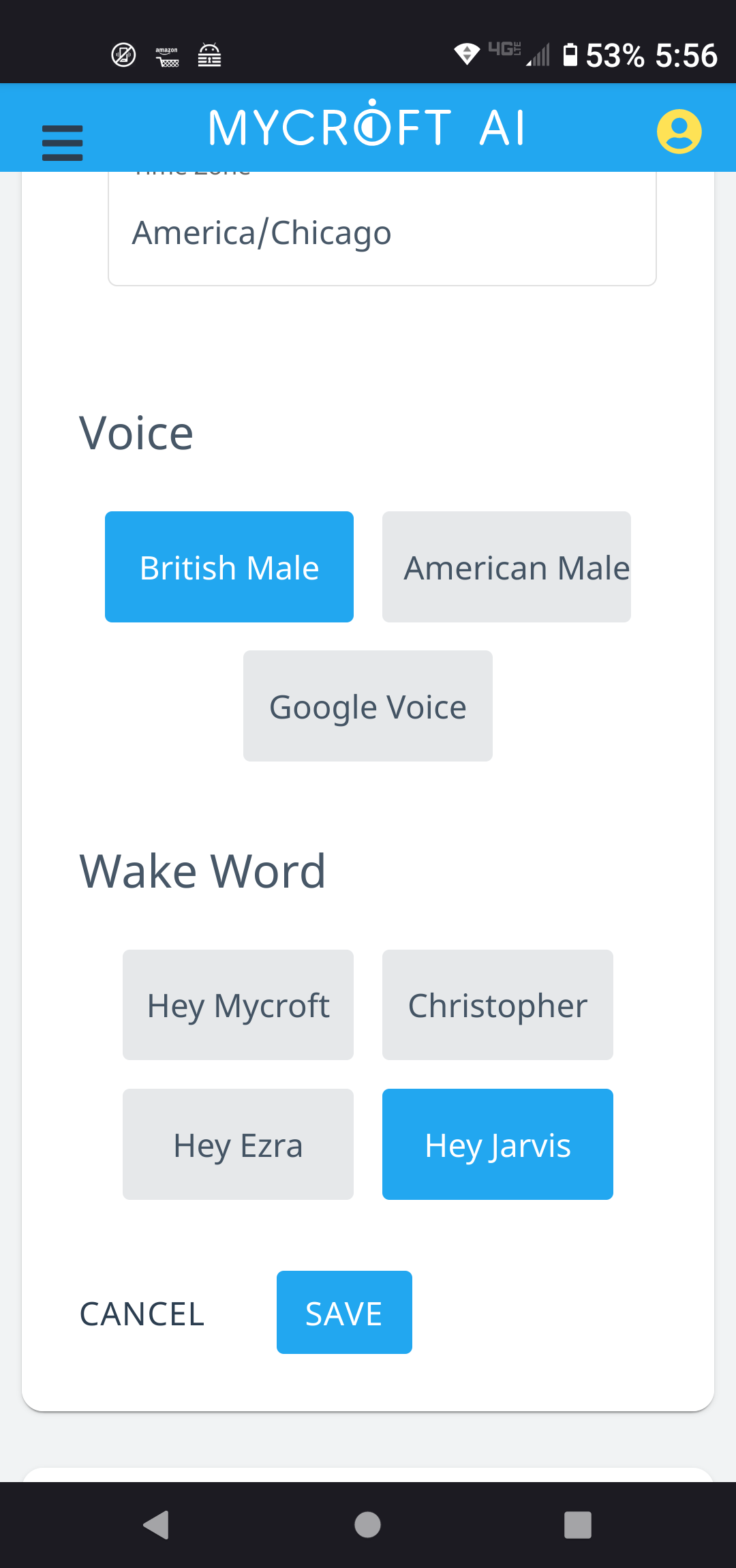
@JarbasAl @goldyfruit Here is a screenshot of my phone on the account.mycroft.ai page. I have selected Hey Jarvis, and my .conf file has Precise configuration. It is working. I’m not sure what you guys are seeing, but that is what I have.
Regardless of the wake-word used, my wake-word problem was my mic input being too loud. Once lowered, the wake-word activated Mycroft from only a few feet away.
---
### Author:  [@nerlins](https://community.openconversational.ai/u/nerlins)
#### Post date: [January 4, 2021, 12:05am UTC](https://community.openconversational.ai/t/google-aiy-v1-with-mycroft-20-08-no-mic/9998/27 "2021-01-04T00:05:25Z")
If what you are saying is correct, then what do I need to add into my .conf file for it to be Hey Jarvis, and use the Sphinx listener?
---
### Author:  [@JarbasAl](https://community.openconversational.ai/u/JarbasAl)
#### Post date: [January 4, 2021, 12:17am UTC](https://community.openconversational.ai/t/google-aiy-v1-with-mycroft-20-08-no-mic/9998/28 "2021-01-04T00:17:47Z")
hey jarvis from backend should use pocketsphinx automatically
was just rulling out a problem with precise
your volume issue makes some sense, but its somewhat unexpected…
---
### Author:  [@aandroide](https://community.openconversational.ai/u/aandroide)
#### Post date: [January 4, 2021, 12:40am UTC](https://community.openconversational.ai/t/google-aiy-v1-with-mycroft-20-08-no-mic/9998/29 "2021-01-04T00:40:22Z")
I do not know your program but if the voice recognition relies on the pyaudio library, it has been ascertained that the updated version of pulseaudio conflicts with pyaudio
---
### Author:  [@nerlins](https://community.openconversational.ai/u/nerlins)
#### Post date: [January 4, 2021, 1:08am UTC](https://community.openconversational.ai/t/google-aiy-v1-with-mycroft-20-08-no-mic/9998/30 "2021-01-04T01:08:49Z")
@aandroide Thank you for the help.
---
### Author:  [@Geab](https://community.openconversational.ai/u/Geab)
#### Post date: [January 4, 2021, 7:25am UTC](https://community.openconversational.ai/t/google-aiy-v1-with-mycroft-20-08-no-mic/9998/31 "2021-01-04T07:25:08Z")
@nerlins Good to hear you are up and running as well. 👌
will check if the 91-pulseaudio-rpi.rules file is still around after I did rerun the setup-wizard
---
### Author:  [@nerlins](https://community.openconversational.ai/u/nerlins)
#### Post date: [January 5, 2021, 2:32am UTC](https://community.openconversational.ai/t/google-aiy-v1-with-mycroft-20-08-no-mic/9998/32 "2021-01-05T02:32:33Z")
I had the mic work randomly once on an install without changing the file. It was like magic, but then went away. I would alter the file, like I did, because the mic now works 100% of the time.
---
### Author:  [@aandroide](https://community.openconversational.ai/u/aandroide)
#### Post date: [January 11, 2021, 7:27am UTC](https://community.openconversational.ai/t/google-aiy-v1-with-mycroft-20-08-no-mic/9998/33 "2021-01-11T07:27:02Z")
this probably happened because as soon as you installed the image, pulseadio was not yet updated to the rpi2 version which contains that file 91.
maybe not everyone knows that after 2 days, the Raspberry is set to download updates automatically and consequently pulseaudio as well that’s why many users say they haven’t touched anything and that it broke by itself. on January 8th they released the new kernel update but I still haven’t checked if they fixed that problem.
---
### Author:  [@nerlins](https://community.openconversational.ai/u/nerlins)
#### Post date: [January 11, 2021, 11:39pm UTC](https://community.openconversational.ai/t/google-aiy-v1-with-mycroft-20-08-no-mic/9998/34 "2021-01-11T23:39:42Z")
I will definitely check the new update.
---
### Author:  [@rune1979](https://community.openconversational.ai/u/rune1979)
#### Post date: [April 22, 2021, 9:29am UTC](https://community.openconversational.ai/t/google-aiy-v1-with-mycroft-20-08-no-mic/9998/35 "2021-04-22T09:29:17Z")
I have spend two days on a RPi3b+, to getting the mic (Voice HAT) to work, with no luck.
**Worth mentioning:** My son have somehow thrown away the button, but I expect it is not a necessity for the mic?
I have done the following:
- Following the default instruction.
- Following the default and make a apt update/ apt upgrade
- Following the update of the 91-rule… file
- Added pi to group audio, pulse, gpio
- Installed the skill “Google AIY Voicekit” by cloning it to “~/” and “sudo ./install\_AIY.sh”
**arecord -l**
– List of CAPTURE Hardware Devices –
card 0: sndrpigooglevoi [snd\_rpi\_googlevoicehat\_soundcar], device 0: Google voiceHAT SoundCard HiFi voicehat-codec-0 [Google voiceHAT SoundCard HiFi voicehat-codec-0]
Subdevices: 0/1
Subdevice #0: subdevice #0
I guess there seems to be kind of a driver problem. Alsamixer:
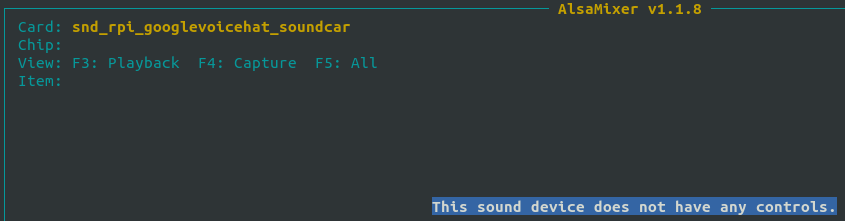
Constantly showing 7.86 db in the CLI.
Any help is very welcome.
Update:
I now changed to an USB mic instead, as I have a suspision that the mic may never have worked (as I did’nt have success with Googles official install either). So, unless other people have same problem, it might be a hw problem.
---
### Author:  [@nerlins](https://community.openconversational.ai/u/nerlins)
#### Post date: [May 27, 2021, 10:48pm UTC](https://community.openconversational.ai/t/google-aiy-v1-with-mycroft-20-08-no-mic/9998/36 "2021-05-27T22:48:28Z")
@rune1979 Sorry, I haven’t logged in here for a bit. I just updated the system and now my Google AIY voicekit skill isn’t working. I’ll see what’s going on.
---
### Author:  [@nerlins](https://community.openconversational.ai/u/nerlins)
#### Post date: [May 27, 2021, 10:56pm UTC](https://community.openconversational.ai/t/google-aiy-v1-with-mycroft-20-08-no-mic/9998/37 "2021-05-27T22:56:47Z")
Actually, no, it looks like it just needed to be rebooted. Honestly, I never had mic problems after I edited that file pulseaudio file. Also, ended up rebuilding my Mycroft from scratch, using the recipe procedure (I had a lot of trouble with the pre-made images):
> [enclosure-picroft/image\_recipe.md at buster · MycroftAI/enclosure-picroft · GitHub](https://github.com/MycroftAI/enclosure-picroft/blob/buster/image_recipe.md)
Another point that should be made is that you shouldn’t have to edit that file anymore. After all my troubles there was another update which fixed the pulseaudio issues. You might be right that the mic didn’t work. If the USB mic works, then great. It also might be worth purchasing another kit if you can find one on the cheap.
---
### Author:  [@mcdonc](https://community.openconversational.ai/u/mcdonc)
#### Post date: [May 29, 2021, 10:17am UTC](https://community.openconversational.ai/t/google-aiy-v1-with-mycroft-20-08-no-mic/9998/38 "2021-05-29T10:17:35Z")
FTR, I recently was able to install the official Picroft\_v20.08\_2020-09-07.img.zip onto a RP3B with the AIY voicehat v1 hardware and didn’t have to do anything special to make the mic and speaker work except choose “AIY voice hat” during the installation. Installing the voicehat skill after that made the light work too.
[Previous page](https://community.openconversational.ai/t/google-aiy-v1-with-mycroft-20-08-no-mic/9998.md?page=1)