# Display custom GUI elements on Picroft
**URL:** https://community.openconversational.ai/t/display-custom-gui-elements-on-picroft/8378
**Category:** Picroft
**Created:** [March 31, 2020, 2:57pm UTC](https://community.openconversational.ai/t/display-custom-gui-elements-on-picroft/8378 "2020-03-31T14:57:30Z")
**Posts on this page:** 7
**Page:** 1
### Author:  [@Vangrel](https://community.openconversational.ai/u/Vangrel)
#### Post date: [March 31, 2020, 2:57pm UTC](https://community.openconversational.ai/t/display-custom-gui-elements-on-picroft/8378/1 "2020-03-31T14:57:30Z")
I’ve been trying to get a Picroft rasbpi installation to run something like what is found in [https://github.com/MycroftAI/mycroft-gui](https://github.com/MycroftAI/mycroft-gui) (though this only works on KDE Neon) that would allow rendering of custom misc elements when using mycroft, specifically images, or gifs on a desktop environment. Have searched thoroughly and haven’t found any readily available solution, any help or direction would be greatly appreciated!
---
### Author:  [@JarbasAl](https://community.openconversational.ai/u/JarbasAl)
#### Post date: [March 31, 2020, 6:04pm UTC](https://community.openconversational.ai/t/display-custom-gui-elements-on-picroft/8378/3 "2020-03-31T18:04:36Z")
Hi vangrel
Mycroft-core supports any numbers of GUIs, even connecting at the same time to a single mycroft instance. it is completely implementation agnostic.
However the gui can be considered alpha, there are no readily available examples yet.
In essence mycroft-core opens a websocket that anything can connect to and know what needs to be displayed, if you are confortable with reading source code you can find the API here
>
the mycroft-gui repo is the first implementation available, but you can implement any GUI that you would like. @forslund recently shared a picture of a proof of concept javascript based gui in the chat
Keep in mind this is in alpha stage so may things can change in the GUI api, a couple things are also placeholders to get the initial qml implementation going, those will likely be the trickiest ones to get around, but have a look at the link above and you should have a general idea of the current state of things
---
### Author:  [@JarbasAl](https://community.openconversational.ai/u/JarbasAl)
#### Post date: [April 1, 2020, 12:45am UTC](https://community.openconversational.ai/t/display-custom-gui-elements-on-picroft/8378/4 "2020-04-01T00:45:22Z")
I don’t think i was very clear in the past post, so i’m leaving a few more reference links
In here you can see the [original GUI Pull Request](https://github.com/MycroftAI/mycroft-core/pull/1899)
Most relevant is probably the [text based GUI](https://github.com/MycroftAI/mycroft-core/blob/dev/mycroft/client/text/gui_server.py) (used for debugging)
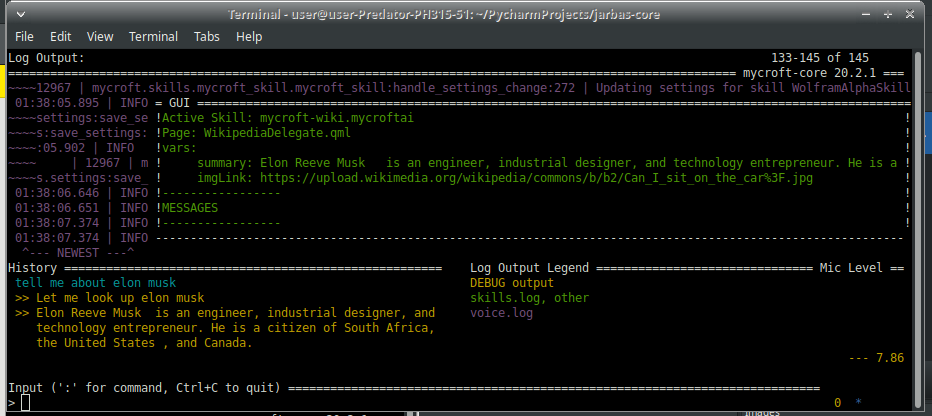
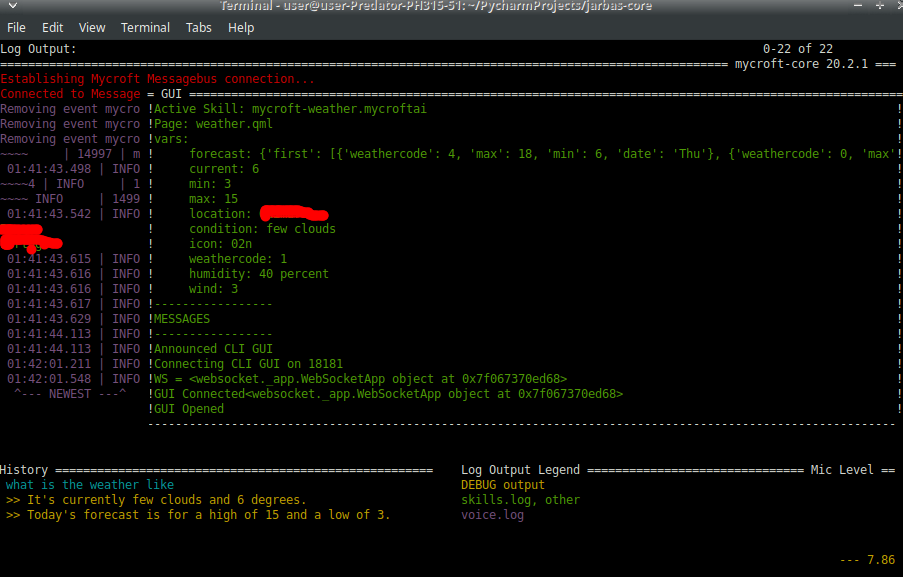
If you run mycroft in debug mode and while in the CLI press ctrl+G you should see something like this
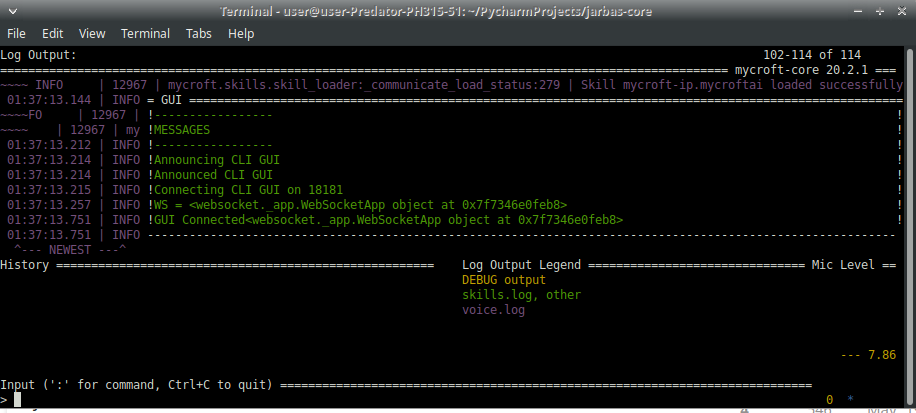
wikipedia skill will send data to display, in this case summary and a picture
weather skill sends weather data
this GUI example only displays the fields, you can however just listen to the websocket parse the json and display whatever way you want
---
### Author:  [@JarbasAl](https://community.openconversational.ai/u/JarbasAl)
#### Post date: [April 1, 2020, 5:20am UTC](https://community.openconversational.ai/t/display-custom-gui-elements-on-picroft/8378/5 "2020-04-01T05:20:07Z")
i made a quick and dirty command line GUI interface, you can check it [here](https://gist.github.com/JarbasAl/031f66adcab4ab85824b8caef9576d9d)
it’s a simple command line interface, useful for debugging but not a real GUI. It is meant to illustrate how the GUI protocol works
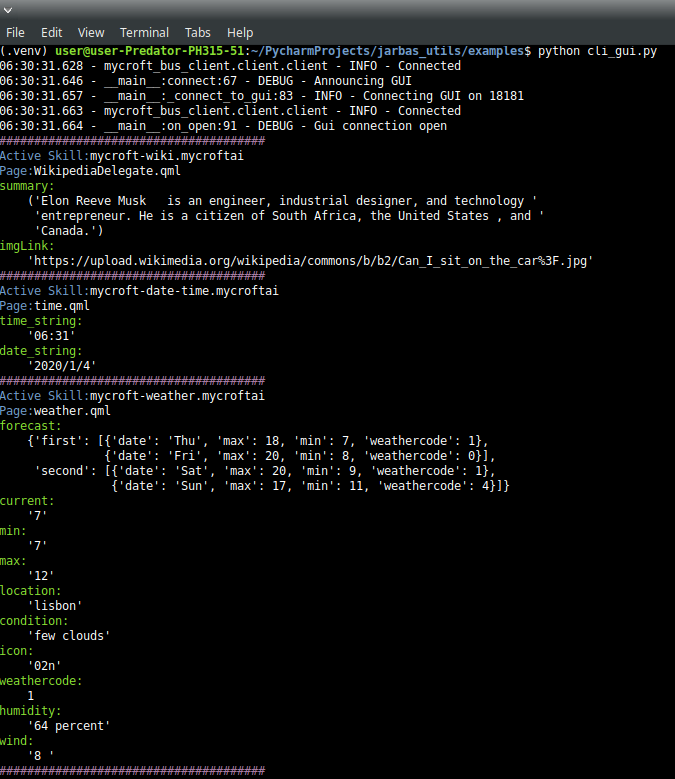
you will want to watch out for [this bug](https://github.com/MycroftAI/mycroft-core/issues/2525), you might need to restart enclosure for the GUI to properly connect
---
### Author:  [@Vangrel](https://community.openconversational.ai/u/Vangrel)
#### Post date: [April 1, 2020, 6:09am UTC](https://community.openconversational.ai/t/display-custom-gui-elements-on-picroft/8378/6 "2020-04-01T06:09:08Z")
Thank you for this @JarbasAl, had been banging my head on this for a while, going through these resources now
---
### Author:  [@JarbasAl](https://community.openconversational.ai/u/JarbasAl)
#### Post date: [April 1, 2020, 7:00am UTC](https://community.openconversational.ai/t/display-custom-gui-elements-on-picroft/8378/7 "2020-04-01T07:00:52Z")
at some point i may revisit my old display service and maybe resurrect it and integrate with the current GUI, here is a video of my early experiments
---
### Author:  [@Vangrel](https://community.openconversational.ai/u/Vangrel)
#### Post date: [April 1, 2020, 6:25pm UTC](https://community.openconversational.ai/t/display-custom-gui-elements-on-picroft/8378/8 "2020-04-01T18:25:46Z")
This hits it on the nail, thank you so much @JarbasAl I !