# Cannt get Mycroft to use Mimic3
**URL:** https://community.openconversational.ai/t/cannt-get-mycroft-to-use-mimic3/12658
**Category:** Mimic
**Created:** [November 2, 2022, 2:18pm UTC](https://community.openconversational.ai/t/cannt-get-mycroft-to-use-mimic3/12658 "2022-11-02T14:18:08Z")
**Posts on this page:** 6
**Page:** 1
### Author:  [@VolkerVollverstrahlt](https://community.openconversational.ai/u/VolkerVollverstrahlt)
#### Post date: [November 2, 2022, 2:18pm UTC](https://community.openconversational.ai/t/cannt-get-mycroft-to-use-mimic3/12658/1 "2022-11-02T14:18:08Z")
Hello everyone,
so I installed the mimic3 plugin for mycroft on my instance and changed the config according to the instructions on github but mycroft still speaks with the default mimic voice and i cant find the reason why it shouldn’t work.
My setup is a Raspberry Pi 4 8GB with Raspberry Pi OS Lite 64bit (Release date: September 22nd 2022)
I only installed the linux mycroft version and paired it with the website befor I installed mimic3
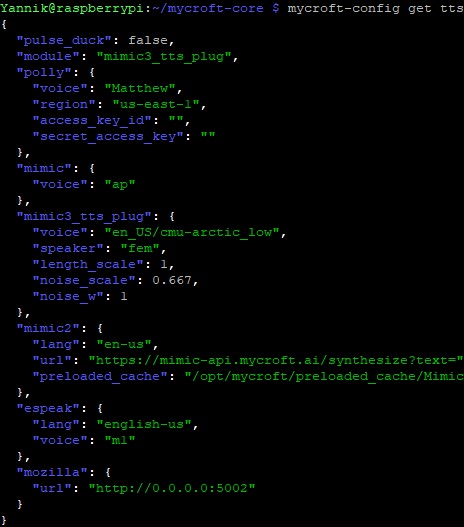
This is my config.

and I verfied with “mycroft-pip list” that the plugin is installed.
---
### Author:  [@synesthesiam](https://community.openconversational.ai/u/synesthesiam)
#### Post date: [November 2, 2022, 2:36pm UTC](https://community.openconversational.ai/t/cannt-get-mycroft-to-use-mimic3/12658/2 "2022-11-02T14:36:27Z")
Do you see any errors in `/var/log/mycroft/audio.log` when starting up?
---
### Author:  [@VolkerVollverstrahlt](https://community.openconversational.ai/u/VolkerVollverstrahlt)
#### Post date: [November 2, 2022, 2:50pm UTC](https://community.openconversational.ai/t/cannt-get-mycroft-to-use-mimic3/12658/3 "2022-11-02T14:50:14Z")
I getting this error when starting
```auto
2022-11-02 14:46:38.954 | INFO | 4067 | mycroft.tts.tts:create:609 | Loaded plugin mimic3_tts_plug
2022-11-02 14:46:38.984 | ERROR | 4067 | mycroft.tts.tts:create:618 | The selected TTS backend couldn't be loaded. Falling back to Mimic
Traceback (most recent call last):
File "/home/Yannik/mycroft-core/mycroft/tts/tts.py", line 613, in create
tts = clazz(tts_lang, tts_config)
File "/home/Yannik/mycroft-core/.venv/lib/python3.9/site-packages/mycroft_plugin_tts_mimic3/ __init__.py", line 110, in __init__
self.tts.preload_voice(voice)
File "/home/Yannik/mycroft-core/.venv/lib/python3.9/site-packages/mimic3_tts/tts.py", line 310, in preload_voice
self._get_or_load_voice(key_to_load)
File "/home/Yannik/mycroft-core/.venv/lib/python3.9/site-packages/mimic3_tts/tts.py", line 553, in _get_or_load_voice
maybe_model_dir = self._download_voice(voice_key)
File "/home/Yannik/mycroft-core/.venv/lib/python3.9/site-packages/mimic3_tts/tts.py", line 605, in _download_voice
download_voice(
File "/home/Yannik/mycroft-core/.venv/lib/python3.9/site-packages/mimic3_tts/download.py", line 85, in download_voice
voice_dir = Path(voices_dir) / voice_key
File "/usr/lib/python3.9/pathlib.py", line 1071, in __new__
self = cls._from_parts(args, init=False)
File "/usr/lib/python3.9/pathlib.py", line 696, in _from_parts
drv, root, parts = self._parse_args(args)
File "/usr/lib/python3.9/pathlib.py", line 680, in _parse_args
a = os.fspath(a)
TypeError: expected str, bytes or os.PathLike object, not NoneType
```
---
### Author:  [@Rudism](https://community.openconversational.ai/u/Rudism)
#### Post date: [November 6, 2022, 2:50pm UTC](https://community.openconversational.ai/t/cannt-get-mycroft-to-use-mimic3/12658/4 "2022-11-06T14:50:17Z")
I had a similar problem. I forget what exactly I traced it to, but it was a problem with how it’s invoking the download process to fetch the voice on first use. The solution for me was to go manually download the voice myself via SSH. Did something like this:
```auto
cd mycroft-core
source .venv/bin/activate
./.venv/bin/mimic3-download en_US/cmu-arctic_low
```
After that I stopped getting the error and mimic3 started working.
---
### Author:  [@synesthesiam](https://community.openconversational.ai/u/synesthesiam)
#### Post date: [November 7, 2022, 3:47pm UTC](https://community.openconversational.ai/t/cannt-get-mycroft-to-use-mimic3/12658/5 "2022-11-07T15:47:12Z")
Please try upgrading the Mimic 3 package:
```nohighlight
pip install --upgrade mycroft-mimic3-tts
```
---
### Author:  [@VolkerVollverstrahlt](https://community.openconversational.ai/u/VolkerVollverstrahlt)
#### Post date: [November 7, 2022, 10:01pm UTC](https://community.openconversational.ai/t/cannt-get-mycroft-to-use-mimic3/12658/6 "2022-11-07T22:01:28Z")
Working now. Did it first manually but tested it with a diffrent language with the updated package and that also worked. Thanks for the help.